

PDF Reader - Edit And Storage
ABV Mobile Utilities iPhoneiPadiPod touch
PDF Reader - Edit And Storage is a free Utilities app for iPhone and iPad by ABV Mobile. Rated 4.0/5 from 93 ratings. Requires iOS 9.0.
- Rating
- 4.0
- 93 ratings
- Price
- Free
- on the App Store
- Size
- 52 MB
- Age 4+
- Updated
- Mar 11
- 2026 · v2.2.0
Screenshots

About PDF Reader - Edit And Storage
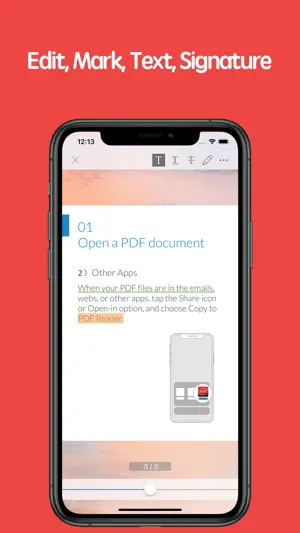
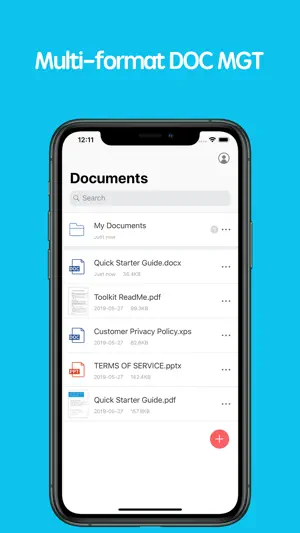
PDF Reader is an easy-to-use software that can quickly view, edit, search, annotate, share or print PDF content ,including forms and multimedia to meet your daily work needs. 【Main functions】 • View • Text search • Annotations • Document Management • Support multiple document formats • Share • Print 【Starter guide】 1. Open the PDF document 1) Open from other applications Find the PDF document on emails, webs or other application, tap the Share icon or Open-in option, and choose Copy to PDF Reader, select "PDF Reader". The document will be opened in the PDF Reader . 2) Within the APP You can open the PDF documents that you viewed or edited recently within the APP . 2. Process the documents Open the PDF documents and choose the tools at the top right to process. 3. Complete processing Share files to your friends with email, Facebook, Twitter, Airdrop. Or, print it. 【PDF Reader VIP member subscription instructions】 We offer subscription plans as followed, the price will change depending on the currency 1-month subscription 1-year subscription Payment will be charged to iTunes Account at confirmation of purchase. Subscriptions automatically renew unless auto-renew is turned off at least 24-hours before the end of the current period. Account will be charged for renewal within 24-hours prior to the end of the current period, and identify the cost of the renewal. Subscriptions may be managed by the user and auto renewal may be turned off by going to the user's Account Settings after purchase. No cancellation of the current subscription is allowed during active subscription period. Any unused portion of a free trial period will be forfeited when the user purchases a subscription to that publication, where applicable. Terms of service: https://kkyun.com/html/service.html Privacy policy: https://kkyun.com/html/privacy.html 【Feedback】 Please contact us: [email protected]
Ratings & reviews
4.0
93 ratings
What’s new
Version 2.2.0 · Updated March 11, 2026
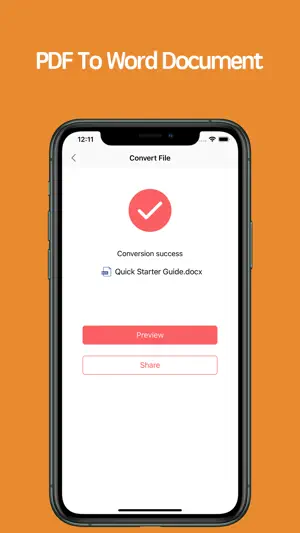
• Fixed PDF to Word conversion functionality • Fixed known crashes
App privacy
The developer, ABV Mobile, reported these privacy practices to Apple.
Data Not Collected
The developer does not collect any data from this app.
Alternatives to PDF Reader - Edit And Storage
Looking for apps like PDF Reader - Edit And Storage? Here are 6 similar apps on the App Store. The highest rated is PDF Reader & Editor - GoPDF (4.6/5), and all 6 are free to download.
-
 PDF Editor: Filler,Stamp,Sign
-
 Sign PDF: Scan & Fill Docs
-
 PDF Reader-simple
-
 XPS Converter, XPS to PDF
2.3
XPS Converter, XPS to PDF
2.3
-
 PDF Reader & Editor - GoPDF
4.6
PDF Reader & Editor - GoPDF
4.6
-
 Simple Pdf-reader
3.2
Simple Pdf-reader
3.2
| App | Rating | Price | Last updated | Compare |
|---|---|---|---|---|
| PDF Reader - Edit And Storage | 4.0 / 5 (93 ratings) | Free | March 11, 2026 | |
| PDF Editor: Filler,Stamp,Sign | – | Free | Aug 21, 2026 | Compare |
| Sign PDF: Scan & Fill Docs | – | Free | Aug 6, 2026 | Compare |
| PDF Reader-simple | – | Free | Jul 30, 2025 | Compare |
| XPS Converter, XPS to PDF | 2.3 / 5 (3) | Free | Jul 2, 2025 | Compare |
| PDF Reader & Editor - GoPDF | 4.6 / 5 (168) | Free | Aug 31, 2026 | Compare |
| Simple Pdf-reader | 3.2 / 5 (6) | Free | Oct 7, 2026 | Compare |