

UniChar — Unicode Keyboard
Jordan Hipwell Reference iPhoneiPadiPod touchApple Watch
UniChar — Unicode Keyboard is a free Reference app for iPhone and iPad by Jordan Hipwell. Rated 4.7/5 from 1,647 ratings. Requires iOS 17.0.
- Rating
- 4.7
- 1.6K ratings
- Price
- Free
- on the App Store
- Size
- 16 MB
- Age 4+
- Updated
- Oct 13
- 2026 · v8.2.1
Screenshots

About UniChar — Unicode Keyboard
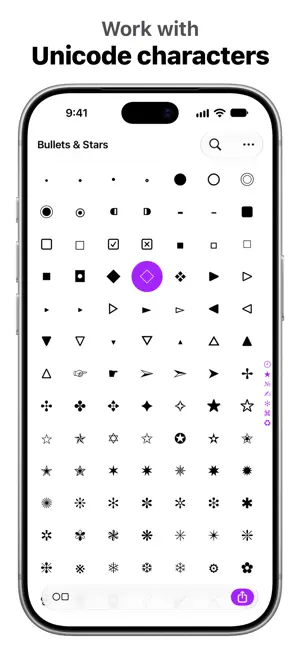
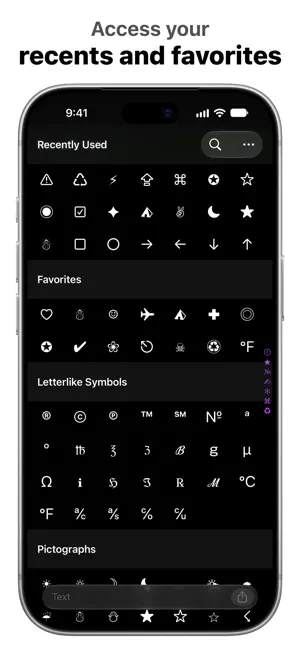
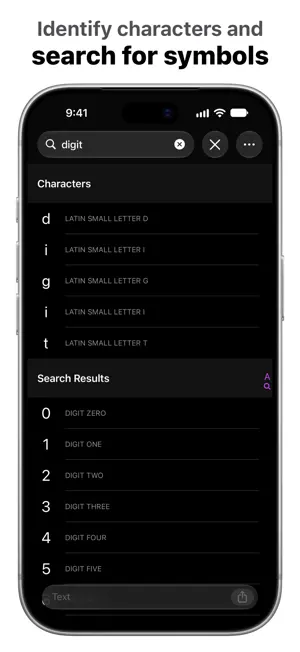
UniChar is a powerful yet beautiful Unicode character app and keyboard that allows you to quickly find, type, and work with special symbols. ◣ "This iOS keyboard app will give you all the Unicode characters you’ll ever need." – lifehacker “UniChar is a cool little app and keyboard, and offers access to a huge world of Unicode characters that are otherwise absent within the standard iOS keyboard.” – iDownloadBlog "On the Mac, you can type any character [with] the Emoji & Symbols viewer ... The selection on iOS is much more limited ... But UniChar changes that." – Cult of Mac “It’s a full-featured utility for searching and copying symbols … it’s always nice to see a developer who’s dedicated to improving this kind of utility over time and adopting new features … it's a very handy app.” – AppStories ◤ Utilize hundreds of thousands of characters organized neatly into categories and a full Unicode table. You can quickly search for the character you’re looking for, type special symbols in any app with the custom keyboard, and collect your favorite characters to access them even quicker. For developers, UniChar is an efficient tool to work with Unicode code points and UTF-8 encodings. Revamp your workflow by using UniChar alongside other apps on iPad, or use Universal Clipboard to copy on your iPhone and paste on your Mac. App ◉ Work with characters and their info – Name, Unicode, and UTF-8 ◉ Browse curated categories in grid or list view ◉ Customize your categories – choose from more than 150 symbol and script categories* ◉ Access the entire Unicode table by character blocks* ◉ Go to a specific block, category, or code point ◉ Search for symbols by name, info, or even by drawing** ◉ Identify characters and see a breakdown of code points that form them ◉ Ask Siri questions about a Unicode character ◉ Select custom fonts to use when rendering glyphs ◉ Collect and organize your favorite symbols ◉ Quickly copy character info to the clipboard ◉ Insert characters into the text field and compose text using the system keyboard ◉ Share your text via Messages, Mail, Mastodon, etc – or open it in other apps like Pages Keyboard ◎ Type special symbols in any app ◎ Quickly input your favorite and recently used characters ◎ Browse curated categories – choose from more than 150 categories* ◎ Designed to compliment the Emoji keyboard Widgets ■ Add your favorite symbol to your Lock Screen ■ View stats for how many drawings you've submitted to help improve Search by Drawing Apple Watch ◆ Add your favorite symbol to your watch face ◆ Quickly access your favorite and recently used characters ◆ Copy character info to your iPhone’s clipboard And More ● Beautiful Liquid Glass design ● Light and dark mode ● Full accessibility support ● Handoff ● Drag and Drop ● Keyboard shortcuts and menu bar on iPad ● Universal app for iPhone, iPad, and Apple silicon Mac ● No ads, no tracking, no subscriptions * All Categories can be unlocked via a one-time in-app purchase. ** Search by Drawing is powered by an on-device machine learning model that predicts matching symbols as you draw in real-time. You can help improve symbol recognition by submitting your own drawings!
Ratings & reviews
4.7
1.6K ratings
What’s new
Version 8.2.1 · Updated October 13, 2026
This update includes optimizations for iPhone Duo.
App privacy
The developer, Jordan Hipwell, reported these privacy practices to Apple.
Data Not Linked to You
The following data, which may be collected but is not linked to your identity, may be used for the following purposes:
- Usage Data: Other Usage Data
- User Content: Other User Content
Used for: Analytics, App Functionality
Alternatives to UniChar — Unicode Keyboard
Looking for apps like UniChar — Unicode Keyboard? Here are 6 similar apps on the App Store. The highest rated is YooniKey (4.8/5), and 5 of the 6 are free to download.
-
 Unicode Map and Code Table
4.6
Unicode Map and Code Table
4.6
-
 Unicode Character Viewer
2.6
Unicode Character Viewer
2.6
-
 YooniKey
4.8
YooniKey
4.8
-
 Kaomoji -- Japanese Emoticons
4.8
Kaomoji -- Japanese Emoticons
4.8
-
 Fonts: Aesthetic Font Keyboard
4.4
Fonts: Aesthetic Font Keyboard
4.4
-
 GO Field Guide
4.6
GO Field Guide
4.6
| App | Rating | Price | Last updated | Compare |
|---|---|---|---|---|
| UniChar — Unicode Keyboard | 4.7 / 5 (1,647 ratings) | Free | October 13, 2026 | |
| Unicode Map and Code Table | 4.6 / 5 (831) | Free | Apr 13, 2025 | Compare |
| Unicode Character Viewer | 2.6 / 5 (54) | 1.99 USD | May 20, 2026 | Compare |
| YooniKey | 4.8 / 5 (12) | Free | Dec 14, 2025 | Compare |
| Kaomoji -- Japanese Emoticons | 4.8 / 5 (7,343) | Free | Jun 24, 2025 | Compare |
| Fonts: Aesthetic Font Keyboard | 4.4 / 5 (3,119) | Free | Sep 16, 2024 | Compare |
| GO Field Guide | 4.6 / 5 (465) | Free | Apr 17, 2025 | Compare |