

QuickBooks Workforce
Intuit Inc. Business iPhoneiPadiPod touch
QuickBooks Workforce is a free Business app for iPhone and iPad by Intuit Inc. Rated 4.6/5 from 196,427 ratings. Requires iOS 17.0.
- Rating
- 4.6
- 196K ratings
- Price
- Free
- on the App Store
- Size
- 259 MB
- Age 4+
- Updated
- Sep 28
- 2026 · v5.32.1
Screenshots



About QuickBooks Workforce
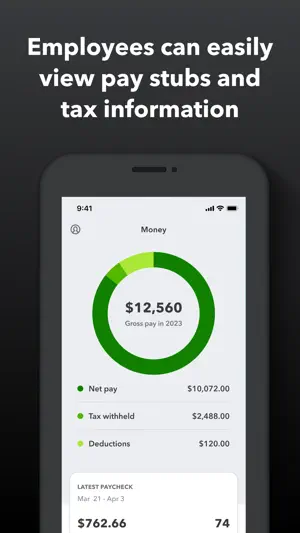
QuickBooks Workforce—an app for QuickBooks Payroll and QuickBooks Time (formerly TSheets)—lets teams view pay info and track time in one place. Pay features are available to businesses that use QuickBooks Online Payroll & QuickBooks Desktop Payroll. Time tracking features are available to businesses that use QuickBooks Time. What your team can do: • Access pay stubs, W-2s, and other pay info anytime, anywhere • Clock in and out, even without Wi-Fi or service • Submit and track paid time off, sick days, and holidays • Edit timesheets and manage job schedules • Switch jobs, pause tracking, or take a break • Use GPS location-based time tracking • Add photos and updates in a project activity feed (QuickBooks Time Elite only) What an employer or admin can do: • Approve, edit, or delete timesheets • Schedule by job or by shift • See who’s working and where in real time • Set up a geofence that reminds your team to clock in or out when they enter or leave a job site (QuickBooks Time Elite only) • Create or modify schedules • Push, text and email alerts are triggered if employees don’t clock in as scheduled, or approach overtime • Track vacation, sick, or holiday accruals for employees • See day and week totals, plus other time reports, at a glance • Oversee team productivity and project status, and adjust budget, deadlines, and resources as needed (QuickBooks Time Elite only) Extra benefits: • Save on payroll costs and eliminate manual data entry • Get real-time reports in multiple formats (PDF, CSV, online, HTML) • Data seamlessly integrates with QuickBooks Online & QuickBooks for PC (Pro, Premier, & Enterprise) • Integrates with other payroll, accounting, and invoicing software • Protect yourself against labor disputes and audits with a detailed time log • Accurate time data replaces paper timesheets and makes payroll and invoicing faster and less costly. • Developer open API Terms, conditions, pricing, special features, and service and support options subject to change without notice.
Ratings & reviews
4.6
196K ratings
What’s new
Version 5.32.1 · Updated September 28, 2026
Bug fixes and performance improvements
App privacy
The developer, Intuit Inc., reported these privacy practices to Apple.
Data Linked to You
The following data, which may be collected and linked to your identity, may be used for the following purposes:
- User Content: Customer Support, Photos or Videos
- Identifiers: Device ID
- Usage Data: Product Interaction
- Diagnostics: Crash Data
- Contact Info: Email Address, Name, Phone Number
- Location: Precise Location, Coarse Location
- Contacts: Contacts
- Sensitive Info: Sensitive Info
Used for: Analytics, Product Personalization, App Functionality
Data Not Linked to You
The following data, which may be collected but is not linked to your identity, may be used for the following purposes:
- Identifiers: User ID
- Diagnostics: Performance Data
- Usage Data: Advertising Data
Used for: Analytics, App Functionality, Other Purposes
Alternatives to QuickBooks Workforce
Looking for apps like QuickBooks Workforce? Here are 6 similar apps on the App Store. The highest rated is Connecteam Team Management App (4.9/5), and all 6 are free to download.
-
 When I Work Staff Scheduling
4.8
When I Work Staff Scheduling
4.8
-
 Homebase: Employee Scheduling
4.8
Homebase: Employee Scheduling
4.8
-
 Connecteam Team Management App
4.9
Connecteam Team Management App
4.9
-
 7shifts: Employee Scheduling
4.8
7shifts: Employee Scheduling
4.8
-
 Punch Time Clock
4.8
Punch Time Clock
4.8
-
 Jobber Field Service Software
4.8
Jobber Field Service Software
4.8
| App | Rating | Price | Last updated | Compare |
|---|---|---|---|---|
| QuickBooks Workforce | 4.6 / 5 (196,427 ratings) | Free | September 28, 2026 | |
| When I Work Staff Scheduling | 4.8 / 5 (57,388) | Free | Sep 29, 2026 | Compare |
| Homebase: Employee Scheduling | 4.8 / 5 (94,785) | Free | Sep 29, 2026 | Compare |
| Connecteam Team Management App | 4.9 / 5 (59,870) | Free | Oct 2, 2026 | Compare |
| 7shifts: Employee Scheduling | 4.8 / 5 (30,101) | Free | Sep 14, 2026 | Compare |
| Punch Time Clock | 4.8 / 5 (36,167) | Free | Apr 21, 2025 | Compare |
| Jobber Field Service Software | 4.8 / 5 (21,143) | Free | Sep 30, 2026 | Compare |