

PDFMagic: Doc Editor & Scanner
iCubemedia Inc. Business iPhoneiPadiPod touch
PDFMagic: Doc Editor & Scanner is a free Business app for iPhone and iPad by iCubemedia Inc. Rated 3.8/5 from 110 ratings. Requires iOS 17.0.
- Rating
- 3.8
- 110 ratings
- Price
- Free
- on the App Store
- Size
- 18 MB
- Age 4+
- Updated
- Sep 9
- 2026 · v2.6.4
Screenshots



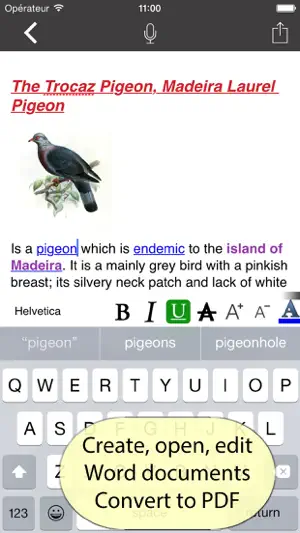
About PDFMagic: Doc Editor & Scanner
Your whole PDF toolbox and it never leaves your iPhone. PDFMagic does what the big online PDF sites do, but right on your device: nothing is uploaded, nothing is stored on a server, and most tools work with no internet at all. Your documents never leave your iPhone. ORGANIZE • Merge, split, reorder, rotate, crop and delete pages • Create a PDF from photos, text or a scan • Start from a template — lined paper, grids, planners OPTIMIZE • Compress to shrink file size • Repair a damaged PDF • OCR — make a scan searchable, on device • Enhance a scan — auto-straighten, color, grayscale or black & white EDIT & SIGN • Add text, drawings and highlights • Fill in forms and flatten them • Draw a signature and place it • Page numbers, watermarks, Bates numbering and pages-per-sheet CONVERT — ON DEVICE • Word and Excel to PDF, and PDF back to editable Word or Excel • Images, text, RTF, Markdown and HTML to PDF • PDF to JPG SECURE & PRIVATE • Password-protect or unlock a PDF • True redaction — permanently removes the text underneath, not just a black box • Auto-redact and Privacy Check — find emails, phone numbers and cards • Sanitize metadata before you share AI & ADVANCED — ON YOUR DEVICE • Summarize any PDF at the length you choose • Extract contacts, totals, dates and addresses • Pull out action items and deadlines • Proofread and rewrite text • Classify, tag and auto-file a document • Upscale images and remove backgrounds • Read QR codes and barcodes • Translate and compare documents Powered by Apple's on-device intelligence — your documents are never sent to a server. IMAGE TOOLS • Compress, convert, resize and upscale images • Convert images to and from PDF WHY PDFMAGIC • On-device and private — your files stay with you • Works offline — no signal needed • Document scanner with edge detection • No account, no sign-up The core PDF tools are free. Use the AI & advanced tools free by watching a short ad, or go Premium to remove every ad and use them without limits. PDFMagic Premium is offered as a weekly or yearly auto-renewable subscription, or a one-time lifetime purchase. Payment is charged to your Apple Account. Subscriptions renew automatically unless cancelled at least 24 hours before the end of the current period; manage or cancel anytime in Settings > Apple Account > Subscriptions. Terms of Use: https://pdfmagic.xyz/terms Privacy Policy: https://pdfmagic.xyz/privacy Questions or feedback? Email - [email protected]
Ratings & reviews
3.8
110 ratings
What’s new
Version 2.6.4 · Updated September 9, 2026
Bug Fixes UX issues patched
App privacy
The developer, iCubemedia Inc., reported these privacy practices to Apple.
Data Used to Track You
The following data may be used to track you across apps and websites owned by other companies:
- Other Data: Other Data Types
Data Not Linked to You
The following data, which may be collected but is not linked to your identity, may be used for the following purposes:
- Other Data: Other Data Types
Used for: Third-Party Advertising
Alternatives to PDFMagic: Doc Editor & Scanner
Looking for apps like PDFMagic: Doc Editor & Scanner? Here are 6 similar apps on the App Store. The highest rated is Trading Journal Pro (5.0/5), and 5 of the 6 are free to download.
-
 PDF Max Pro - Edit, Sign PDFs
4.5
PDF Max Pro - Edit, Sign PDFs
4.5
-
 Minimalistic Countdown Timer
4.0
Minimalistic Countdown Timer
4.0
-
 Trading Journal Pro
5.0
Trading Journal Pro
5.0
-
 PDF Editor: Document Assistant
-
 Voice Recorder Plus Pro :Memos
4.5
Voice Recorder Plus Pro :Memos
4.5
-
 NoteWorthy: Smart Notes
| App | Rating | Price | Last updated | Compare |
|---|---|---|---|---|
| PDFMagic: Doc Editor & Scanner | 3.8 / 5 (110 ratings) | Free | September 9, 2026 | |
| PDF Max Pro - Edit, Sign PDFs | 4.5 / 5 (1,457) | Free | Sep 15, 2026 | Compare |
| Minimalistic Countdown Timer | 4.0 / 5 (12) | Free | Oct 23, 2026 | Compare |
| Trading Journal Pro | 5.0 / 5 (7) | Free | Oct 18, 2026 | Compare |
| PDF Editor: Document Assistant | – | Free | Oct 25, 2026 | Compare |
| Voice Recorder Plus Pro :Memos | 4.5 / 5 (412) | 4.99 USD | Aug 19, 2026 | Compare |
| NoteWorthy: Smart Notes | – | Free | Sep 29, 2026 | Compare |