

Visage Ease Pro
Visage Imaging Medical iPhoneiPadiPod touch
Visage Ease Pro is a free Medical app for iPhone and iPad by Visage Imaging. Rated 5.0/5 from 2 ratings. Requires iOS 15.6. Updated August 28, 2026.
- Rating
- 5.0
- 2 ratings
- Price
- Free
- on the App Store
- Size
- 58 MB
- Age 4+
- Updated
- Aug 28
- 2026 · v2.4.7
Screenshots



About Visage Ease Pro
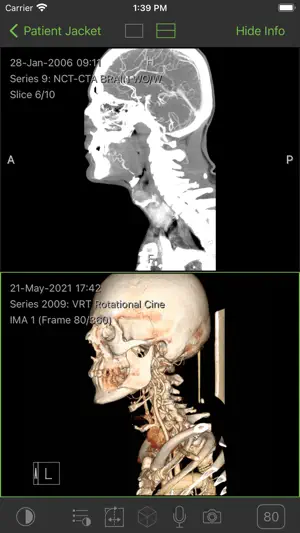
Using Visage Ease Pro you can view radiologic images that are stored on a Visage 7 server on your iPad, iPhone, and iPod Touch. Please note that this app requires access to a Visage 7 server, e.g. in your clinic, practice, or via your radiology provider. Without access to a server, you will not be able to view any images. Visage Ease Pro provides you with immediate server-based access to DICOM images without cumbersome image transfer. Use the app for patient education and for illustrating findings in the diagnostic report. Radiology providers use the Visage 7 server in conjunction with Visage Ease Pro to provide their referring physicians with efficient access to key images as well as original images. Compared to printed film or patient CDs, the Visage 7 solution provides a much richer and much more efficient means of communication. Visage 7 is the world’s first diagnostic imaging solution based entirely on efficient thin client streaming technology. Visage scales easily from a single radiology practice to large distributed healthcare enterprises. Visage allows efficient viewing, processing, and archiving of very large amounts of images, including thin slice volumetric data from CT, MR, PET-CT, and other 3D modalities. A "Getting Started" document is available here: http://www.visageimaging.com/e-labeling INTENDED USE Visage Ease Pro is a mobile client for diagnostic image viewing of radiological images from the following modalities: X-ray, CT, MRI, PET, SPECT, Ultrasound and XA. It is based on the Visage 7 product for distributing, viewing, processing, and archiving medical images within and outside health care environments. Visage Ease Pro must only be used by trained health care professionals. It may support physicians and/or the medical staff by providing mobile access to relevant medical images. Any diagnostic or therapeutic decision resides with the doctors and/or the medical staff in their respective area of responsibility. Visage Ease Pro is not intended to replace full radiologic reading workstations. It must not be used in the context of diagnostic or therapeutic decisions if a radiologic reading workstation with appropriate display hardware is available. The user must make sure that the reading environment complies with any applicable diagnostic requirements and the state-of-the-art. Visage Ease Pro must not be used for primary image diagnosis in mammography or digital breast tomosynthesis.
What’s new
Version 2.4.7 · Updated August 28, 2026
- improved stability, security, and overall performance - adapted the UI for iOS 26 - enhanced Mobile Device Management (MDM) authentication - streamlined the OEM call workflow - improved cine mode for multi-frame images - strengthened two-factor authentication
App privacy
The developer, Visage Imaging, reported these privacy practices to Apple.
Data Linked to You
The following data, which may be collected and linked to your identity, may be used for the following purposes:
- Search History: Search History
- Identifiers: User ID, Device ID
Used for: App Functionality
Alternatives to Visage Ease Pro
Looking for apps like Visage Ease Pro? Here are 6 similar apps on the App Store. The highest rated is OHSU MViPS (5.0/5), and 5 of the 6 are free to download.
-
 OHSU MViPS
5.0
OHSU MViPS
5.0
-
 eUnity
2.3
eUnity
2.3
-
 Radiology Core: Physics Plus
2.9
Radiology Core: Physics Plus
2.9
-
 MobiPACS Pro
-
 PowerScribe Radiologist
1.7
PowerScribe Radiologist
1.7
-
 Mobile MIM
3.1
Mobile MIM
3.1
| App | Rating | Price | Last updated | Compare |
|---|---|---|---|---|
| Visage Ease Pro | 5.0 / 5 (2 ratings) | Free | August 28, 2026 | |
| OHSU MViPS | 5.0 / 5 (3) | Free | Jul 15, 2026 | Compare |
| eUnity | 2.3 / 5 (3) | Free | Jul 29, 2025 | Compare |
| Radiology Core: Physics Plus | 2.9 / 5 (50) | 9.99 USD | Mar 26, 2024 | Compare |
| MobiPACS Pro | – | Free | May 20, 2025 | Compare |
| PowerScribe Radiologist | 1.7 / 5 (10) | Free | Oct 31, 2025 | Compare |
| Mobile MIM | 3.1 / 5 (18) | Free | May 29, 2024 | Compare |
Compare Visage Ease Pro with the top alternatives: ratings, updates, ASO score and keyword gaps →