

Wireless Workbench Mobile
Shure Utilities iPhoneiPadiPod touch
Wireless Workbench Mobile is a free Utilities app for iPhone and iPad by Shure. Rated 4.4/5 from 47 ratings. Requires iOS 26.0. Updated September 30, 2026.
- Rating
- 4.4
- 47 ratings
- Price
- Free
- on the App Store
- Size
- 120 MB
- Age 4+
- Updated
- Sep 30
- 2026 · v2.4.0
Screenshots



About Wireless Workbench Mobile
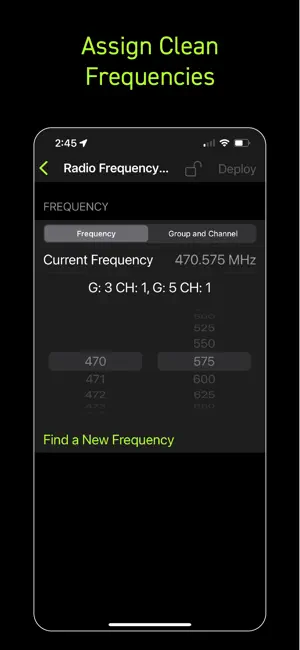
ShurePlus Channels is now Wireless Workbench Mobile. Wireless Workbench Mobile puts wireless control in your hands, wherever the job takes you. Built for professionals on the move, the app replaces ShurePlus Channels with a sleeker interface and powerful new tools, including frequency coordination on iOS mobile devices and guided alerts. Whether on a walk test, working from a cart, or managing a live show, Wireless Workbench Mobile keeps you connected to your Shure Wireless and one step ahead. Wireless Workbench Mobile supports the following Shure devices: • Axient® Digital receivers • Axient® Digital PSM transmitters • ANX4 • SLX-D+ • SLX-D® • ULX-D® • QLX-D® • PSM®1000 Wireless Control, Always Within Reach: • Control your Shure wireless systems on the go with fast, intuitive mobile access. • Make quick, informed decisions with an interface that highlights key channel data. • Scan and assign clean frequencies on iOS using built-in coordination tools to simplify your setup. • Receive guided alerts that show precisely what’s wrong and how to fix it. • Tag, color-label, and favorite channels to match your unique workflow. • Connect over Wi-Fi or Ethernet for reliable performance in any environment. How It Works: Wireless Workbench Mobile connects to supported Shure Wireless, displaying essential RF, battery, and audio data in real time. The streamlined layout adapts to your workflow, enabling you to focus on what matters most. Scan and deploy frequencies, monitor system performance, and troubleshoot directly from your tablet or phone. Why It's Better: On the Go Coordination Find and deploy frequencies to your Shure Wireless from your iOS mobile device with the same trusted performance of Wireless Workbench desktop. Stay Ahead of Issues Real-time alerts flag potential problems and provide guidance to resolve them, keeping your production on track. Built for How You Work Designed for speed and precision, the focused interface supports fast decisions in live production environments.
Ratings & reviews
4.4
47 ratings
What’s new
Version 2.4.0 · Updated September 30, 2026
• Monitor, control, and coordinate frequencies for ADTQ and ADTD Axient® Digital PSM wireless transmitters. • View live scan data in the frequency plot during the Find New Frequencies coordination workflow. • Use Access Control to protect devices from unauthorized access with assigned PINs or passwords. • Monitor Axient Digital devices configured with Channel Linking and Device Redundancy. • During frequency calculation, the app alerts you when devices are locked by Access Control or offline, helping ensure every channel in your system is included. • Added support for Preferred Access Point, a new Axient Digital system feature that gives you more control over which access point your ShowLink portables use.
App privacy
The developer, Shure, reported these privacy practices to Apple.
Data Not Linked to You
The following data, which may be collected but is not linked to your identity, may be used for the following purposes:
- Identifiers: Device ID
- Usage Data: Product Interaction, Other Usage Data
Used for: Analytics
Alternatives to Wireless Workbench Mobile
Looking for apps like Wireless Workbench Mobile? Here are 6 similar apps on the App Store. The highest rated is PAcalculate (5.0/5), and all 6 are free to download.
-
 QLab Remote
4.7
QLab Remote
4.7
-
 PAcalculate
5.0
PAcalculate
5.0
-
 ProPresenter Remote
2.4
ProPresenter Remote
2.4
-
 HAA CinemaTools with HAA Link
5.0
HAA CinemaTools with HAA Link
5.0
-
 Mixing Station
4.5
Mixing Station
4.5
-
 DMXcat®
3.9
DMXcat®
3.9
| App | Rating | Price | Last updated | Compare |
|---|---|---|---|---|
| Wireless Workbench Mobile | 4.4 / 5 (47 ratings) | Free | September 30, 2026 | |
| QLab Remote | 4.7 / 5 (26) | Free | Sep 23, 2026 | Compare |
| PAcalculate | 5.0 / 5 (7) | Free | May 26, 2026 | Compare |
| ProPresenter Remote | 2.4 / 5 (75) | Free | Dec 20, 2025 | Compare |
| HAA CinemaTools with HAA Link | 5.0 / 5 (1) | Free | Sep 11, 2026 | Compare |
| Mixing Station | 4.5 / 5 (613) | Free | Oct 12, 2026 | Compare |
| DMXcat® | 3.9 / 5 (26) | Free | Oct 9, 2026 | Compare |