

The iCalculator
HELM Coders LLC Utilities iPhoneiPadiPod touch
The iCalculator is a paid Utilities app for iPhone and iPad by HELM Coders LLC. Rated 5.0/5 from 1 ratings. Requires iOS 17.6. Updated September 8, 2026.
- Rating
- 5.0
- 1 ratings
- Price
- 0.99 USD
- on the App Store
- Size
- 12 MB
- Age 4+
- Updated
- Sep 8
- 2026 · v2.1
Screenshots


About The iCalculator
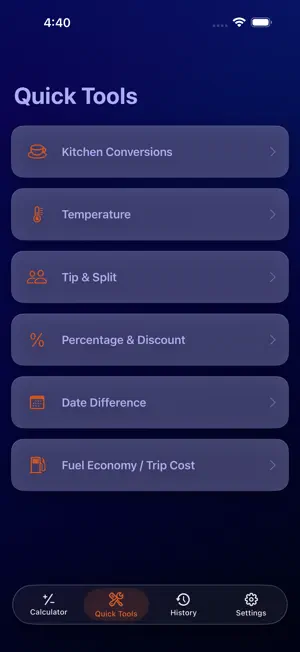
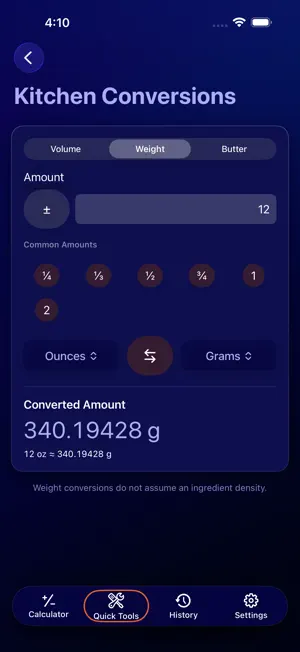
The iCalculator is back. A classic calculator with an intentionally retro personality, rebuilt for modern iPhone and iPad with useful everyday tools that go far beyond basic arithmetic. CLASSIC CALCULATOR The familiar calculator experience returns with: • Addition, subtraction, multiplication, and division • Percent • Positive/negative values • Decimal calculations • Memory controls • Chained calculations • Calculation history • Tactile button feedback The large circular controls and bold display preserve the spirit of the original iCalculator while the app underneath has been completely rebuilt in modern SwiftUI. QUICK TOOLS Skip the formulas and jump straight to the answer. KITCHEN CONVERSIONS Convert common cooking measurements quickly with dedicated Volume, Weight, and Butter tools. Common conversions include: • Cups • Tablespoons • Teaspoons • Fluid ounces • Milliliters • Liters • Pints • Quarts • Gallons • Ounces • Pounds • Grams • Kilograms • Butter measurements • And more Quick amount presets make common recipe conversions even faster. TEMPERATURE Convert Celsius and Fahrenheit instantly. TIP & SPLIT Enter the bill, choose a tip, and split the total between any number of people. Quick presets include: • 15% • 18% • 20% • 25% See the tip amount, total bill, and amount per person immediately. PERCENTAGE & DISCOUNT Handle common percentage problems without remembering the formula. Calculate: • X% of a value • Percentage change • Discounts • Amount saved • Final price DATE DIFFERENCE Choose two dates and see: • Total days • Weeks and days • Calendar difference in years, months, and days FUEL ECONOMY & TRIP COST Estimate fuel use and trip cost using: • MPG • L/100 km • Trip distance • Fuel economy • Fuel price HISTORY Review previous calculator operations, reuse results, delete individual entries, or clear the history when you are finished. MADE FOR IPHONE AND IPAD The iCalculator adapts to iPhone and iPad while preserving its distinctive retro calculator design. ENGLISH & SPANISH The full interface is available in English and Spanish. Calculation history and preferences stay local to your device. The iCalculator combines the personality of the original app with practical everyday tools designed to help you get an answer quickly.
What’s new
Version 2.1 · Updated September 8, 2026
The iCalculator 2.1 delivers major improvements to calculation accuracy, reliability, and usability. • Improved calculator behavior for chained calculations, percentages, signs, memory, decimals, and error recovery. • Improved calculation history with greater precision when reusing previous results. • Improved number entry and validation across conversion tools. • Improved kitchen, temperature, percentage, date, tip, and fuel calculations for edge cases and invalid inputs. • Improved localized number entry and display. • Improved Quick Tool navigation so in-progress calculations are preserved when switching sections. • Improved support for Larger Text, landscape layouts, keyboard controls, and readability. • Additional reliability and interface improvements throughout the app.
App privacy
The developer, HELM Coders LLC, reported these privacy practices to Apple.
Data Not Collected
The developer does not collect any data from this app.
Alternatives to The iCalculator
Looking for apps like The iCalculator? Here are 6 similar apps on the App Store. The highest rated is Input Calculator (5.0/5), and all 6 are free to download.
-
 Input Calculator
5.0
Input Calculator
5.0
-
 Duoza
Duoza
-
 Calculator Plus Basic & PEMDAS
5.0
Calculator Plus Basic & PEMDAS
5.0
-
 Numby:Beautiful Calculator
-
 CodeYam Counter
-
 Aritio — Beautiful Calculator
3.5
Aritio — Beautiful Calculator
3.5
| App | Rating | Price | Last updated | Compare |
|---|---|---|---|---|
| The iCalculator | 5.0 / 5 (1 rating) | 0.99 USD | September 8, 2026 | |
| Input Calculator | 5.0 / 5 (1) | Free | Sep 20, 2024 | Compare |
| Duoza | – | Free | Aug 8, 2026 | Compare |
| Calculator Plus Basic & PEMDAS | 5.0 / 5 (5) | Free | Oct 10, 2026 | Compare |
| Numby:Beautiful Calculator | – | Free | Nov 30, 2025 | Compare |
| CodeYam Counter | – | Free | Jul 30, 2026 | Compare |
| Aritio — Beautiful Calculator | 3.5 / 5 (2) | Free | Jul 10, 2026 | Compare |
Compare The iCalculator with the top alternatives: ratings, updates, ASO score and keyword gaps →