

Flightscape eFlight Manager
CAE Inc. Business iPad
Flightscape eFlight Manager is a free Business app for iPad by CAE Inc. Rated 5.0/5 from 2 ratings. Requires iOS 16.0. Updated September 8, 2026.
- Rating
- 5.0
- 2 ratings
- Price
- Free
- on the App Store
- Size
- 138 MB
- Age 4+
- Updated
- Sep 8
- 2026 · v7.14.0
Screenshots

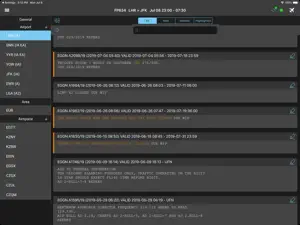

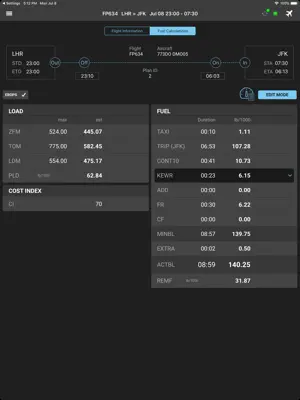
About Flightscape eFlight Manager
Flightscape eFlight Manager is a Flight Plan Manager add-on to expand the connected flight to the cockpit. The application automates the process of collecting all the information for your trip by ingesting flight plans from your flight planning system of choice. A comprehensive and complete package is then generated containing all the latest information required for a trip such as MET, NOTAM, Upper Wind and Temperature / Significant Weather charts and documentation. As well as being a system for delivering data for a trip, eFlight Manager has the ability to capture information from the flight crew. Information such as fuel records, actual flight times, and actual Fuel On board (FOB) are uploaded to the ground server for immediate analysis and reporting. Major features include: - ARINC 633-2 flight plan ingestion. Pre-flight Briefing: - METAR data with green, amber, red coloring based on configurable minima. - TAF for each airfield. - NOTAM for each airfield. - SNOWTAM for each airfield. - Update facility to receive the latest data for your trip. - FIR NOTAM, ASHTAM and SIGMETS. - Operational notices. - PDF Briefing Package. - Flight Recalculation - Sign Off. Trip: - Flight Summary showing weight and fuel information with offline recalculations. - Delay records. - Trip Log for capturing actual flight times, fuel on board, etc. Scratch Pad - Captures text notes. - Captures drawings. Device Sync - Allows crews to “push” or “share” the data that has been entered into eFM from their device to another device
What’s new
Version 7.14.0 · Updated September 8, 2026
Mandatory Fields – Archival Validation (New Feature) • Airline-configurable mandatory fields and sections in Trip Log (Departure & Arrival tabs) and Sign Off modules (Crew Fitness, Flight Acceptance, Weight & Balance) are now enforced before Archive & Close. • When mandatory data is missing, a validation popup lists incomplete sections; orange highlighting appears on affected tabs, containers, and individual input fields. • Highlighting clears automatically when the user fills in the missing data. • Pilot Override: if enabled by the configuration, pilots can override the mandatory check by providing a reason. The override reason is recorded in post-flight data and displayed in Trip Log Summary. • Unarchived flights with partial data entry now show a visual indicator on the Flight Management screen when past the reminder period. Device Sync – Master Document (New Feature) • New configurable "Master Document" status: a pilot can designate their device as the master document via a button. • Master status can be transferred to another device during Device Sync. • Only the master device can archive the flight (unless overridden with a reason, integrated with the Mandatory Fields override flow). • Feature is disabled by default; existing behavior preserved when off. Flight Details Load Table Column Configuration • Added the ability to swap the columns on the Flight Details load table. If desired, please contact for configuration PDF File Naming (iOS) • Removed problematic characters (:) from PDF file names when saving briefing documents to the iOS Files app. • City pair (DEP-DEST IATA codes) now included in briefing PDF file names. Map • Fixed a memory leak that could cause the app to be forcibly shutdown • Fixed multiple deadlocks that could cause the app to hang or not render properly in various situations Trip Log • Fixed issue where RCF at DP in eFM was not correct when there was no alternate Weight & Balance • Fixed missing pilot printed name in Weight & Balance Document Sign Off popup • Fixed Weight & Balance statement (allow empty value) SSO & Authentication • Fixed SSO re-authentication when the server is unreachable — app now stays in offline mode and allows retry • Fixed MQTT connection status indicator not updating immediately when going offline via SSO UI Fixes • Fixed Trip Log "Show Details" panel overlapping input fields after keyboard dismissal on iOS Performance & Responsiveness • Fixed app unresponsiveness during background flight downloads • Fixed deadlock when opening a flight while background sector cleanup was in progress Other • Fixed incorrect region migration prompt appearing for US-region operators after logout/login • Several crash fixes & stability improvements
App privacy
The developer, CAE Inc., reported these privacy practices to Apple.
Data Linked to You
The following data, which may be collected and linked to your identity, may be used for the following purposes:
- Identifiers: User ID
Used for: App Functionality
Data Not Linked to You
The following data, which may be collected but is not linked to your identity, may be used for the following purposes:
- Location: Coarse Location
- Identifiers: Device ID
- Usage Data: Product Interaction
- Diagnostics: Crash Data, Performance Data, Other Diagnostic Data
Used for: Analytics, App Functionality
Alternatives to Flightscape eFlight Manager
Looking for apps like Flightscape eFlight Manager? Here are 6 similar apps on the App Store. The highest rated is Flysmart+ TakeOff (5.0/5), and all 6 are free to download.
-
 Flysmart+ InFlight
1.0
Flysmart+ InFlight
1.0
-
 Flysmart+ Manager
1.0
Flysmart+ Manager
1.0
-
 Flysmart+ Landing
-
 AQD
1.0
AQD
1.0
-
 Flysmart+ TakeOff
5.0
Flysmart+ TakeOff
5.0
-
 SMS Mobile
1.0
SMS Mobile
1.0
| App | Rating | Price | Last updated | Compare |
|---|---|---|---|---|
| Flightscape eFlight Manager | 5.0 / 5 (2 ratings) | Free | September 8, 2026 | |
| Flysmart+ InFlight | 1.0 / 5 (1) | Free | Sep 23, 2026 | Compare |
| Flysmart+ Manager | 1.0 / 5 (3) | Free | Sep 23, 2026 | Compare |
| Flysmart+ Landing | – | Free | Sep 23, 2026 | Compare |
| AQD | 1.0 / 5 (1) | Free | Oct 13, 2026 | Compare |
| Flysmart+ TakeOff | 5.0 / 5 (1) | Free | Sep 23, 2026 | Compare |
| SMS Mobile | 1.0 / 5 (2) | Free | Nov 6, 2025 | Compare |