

SwiftScan AI Document Scanner
Maple Media Apps, LLC Utilities iPhoneiPadiPod touch
SwiftScan AI Document Scanner is a free Utilities app for iPhone and iPad by Maple Media Apps, LLC. Rated 4.8/5 from 18,941 ratings. Requires iOS 15.0.
- Rating
- 4.8
- 18.9K ratings
- Price
- Free
- on the App Store
- Size
- 498 MB
- Age 17+
- Updated
- Sep 28
- 2026 · v9.6.82
Screenshots


About SwiftScan AI Document Scanner
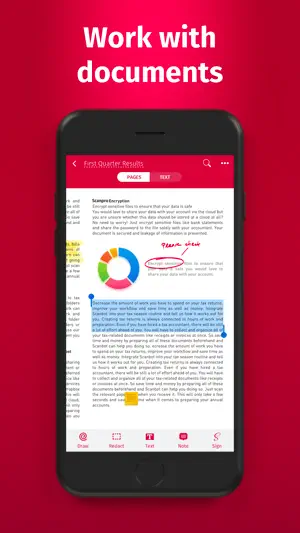
SwiftScan AI is the best mobile scanner app for documents and QR codes. Create free, high-quality PDF or JPG scans with just one tap. Use smart AI Tools to translate scans into other languages, or to summarize into brief overviews or generate longer reports. Send files via email or as a fax. Save files to iCloud Drive, Box, Dropbox, Evernote and other cloud services. SwiftScan AI packs all the power of a desktop scanner into one tiny scanner app! SwiftScan AI Features – Scan, sign, edit, save & send, summarize, translate, fax, and more! - Scan premium quality PDFs or JPGs with 200 dpi and higher - Advanced AI Tools to summarize your documents for quick comprehension, or even translate documents to another language - OCR: AI-powered OCR can extract the text of your scans to search, copy, and lookup to find things fast - Fax: send your documents as a fax right from SwiftScan - Cloud integration: save files to iCloud Drive, Dropbox, Google Drive and other cloud services - Scan QR codes: URLs, Contacts, Phone Numbers - Home Screen Widget: Shortcut widget provides instant access to scan, search, or view recent documents - Lightning fast: automatic edge detection and scanning - Scan single & multi-page documents - Enhance your scans: apply color, grayscale or black & white filters with automatic optimization - Add text, comments, annotations, or draw on documents - Insert e-signature, redact text, add pages - WebDAV and FTP, sFTP and FTPs - Edit documents: Move, rotate, add or delete pages - Encryption: PDF password protection - Passcode protection with Touch/Face ID support - Beautiful themes: select your preferred look and feel - Smart file naming based on tags you select, like dates, keywords, and more - One-tap email and print workflows Scan PRIVACY SAFE SwiftScan AI values your privacy. We will never store or save your documents, or use them for any purpose. All document-related activity happens on your device, or with the cloud backup provider you choose. Scan HIGH-QUALITY SwiftScan AI uses the most advanced scanning technology. Scans start at 200 dpi, premium quality comparable to desktop scanners. Various color modes, auto-optimization and blur-reduction help you to get the most out of your scans. Scan QUICKLY SwiftScan AI is lightning fast and incredibly easy. Hold your iPhone over any document, receipt, whiteboard, notebook, or QR code to scan and save it as a PDF or JPG quickly. The edges of the document are automatically identified so that only the document itself is scanned. It captures the best possible image in the perfect moment. Scan ANYTHING SwiftScan AI works with any type of document, from paper documents to business cards, QR codes, barcodes, notes- even whiteboards or post-its. It saves the documents that are important for you and gets rid of paper clutter. --- CONTACT & SUPPORT --- Learn more: https://maplemedia.io/ Get in touch: [email protected] --- LEGAL --- Terms of Service: https://maplemedia.io/terms-of-service/ Privacy Policy: https://maplemedia.io/privacy/ Subscription Terms: Payment for subscriptions will be charged to your Apple Account at confirmation of purchase. Subscription automatically renews unless auto-renew is turned off at least 24-hours before the end of the current period. Account will be charged for renewal within 24-hours prior to the end of the current period, and identify the cost of the renewal. Subscriptions may be managed by the user and auto-renewal may be turned off by going to the user's Account Settings after purchase. Any unused portion of a free trial period will be forfeited when the user purchases a subscription to that publication.
Ratings & reviews
4.8
18.9K ratings
What’s new
Version 9.6.82 · Updated September 28, 2026
A new version of SwiftScan AI is here! Here’s what’s new: - New Widgets — Get quick access to your recent scans. Also available in an Extra Large widget on iOS 27. - Family Sharing - Current SwiftScan Plus subscription products now include the ability to share your subscription with up to 5 others. - More Scan Sizes — Easily scan documents in the right size, with new options for driver’s licenses, receipts, passports, & more. - Crop All Pages — Crop all pages in a multi-page document at once for faster, easier editing. - iPhone Duo Optimizations - Initial optimizations ahead of the iPhone Duo launch. - Improved Merge & Reorder — Streamlined the merge and document reordering experience for a smoother workflow. - General optimizations & stability improvements. Thanks for using SwiftScan AI! Have questions or feedback? Email us at [email protected] for fast & friendly support.
App privacy
The developer, Maple Media Apps, LLC, reported these privacy practices to Apple.
Data Used to Track You
The following data may be used to track you across apps and websites owned by other companies:
- Contact Info: Email Address
- Identifiers: Device ID
- Usage Data: Advertising Data
Data Linked to You
The following data, which may be collected and linked to your identity, may be used for the following purposes:
- Contact Info: Email Address
- Identifiers: Device ID, User ID
- Usage Data: Advertising Data
- Purchases: Purchase History
Used for: Third-Party Advertising, Developer’s Advertising or Marketing, Analytics, Product Personalization, App Functionality
Data Not Linked to You
The following data, which may be collected but is not linked to your identity, may be used for the following purposes:
- Usage Data: Product Interaction
- Diagnostics: Crash Data, Performance Data
Used for: Developer’s Advertising or Marketing, Analytics, Product Personalization, App Functionality
Alternatives to SwiftScan AI Document Scanner
Looking for apps like SwiftScan AI Document Scanner? Here are 6 similar apps on the App Store. The highest rated is Content Transfer: Copy my Data (4.8/5), and all 6 are free to download.
-
 The private browser арр
4.7
The private browser арр
4.7
-
 Content Transfer: Copy my Data
4.8
Content Transfer: Copy my Data
4.8
-
 Smart QR code scanner •
4.8
Smart QR code scanner •
4.8
-
 Fax mobile: Send & Receive
3.7
Fax mobile: Send & Receive
3.7
-
 PDF Scanner Pro ⊟
4.7
PDF Scanner Pro ⊟
4.7
-
 Barcode Scanner app
4.1
Barcode Scanner app
4.1
| App | Rating | Price | Last updated | Compare |
|---|---|---|---|---|
| SwiftScan AI Document Scanner | 4.8 / 5 (18,941 ratings) | Free | September 28, 2026 | |
| The private browser арр | 4.7 / 5 (54) | Free | Aug 21, 2026 | Compare |
| Content Transfer: Copy my Data | 4.8 / 5 (9) | Free | Jul 23, 2025 | Compare |
| Smart QR code scanner • | 4.8 / 5 (4) | Free | Sep 10, 2025 | Compare |
| Fax mobile: Send & Receive | 3.7 / 5 (10) | Free | Aug 6, 2025 | Compare |
| PDF Scanner Pro ⊟ | 4.7 / 5 (6,147) | Free | Aug 18, 2026 | Compare |
| Barcode Scanner app | 4.1 / 5 (71) | Free | Feb 9, 2026 | Compare |