

Simionic G1000 (MFD)
晨 李 Utilities iPadMac
Simionic G1000 (MFD) is a paid Utilities app for iPad and Mac by 晨 李. Rated 3.6/5 from 67 ratings. Requires iOS 9.0. Updated September 8, 2026.
- Rating
- 3.6
- 67 ratings
- Price
- 9.99 USD
- on the App Store
- Size
- 1.9 GB
- Age 4+
- Updated
- Sep 8
- 2026 · v7.6.1
Screenshots


About Simionic G1000 (MFD)
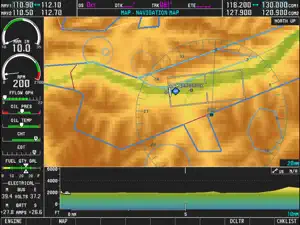
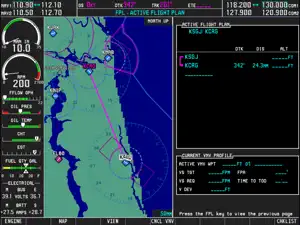
Check out this video: https://www.youtube.com/watch?v=3xePnu3MsBQ IMPORTANT NOTICE: 1. This app emulates G1000 MFD functionalities only. It does not include PFD functionalities. To obtain PFD functionalities, download the PFD app from AppStore which can co-operate with this app(MFD) via wifi connection. Download address of PFD app: http://itunes.apple.com/us/app/id501990787?mt=8 2. This app is for practice only. The navigation database included in this app may be outdated and very possible to be different from what it is in real life. 3. Due to huge memory consumption, it's highly recommended that you install this app on an iPad which has at least 1G memory on board. Thus, install this app on iPad 1, iPad 2 or iPad mini is not recommended. Running this app on iPad Air or newer devices will get you a much better performance. Disclaimer: -Simionic and the seller are not affiliated with Garmin, -The app is not provided, approved, endorsed, or otherwise supported by Garmin. This is an app which simulates the Multi Function Display(MFD) of the Garmin G1000 used on Cessna 182T, 172S, 172R, 206H and Beechcraft Baron G58. It can also be configured to adapt piston, turboprop and jet engines. Most of the functionalities are implemented just as they are in the real life. It can be used by aviation enthusiasts as well as pilots to perform either an IFR training or just to familiarize the operations of G1000 MFD. This app is capable to connect to another app which simulates the G1000 PFD via wifi connection through which you can have a complete set of G1000 and make them work with FSX, Prepar3D , X-Plane or InfiniteFlight to get the best experience. G1000 is a highly integrated system, it is very powerful and also very complicated. It is recommended that you have a real G1000 user guide from Garmin. Details: 1. Global navigation database and topo data 2. Engine status simulation 3. Functional "Map Setup" 4. All pages including AUX pages are implemented 5. Terminal procedures are included 6. User waypoint creating/editing 7. User defined holding patterns 8. Flight plans storing/editing 9. Checklists for Cessna 182T, 172S, 172R and 206H are included 10. PFD connection via wifi
Ratings & reviews
3.6
67 ratings
What’s new
Version 7.6.1 · Updated September 8, 2026
1. CDI in LPV mode is now more sensitive as it should, and the sensitivity increases gradually from FAF to runway threshold 2. When FAF leg of an RNAV approach is active, a 20NM magenta line will be drawn on the map from the FAF towards the back course of the approach heading 3. Approach names for circle-to-land approaches now are shown correctly, also fixes same approach names with different letter suffixes
App privacy
The developer, 晨 李, reported these privacy practices to Apple.
Data Not Collected
The developer does not collect any data from this app.
Alternatives to Simionic G1000 (MFD)
Looking for apps like Simionic G1000 (MFD)? Here are 6 similar apps on the App Store. The highest rated is C172 Performance (4.9/5), and 5 of the 6 are free to download.
-
 C172 Performance
4.9
C172 Performance
4.9
-
 CX-3 Flight Computer
3.7
CX-3 Flight Computer
3.7
-
 PA28 Performance
4.5
PA28 Performance
4.5
-
 C182 Performance
4.3
C182 Performance
4.3
-
 Flight Assessment of Risk Tool
3.3
Flight Assessment of Risk Tool
3.3
-
 Lightspeed App
3.4
Lightspeed App
3.4
| App | Rating | Price | Last updated | Compare |
|---|---|---|---|---|
| Simionic G1000 (MFD) | 3.6 / 5 (67 ratings) | 9.99 USD | September 8, 2026 | |
| C172 Performance | 4.9 / 5 (52) | Free | Jul 7, 2026 | Compare |
| CX-3 Flight Computer | 3.7 / 5 (11) | 19.99 USD | Apr 29, 2025 | Compare |
| PA28 Performance | 4.5 / 5 (17) | Free | Oct 5, 2026 | Compare |
| C182 Performance | 4.3 / 5 (10) | Free | Oct 5, 2026 | Compare |
| Flight Assessment of Risk Tool | 3.3 / 5 (9) | Free | Sep 22, 2026 | Compare |
| Lightspeed App | 3.4 / 5 (52) | Free | Aug 10, 2026 | Compare |