

AnyFont
Evo Tec Labs @ Pepperbit Online Utilities iPhoneiPadiPod touch
AnyFont is a paid Utilities app for iPhone and iPad by Evo Tec Labs @ Pepperbit Online. Rated 4.6/5 from 26,164 ratings. Requires iOS 12.0.
- Rating
- 4.6
- 26.1K ratings
- Price
- 1.99 USD
- on the App Store
- Size
- 40 MB
- Age 4+
- Updated
- Jul 31
- 2024 · v3.3.4
Screenshots

About AnyFont
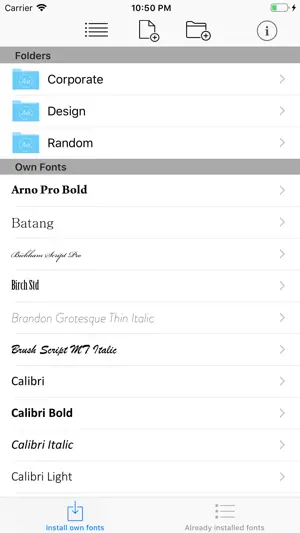
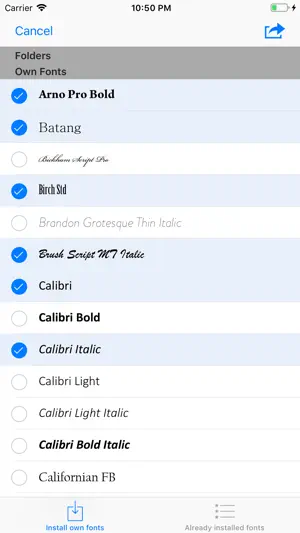
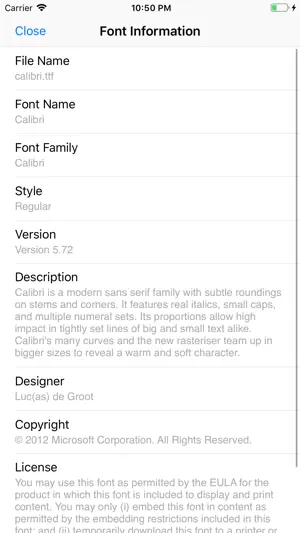
*** COMPATIBLE WITH WORD, EXCEL AND POWERPOINT FOR IOS *** With AnyFont it is finally possible to install any additional font in TrueTypeFont- (.ttf), OpenTypeFont- (.otf) or TrueType Collection- (.ttc) format on your iPhone or iPad. These fonts can then be used throughout the system in other apps like Word, PowerPoint, Pages, Keynote and many more. No more unexpectedly replaced fonts in presentations because the iPhone or iPad does not know them. The perfect solution for everybody who creates presentations on a Mac or PC to show them on their iPad. Extremely easy to use. An extensive FAQ and an introductory tutorial help you to understand the app. Check out this video tutorial: https://www.youtube.com/@AnyFont-iOS Features: - Add new fonts as .ttf, .ttc or .otf file using iTunes file sharing or the „Open in…“ dialog from other apps like Mail or Dropbox - Add single fonts or multiple fonts as a ZIP- or TTC-file - Install single fonts or multiple fonts at once - Preview your fonts in AnyFont’s storage - Access FontBundles.net from within AnyFont - Optional bundle of 1,000+ fonts (In-App Purchase) - Complete list of all installed fonts on the device - Support for Dark Mode (requires iOS 13) Working with: - Word, Excel and PowerPoint - Numbers, Keynote and Pages - Cricut Design Space - Office Suite Pro - Office²HD - and many other apps! AnyFont website: https://www.anyfont.app Tutorial Video: https://www.youtube.com/@AnyFont-iOS NOTE: It is not possible to change the system-font on your device with AnyFont. With AnyFont you can install additional fonts on your device which can then be used by other apps which make use of the device's font book. NOTE II: Some fonts using Cyrillic or Asian characters may not be supported by this way of installing fonts due to their size. The maximum size of a configuration profile for a font is 20 MB. NOTE III: You don't have to purchase the optional font bundle to use AnyFont. You can always add your own fonts to install them on your device.
Ratings & reviews
4.6
26.1K ratings
What’s new
Version 3.3.4 · Updated July 31, 2024
Hello everyone! This update brings you: - small bug fixes If you like AnyFont, please leave a positive rating or review in the App Store. Have a good time!
App privacy
The developer, Evo Tec Labs @ Pepperbit Online, reported these privacy practices to Apple.
Data Used to Track You
The following data may be used to track you across apps and websites owned by other companies:
- Usage Data: Product Interaction, Advertising Data
Data Linked to You
The following data, which may be collected and linked to your identity, may be used for the following purposes:
- Contact Info: Email Address, Name
- Identifiers: User ID
- Purchases: Purchase History
Used for: App Functionality, Other Purposes
Data Not Linked to You
The following data, which may be collected but is not linked to your identity, may be used for the following purposes:
- Usage Data: Product Interaction, Advertising Data
- Diagnostics: Crash Data
Used for: Third-Party Advertising, App Functionality
Alternatives to AnyFont
Looking for apps like AnyFont? Here are 6 similar apps on the App Store. The highest rated is Fontasy - Font Browser (4.7/5), and all 6 are free to download.
-
 Font Keyboard iPhones & iPads
4.4
Font Keyboard iPhones & iPads
4.4
-
 iFont: find, install any font
4.6
iFont: find, install any font
4.6
-
 Font Installer - Install fonts
3.4
Font Installer - Install fonts
3.4
-
 Install Fonts - Font Installer
4.5
Install Fonts - Font Installer
4.5
-
 Fontasy - Font Browser
4.7
Fontasy - Font Browser
4.7
-
 Font Keyboard: Smart Fonts
4.5
Font Keyboard: Smart Fonts
4.5
| App | Rating | Price | Last updated | Compare |
|---|---|---|---|---|
| AnyFont | 4.6 / 5 (26,164 ratings) | 1.99 USD | July 31, 2024 | |
| Font Keyboard iPhones & iPads | 4.4 / 5 (2,071) | Free | Feb 25, 2026 | Compare |
| iFont: find, install any font | 4.6 / 5 (13,798) | Free | Sep 20, 2026 | Compare |
| Font Installer - Install fonts | 3.4 / 5 (9) | Free | Aug 20, 2025 | Compare |
| Install Fonts - Font Installer | 4.5 / 5 (114) | Free | Jul 22, 2026 | Compare |
| Fontasy - Font Browser | 4.7 / 5 (850) | Free | Oct 3, 2026 | Compare |
| Font Keyboard: Smart Fonts | 4.5 / 5 (2,299) | Free | May 14, 2026 | Compare |
Compare AnyFont with the top alternatives: ratings, updates, ASO score and keyword gaps →