

SafeInCloud 1
SAFEINCLOUD SAS Productivity iPhoneiPadiPod touchApple Watch
SafeInCloud 1 is a paid Productivity app for iPhone and iPad by SAFEINCLOUD SAS. Rated 4.9/5 from 2,341 ratings. Requires iOS 14.0. Updated October 2, 2026.
- Rating
- 4.9
- 2.3K ratings
- Price
- 49.99 USD
- on the App Store
- Size
- 61 MB
- Age 4+
- Updated
- Oct 2
- 2026 · v27.0.2
Screenshots



About SafeInCloud 1
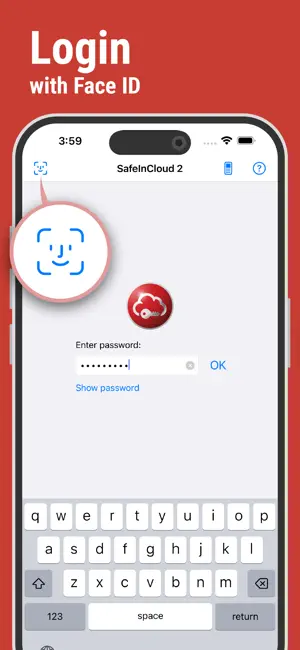
SafeInCloud Password Manager allows you to keep your logins, passwords, and other private info safe and secure in an encrypted database. You can synchronize your data with another phone, tablet, Mac or PC via your own cloud account. KEY FEATURES ◆ Easy to Use ◆ Strong Encryption (256-bit Advanced Encryption Standard) ◆ Cloud Synchronization (iCloud, Google Drive, Dropbox, OneDrive, NAS, WebDAV) ◆ Login with Touch ID & Face ID ◆ Autofill in Apps ◆ Apple Watch App ◆ Password Strength Analysis ◆ Password Generator ◆ Free Desktop App (Windows, Mac) ◆ Automatic Data Import ◆ Cross-Platform EASY TO USE Try it yourself and enjoy an easy-to-use yet powerful user interface. STRONG ENCRYPTION Your data is always encrypted on a device and in a cloud with a strong 256-bit Advanced Encryption Standard (AES). This algorithm is used by the U.S. Government for protection of a top secret information. AES is also widely adopted worldwide and became the de facto encryption standard. CLOUD SYNCHRONIZATION Your database is automatically synchronized with your own cloud account. Thus you can easily restore your entire database from a cloud to a new phone or computer (in case of a loss or an upgrade). Your phone, tablet and computer are also automatically synchronized between each other via a cloud. LOGIN WITH TOUCH ID & FACE ID You can instantly unlock SafeInCloud with a fingerprint on devices with Touch ID. You can also unlock SafeInCloud by face recognition using Face ID technology. AUTOFILL IN APPS You can autofill login and password fields into any app on your phone directly from SafeInCloud. You don't need to copy and paste them manually. APPLE WATCH APP You can put some selected cards on your wrist to easily access them on the run. These could be your credit card PINs, door and locker codes. PASSWORD STRENGTH ANALYSIS SafeInCloud analyses your password strengths and shows a strength indicator next to each password. The strength indicator displays an estimated crack time for a password. All cards with weak passwords are marked with a red sign. PASSWORD GENERATOR The password generator helps you generating random and secure passwords. There is also an option to generate memorable, but still strong passwords. FREE DESKTOP APP Download a free Desktop application for Windows or Mac OS from www.safe-in-cloud.com to be able access your database on your computer. The Desktop application also makes data entry and editing fast and easy using a hardware keyboard. AUTOMATIC DATA IMPORT The Desktop application can automatically import your data from another password manager. You don't need to manually reenter all your passwords.
Ratings & reviews
4.9
2.3K ratings
What’s new
Version 27.0.2 · Updated October 2, 2026
Fixed a sync issue with Microsoft OneDrive.
App privacy
The developer, SAFEINCLOUD SAS, reported these privacy practices to Apple.
Data Not Linked to You
The following data, which may be collected but is not linked to your identity, may be used for the following purposes:
- Usage Data: Product Interaction
- Diagnostics: Crash Data
Used for: Analytics, Other Purposes
Alternatives to SafeInCloud 1
Looking for apps like SafeInCloud 1? Here are 6 similar apps on the App Store. The highest rated is Keeper Password Manager (4.9/5), and 5 of the 6 are free to download.
-
 mSecure: Password Manager
4.8
mSecure: Password Manager
4.8
-
 RoboForm Password Manager
4.7
RoboForm Password Manager
4.7
-
 Keeper Password Manager
4.9
Keeper Password Manager
4.9
-
 Things 3
4.8
Things 3
4.8
-
 Dashlane Password Manager
4.8
Dashlane Password Manager
4.8
-
 Quicken Classic
4.6
Quicken Classic
4.6
| App | Rating | Price | Last updated | Compare |
|---|---|---|---|---|
| SafeInCloud 1 | 4.9 / 5 (2,341 ratings) | 49.99 USD | October 2, 2026 | |
| mSecure: Password Manager | 4.8 / 5 (51,334) | Free | Aug 13, 2026 | Compare |
| RoboForm Password Manager | 4.7 / 5 (48,859) | Free | Oct 12, 2026 | Compare |
| Keeper Password Manager | 4.9 / 5 (231,285) | Free | Aug 3, 2026 | Compare |
| Things 3 | 4.8 / 5 (28,006) | 9.99 USD | Sep 22, 2026 | Compare |
| Dashlane Password Manager | 4.8 / 5 (107,229) | Free | Oct 12, 2026 | Compare |
| Quicken Classic | 4.6 / 5 (14,936) | Free | Sep 22, 2026 | Compare |
Compare SafeInCloud 1 with the top alternatives: ratings, updates, ASO score and keyword gaps →