

Mapillary
Mapillary AB Photo & Video iPhoneiPadiPod touch
Mapillary is a free Photo & Video app for iPhone and iPad by Mapillary AB. Rated 4.6/5 from 21 ratings. Requires iOS 15.1. Updated October 28, 2026.
- Rating
- 4.6
- 21 ratings
- Price
- Free
- on the App Store
- Size
- 38 MB
- Age 4+
- Updated
- Oct 28
- 2026 · v6.12.3
Screenshots


About Mapillary
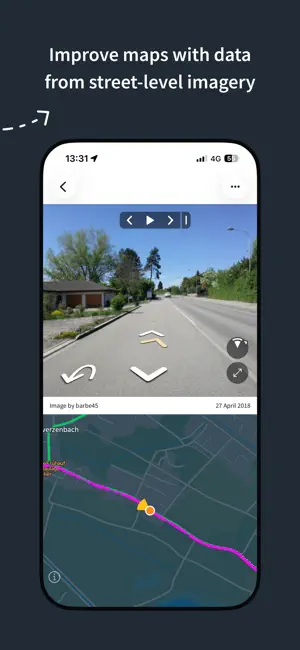
Mapillary is the street-level imagery platform that scales and automates mapping using collaboration, cameras, and computer vision. Anyone can capture images of any place, as often as needed, with any camera—including smartphones. Mapillary combines all images into a collaborative street-level view of the world that’s available for anyone to explore and use for improving maps, cities, and mobility. Computer vision technology provides a smooth viewing experience and speeds up mapping through machine-extracted map data. Capturing with the Mapillary mobile app is the easiest way to join our contributor network. Let’s get started! CREATE YOUR OWN STREET-LEVEL VIEWS You control when and where to capture to create the freshest street-level imagery. Mapillary’s technology combines all images into a navigable view and blurs faces and license plates for privacy. ACCESS AND OPEN UP DATA Mapillary contributors are people, organizations, companies, and governments in 190 countries. Millions of images are added to the dataset every week, which you can explore right here in the mobile app. MAKE BETTER MAPS Use imagery and machine-extracted data to add details to maps and geospatial datasets. Mapillary integrates with tools like OpenStreetMap iD editor and JOSM, HERE Map Creator, and ArcGIS. To access the available map data, go to mapillary.com/app.
Ratings & reviews
4.6
21 ratings
What’s new
Version 6.12.3 · Updated October 28, 2026
Added a zoom button on iPhones without an ultra-wide lens The camera lens button now shows the current zoom level Alerts now fade out instead of sliding down The tab bar is now hidden while viewing a sequence from Explore The image viewer is updated to the latest MapillaryJS Removed about 5 MB of unused files from the app Fixed bug where a capture was not saved, or only partly saved, even though the camera showed it was recording Fixed bug where the camera preview would be upside down if the camera was launched from landscape right orientation Fixed bug where a closed sequence could stay highlighted on the map Fixed bug where opening an uploaded sequence briefly showed your current location first Fixed bug where screen brightness was not restored in camera when recovering from the overheating state Fixed bug where the map in camera would not always show the user location
App privacy
The developer, Mapillary AB, reported these privacy practices to Apple.
Data Linked to You
The following data, which may be collected and linked to your identity, may be used for the following purposes:
- User Content: Photos or Videos, Customer Support, Other User Content
- Identifiers: User ID, Device ID
- Usage Data: Product Interaction
- Location: Precise Location
- Contact Info: Email Address, Name
Used for: Analytics, App Functionality, Other Purposes
Data Not Linked to You
The following data, which may be collected but is not linked to your identity, may be used for the following purposes:
- Location: Coarse Location
Used for: Analytics, App Functionality
Alternatives to Mapillary
Looking for apps like Mapillary? Here are 6 similar apps on the App Store. The highest rated is Dot3D: Precision LiDAR Scanner (4.7/5), and all 6 are free to download.
-
 KartaView
2.6
KartaView
2.6
-
 Photo Investigator: GPS & EXIF
4.4
Photo Investigator: GPS & EXIF
4.4
-
 HDReye
4.5
HDReye
4.5
-
 360 Photo Cam
4.4
360 Photo Cam
4.4
-
 Dot3D: Precision LiDAR Scanner
4.7
Dot3D: Precision LiDAR Scanner
4.7
-
 Map Pilot Pro
4.6
Map Pilot Pro
4.6
| App | Rating | Price | Last updated | Compare |
|---|---|---|---|---|
| Mapillary | 4.6 / 5 (21 ratings) | Free | October 28, 2026 | |
| KartaView | 2.6 / 5 (19) | Free | Aug 20, 2026 | Compare |
| Photo Investigator: GPS & EXIF | 4.4 / 5 (1,449) | Free | Oct 15, 2026 | Compare |
| HDReye | 4.5 / 5 (773) | Free | Sep 12, 2026 | Compare |
| 360 Photo Cam | 4.4 / 5 (170) | Free | Apr 6, 2026 | Compare |
| Dot3D: Precision LiDAR Scanner | 4.7 / 5 (104) | Free | Oct 10, 2026 | Compare |
| Map Pilot Pro | 4.6 / 5 (258) | Free | Apr 10, 2026 | Compare |
Compare Mapillary with the top alternatives: ratings, updates, ASO score and keyword gaps →