

Noonlight: Feel Protected 24/7
Noonlight, Inc. Lifestyle iPhoneApple Watch
Noonlight: Feel Protected 24/7 is a free Lifestyle app for iPhone and Apple Watch by Noonlight, Inc. Rated 4.7/5 from 16,636 ratings. Requires iOS 15.0.
- Rating
- 4.7
- 16.6K ratings
- Price
- Free
- on the App Store
- Size
- 104 MB
- Age 4+
- Updated
- Jul 20
- 2026 · v2.20.1
Screenshots
About Noonlight: Feel Protected 24/7
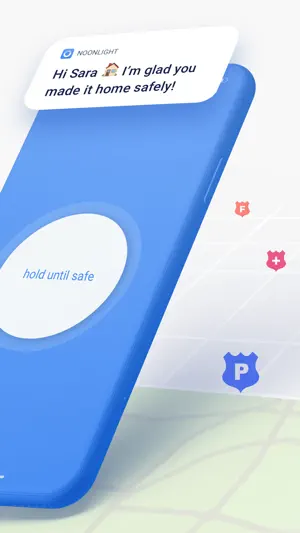
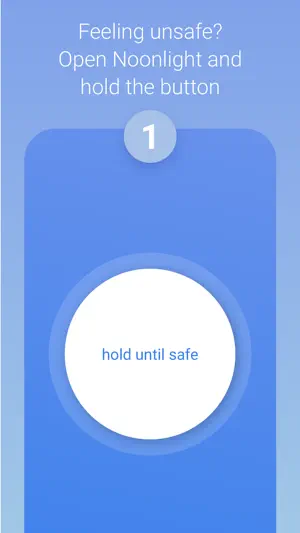
Have you ever been in a situation where you question whether it’s dangerous enough to call 911? Instead of worrying yourself with indecision, use Noonlight. Noonlight uses advanced technology to get emergency help to your exact location with just the release of a button. It can be used in moments where you simply feel unsafe, as well as moments where you need immediate emergency help. Here’s how simple it is: 1. Press and hold the button whenever you feel uneasy. 2. Release the button when you have reached your home, car, or a safe destination and enter your 4-digit pin. 3. In danger? Simply release the button and do not enter your pin. Your local police will be notified of your location and emergency. Free Features: • Meeting a stranger? See something suspicious? Simply add information to your Timeline and we’ll share important details with first responders in an emergency. • We’ve partnered with Tinder to provide backup on your next date! Share details about who you’ll be meeting to your timeline, directly from the Tinder app. Or add a ‘Protected by Noonlight’ badge to your Tinder chat threads so everyone will know we have your back. • Prefer texting? If you can’t talk in an emergency, you can still communicate with us via text. • Can’t text or talk? No worries, we’re still sending help to your exact location. • On the move? We update your location even if you’re in a taxi, bus, running, or walking. • On-call team of friendly, certified dispatchers ready 24/7/365 to get you help. Instant Access Features: • Automatic Crash Response: Using the accelerometer, GPS, and gyroscope on your phone, Noonlight can detect if you’ve been in a car accident and automatically send first responders. • In a panic? Add the Noonlight widget to “Send help!” directly from your lock screen. • Apple Watch: Get emergency help from your wrist. In an emergency, tap “Send help!” to trigger an alarm. We’ll text and call to verify you need help. If you’re unable to answer, we’ll still send help to your location. • Wear OS: Get emergency help from your wrist using timer or panic mode. In an emergency, tap Trigger Alarm. Or Set Timer, and we’ll send help if you don’t enter your PIN when time’s up. • Connect the Apple Health app so first responders have more info to better help you in an emergency. • Connect your Lyft or Uber account to send your trip and driver information to first responders when you trigger a Noonlight alarm. • IFTTT Integrations: From home security to voice commands, Noonlight can send smarter, faster help in an emergency. If you choose to upgrade to Noonlight Instant Access, you’ll get unlimited access to all safety features and integrations. Payment will be charged to your iTunes account at confirmation of purchase, and will automatically renew at the end of each monthly period. You can turn off auto-renewal at any time from your account settings, but refunds will not be provided for any unused portion of the current period. Please note, if you wish to avoid auto-renewal, you must turn it off at least 24 hours prior to the end of the current period. We take the satisfaction and safety of our customers very seriously. Please check out our reviews to see how Noonlight is helping people just like you! Noonlight's Terms of Use: https://noonlight.com/terms Noonlight's Privacy Policy: https://noonlight.com/privacy Note: Continued use of GPS running in the background can dramatically decrease battery life. Noonlight will only use your GPS location in the background if you have an active alert, or if you've enabled Safety Network or crash detection.
Ratings & reviews
4.7
16.6K ratings
What’s new
Version 2.20.1 · Updated July 20, 2026
Resolved an issue with the contact picker that prevented selecting an Emergency Contact or Safety Network contact on some devices. Thank you for staying safe with Noonlight!
App privacy
The developer, Noonlight, Inc., reported these privacy practices to Apple.
Data Linked to You
The following data, which may be collected and linked to your identity, may be used for the following purposes:
- Usage Data: Product Interaction
- Location: Coarse Location, Precise Location
- Identifiers: User ID, Device ID
- Diagnostics: Performance Data
- Contact Info: Name, Phone Number
Used for: Developer’s Advertising or Marketing, Analytics, Product Personalization, App Functionality
Data Not Linked to You
The following data, which may be collected but is not linked to your identity, may be used for the following purposes:
- Diagnostics: Crash Data
Used for: App Functionality
Alternatives to Noonlight: Feel Protected 24/7
Looking for apps like Noonlight: Feel Protected 24/7? Here are 6 similar apps on the App Store. The highest rated is Rave Guardian (4.6/5), and all 6 are free to download.
-
 bSafe - Never Walk Alone
3.4
bSafe - Never Walk Alone
3.4
-
 Rave Guardian
4.6
Rave Guardian
4.6
-
 Hiki: Autism ADHD & ND Dating
3.9
Hiki: Autism ADHD & ND Dating
3.9
-
 Delight: Dating & Relationship
4.3
Delight: Dating & Relationship
4.3
-
 The League: Intelligent Dating
4.2
The League: Intelligent Dating
4.2
-
 Roomie: Roommates & Rentals
4.6
Roomie: Roommates & Rentals
4.6
| App | Rating | Price | Last updated | Compare |
|---|---|---|---|---|
| Noonlight: Feel Protected 24/7 | 4.7 / 5 (16,636 ratings) | Free | July 20, 2026 | |
| bSafe - Never Walk Alone | 3.4 / 5 (208) | Free | Jan 9, 2025 | Compare |
| Rave Guardian | 4.6 / 5 (2,976) | Free | Nov 20, 2025 | Compare |
| Hiki: Autism ADHD & ND Dating | 3.9 / 5 (2,589) | Free | Oct 28, 2026 | Compare |
| Delight: Dating & Relationship | 4.3 / 5 (6,667) | Free | Dec 8, 2024 | Compare |
| The League: Intelligent Dating | 4.2 / 5 (56,379) | Free | Oct 23, 2026 | Compare |
| Roomie: Roommates & Rentals | 4.6 / 5 (10,414) | Free | Oct 27, 2026 | Compare |