

Nivo AI: Recorder & Summary
Developer App Studio Productivity iPhoneiPadiPod touchApple Watch
Nivo AI: Recorder & Summary is a free Productivity app for iPhone and iPad by Developer App Studio. Requires iOS 26.0. Updated November 25, 2026.
- Price
- Free
- on the App Store
- Size
- 14 MB
- Age 4+
- Updated
- Nov 25
- 2026 · v1.0
Screenshots
Save to Pinterest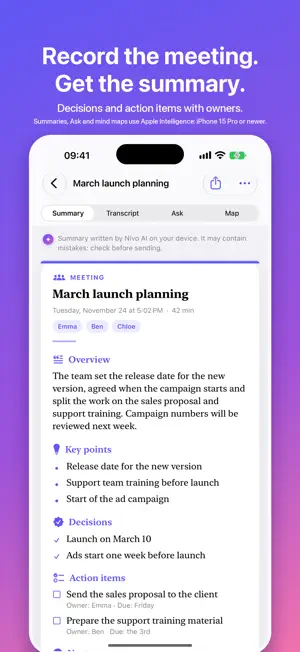


About Nivo AI: Recorder & Summary
Record meetings, classes and conversations and get the summary ready. Nivo AI records, transcribes live while you talk and, when you stop, organizes everything into an overview, key points, decisions, action items and next steps. Transcription and AI run on your iPhone: your recordings never leave it. Summaries, Ask and mind maps use Apple Intelligence and require an iPhone 15 Pro or newer, with Apple Intelligence turned on. Recording and transcription work on any iPhone with iOS 26. RECORD ANYWHERE • On iPhone, keeps recording with the screen locked • Live Activity on the Lock Screen and Dynamic Island shows the timer and the last transcribed sentence • Mark important moments, pause and resume anytime • Record from Apple Watch, right on your wrist • Import audio files, including voice messages from chat apps PHONE CALLS Nivo AI does not record calls. But if you use the iPhone's built-in call recording (saved in Notes), just import that audio to get a summary. LIVE, ON-DEVICE TRANSCRIPTION • English, Spanish, French, German, Italian, Japanese, Korean, Simplified Chinese and Portuguese (Brazil and Portugal) • Each language requires that speech language to be available on your iPhone • Switch languages mid-recording • Custom vocabulary: names, acronyms and technical terms spelled right • Optional advanced transcription: after recording, a more accurate model revises the text on the device, with fewer errors in conversations with several people (one-time download of about 630 MB, on recent iPhones) SUMMARIES BY NIVO AI • A quick overview • Key points and decisions • Action items with owner and deadline • Next steps • Automatic title TEMPLATES FOR EVERY SITUATION • Meeting, class, client conversation, sermon or talk • Create your own summary templates (Premium) ASK AND VISUALIZE (PREMIUM) • Ask one recording or all of them at once: "What did we decide about pricing?" • Editable mind map of the topic STAY ON TOP OF TASKS • Tasks tab: mark items done or send them to Apple Reminders • Widgets, a Control Center button, Siri and the Action button • Shortcuts actions for the latest summary, the transcript and pending tasks, to send to Notion, Slack or email SHARE YOUR WAY • Text formatted for chat apps, email or an image card • PDF and Word (Premium) • Subtitles (.srt), transcript (.txt) and the original audio • Play the audio back at up to 2x speed, with 15-second skips • Trash: restore deleted recordings for up to 30 days • Folders and search inside transcripts (Premium) PRIVACY Transcription and AI run on your iPhone. Recordings, transcripts and summaries stay on your device, and no account is needed. Please let people know they are being recorded wherever the law requires it. FREE • Record and transcribe up to 30 minutes per recording • 3 AI summaries • Share as text PREMIUM • Unlimited summaries • Recordings with no time limit • Templates and custom templates • Ask and mind map • PDF and Word export • Folders and search Monthly or annual auto-renewing subscription. The annual plan includes a 3-day free trial for eligible users. Note: summaries, Ask and mind maps use Apple Intelligence and require an iPhone 15 Pro or newer, with Apple Intelligence turned on. Recording and transcription work on any iPhone with iOS 26. Your subscription renews automatically unless cancelled at least 24 hours before the end of the current period. Payment is charged to your App Store account. Manage or cancel in Settings > your name > Subscriptions. Terms of Use: https://www.apple.com/legal/internet-services/itunes/dev/stdeula/ Privacy Policy: https://nivo-app-omega.vercel.app/privacy
App privacy
The developer, Developer App Studio, reported these privacy practices to Apple.
Data Not Linked to You
The following data, which may be collected but is not linked to your identity, may be used for the following purposes:
- Purchases: Purchase History
Used for: Analytics, App Functionality
Alternatives to Nivo AI: Recorder & Summary
Looking for apps like Nivo AI: Recorder & Summary? Here are 6 similar apps on the App Store. The highest rated is Teleprompter • Video Recorder (4.5/5), and all 6 are free to download.
-
 Pomi: Focus Timer & Pomodoro
-
 Teleprompter App: Video Script
-
 Scaza
-
 Solar Next
-
 Condo Id
1.0
-
 Teleprompter • Video Recorder
4.5
| App | Rating | Price | Last updated | Compare |
|---|---|---|---|---|
| Nivo AI: Recorder & Summary | – | Free | November 25, 2026 | |
| Pomi: Focus Timer & Pomodoro | – | Free | Nov 27, 2026 | Compare |
| Teleprompter App: Video Script | – | Free | Nov 27, 2026 | Compare |
| Scaza | – | Free | Aug 18, 2026 | Compare |
| Solar Next | – | Free | Sep 9, 2025 | Compare |
| Condo Id | 1.0 / 5 (3) | Free | Nov 6, 2026 | Compare |
| Teleprompter • Video Recorder | 4.5 / 5 (61) | Free | Nov 26, 2026 | Compare |