

Hex: voice dictation keyboard
Anomaly Innovations, Inc. Productivity iPhoneiPadiPod touch
Hex: voice dictation keyboard is a free Productivity app for iPhone and iPad by Anomaly Innovations, Inc. Rated 4.8/5 from 66 ratings. Requires iOS 18.0.
- Rating
- 4.8
- 66 ratings
- Price
- Free
- on the App Store
- Size
- 82 MB
- Age 4+
- Updated
- Nov 26
- 2026 · v1.0.5
Screenshots
Save to Pinterest

About Hex: voice dictation keyboard
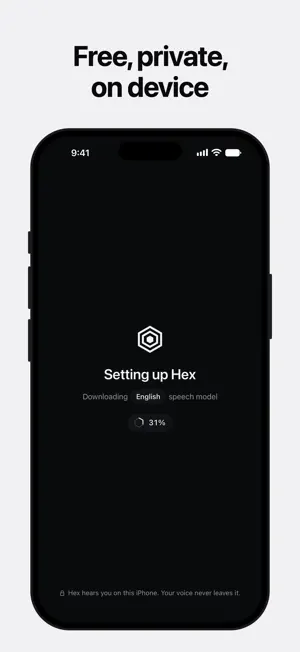
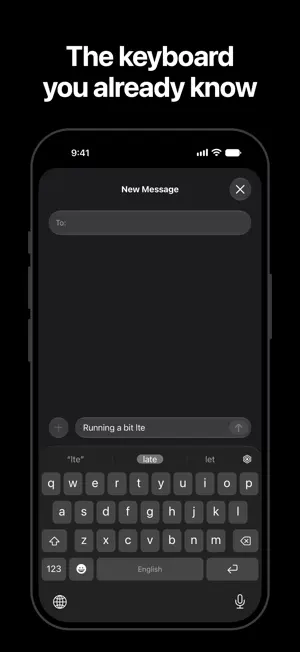
Hex is a keyboard you can talk to. Type as usual, or tap the Hex key in any app, say what you mean, and your words land right where you're typing. No switching apps, no copy and paste. Hex comes with Hex Keyboard, a custom keyboard you add in Settings, plus a Control Center control and an Action Button shortcut. Free and on your iPhone What you say is turned into text on your iPhone and never sent anywhere. There's no account, no subscription and no cloud. Once a language's speech model is downloaded, dictation works offline. A keyboard first • Keys laid out like Apple's keyboard, with the same long-press accents • Autocorrect and suggestions in your language • Swipe typing in English and Spanish • Emoji with search, skin tones and suggestions from what you type • A Return key that matches each app: send, go, search or done • Your text replacements, a space-bar cursor, and a slim dictation bar if you'd rather • Keyboards for English, Spanish, German, French, Italian, Portuguese, Norwegian, Polish, Czech, Ukrainian, Greek and more Dictation that writes it right • Dictate right inside the keyboard, in every app: tap the Hex key, or hold it, talk and let go • Spoken punctuation: say "comma", "period" or "question mark" in English, Spanish, French, German, Italian and Portuguese • Clean up what I say drops ums, repeats and the words you corrected, so "Friday at 3pm, actually 4pm" becomes "Friday at 4pm" • Styles for how it's written: Polished, Casual, Notes and Verbatim • Say "first … second …" and get a numbered list, in English and Spanish • Every language Apple can transcribe on device, picked from your iPhone's languages or switched from the keyboard • Dictate from the Action Button or Control Center, with a Live Activity while it records Optional features They stay off until you turn them on, and all of them run on your iPhone: • Translate what I say: speak one language, insert another • Custom vocabulary: names and terms spelled your way • Learn how I type: learns from where you tap and the words you fix • Clean up with Apple Intelligence: fixes misheard words on iPhones that support it About Full Access Hex Keyboard types without Full Access. To dictate, it asks for Full Access so it can record with the microphone you allowed for Hex and share your settings with the Hex app. Hex has no servers and no analytics. Nothing you type or say leaves your iPhone. Requirements iOS 18 or later. Dictating inside the keyboard needs iOS 26 or later. On iOS 18 to 25, the keyboard opens Hex to record, Hex transcribes with Apple's on-device speech recognition (or, for English, an on-device model it downloads once), and you swipe back to your app. On iOS 18, a dictation translates only if you finish it in Hex. Speech models download once, the first time you use a language.
Ratings & reviews
4.8
66 ratings
What’s new
Version 1.0.5 · Updated November 26, 2026
• New: Dutch, Swedish and Slovak keyboards (Settings › Keyboard › Languages) • New: emoji as you type. Type a word like "smile" and tap its emoji above the keys • New: word replacements. Tell Hex to write "GitHub" when it hears "jet hub", and share your list as a file (Settings › Dictation › Custom vocabulary) • New: a dictation is kept when your iPhone locks. Tap Paste in the keyboard to put it in • New: Send feedback at the bottom of Home, to tell us what to fix or add • New: choose English or Multilingual for Hex's own speech model in the keyboard (Settings › Dictation › Model). Multilingual covers 25 European languages • New: a Passwords button in login fields, and Hex's own number pad in number fields • With live words going into the field, tap Send in a chat and keep talking: Hex starts a fresh message • Speech models download on Wi-Fi unless you tap Use mobile data • When the keyboard can't use Hex's own speech model, Settings says why • Experiments is now Labs, with Key colors to pick a color for the keys • Settings pages are shorter and clearer, and a language is named the same way everywhere • A notification no longer ends a dictation in the keyboard, and the last words you say before finishing are kept
App privacy
The developer, Anomaly Innovations, Inc., reported these privacy practices to Apple.
Data Linked to You
The following data, which may be collected and linked to your identity, may be used for the following purposes:
- Contact Info: Email Address
- User Content: Photos or Videos, Customer Support
- Identifiers: User ID
- Diagnostics: Other Diagnostic Data
Used for: App Functionality
Alternatives to Hex: voice dictation keyboard
Looking for apps like Hex: voice dictation keyboard? Here are 6 similar apps on the App Store. The highest rated is Function Keyboard (5.0/5), and all 6 are free to download.
-
 Monologue: Smart Dictation
4.8
-
 Aqua Voice: AI Dictation
4.4
-
 Function Keyboard
5.0
-
 Floaty: Lock Screen Essentials
5.0
-
 Paseo - Remote Coding Agents
4.9
-
 MausBot: Private AI Agents
4.1
| App | Rating | Price | Last updated | Compare |
|---|---|---|---|---|
| Hex: voice dictation keyboard | 4.8 / 5 (66 ratings) | Free | November 26, 2026 | |
| Monologue: Smart Dictation | 4.8 / 5 (306) | Free | Nov 20, 2026 | Compare |
| Aqua Voice: AI Dictation | 4.4 / 5 (118) | Free | Nov 24, 2026 | Compare |
| Function Keyboard | 5.0 / 5 (4) | Free | Nov 26, 2026 | Compare |
| Floaty: Lock Screen Essentials | 5.0 / 5 (8) | Free | Nov 18, 2026 | Compare |
| Paseo - Remote Coding Agents | 4.9 / 5 (120) | Free | Nov 26, 2026 | Compare |
| MausBot: Private AI Agents | 4.1 / 5 (15) | Free | Nov 21, 2026 | Compare |