

Dozyface: Nightstand Clock
HAST Services LLC. Utilities iPhoneiPadiPod touch
Dozyface: Nightstand Clock is a free Utilities app for iPhone and iPad by HAST Services LLC. Requires iOS 17.0. Updated November 21, 2026.
- Price
- Free
- on the App Store
- Size
- 24 MB
- Age 4+
- Updated
- Nov 21
- 2026 · v1.0.1
Screenshots
Save to Pinterest


About Dozyface: Nightstand Clock
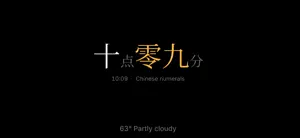
Dozyface turns the iPhone on your nightstand into a beautiful bedside clock. Put it on the charger, open the app, and it stays on as a clock all night: big and clear by day, dim and deep red at bedtime. 132 FACES IN ELEVEN STYLES Minimal digital, classic analog, retro flip and LED and glowing tubes, typography, slow generative art, sun and moon, a morning dashboard, playful faces, candle-dim ambient faces, world time, and scripts and numerals. Pick one, or let Dozyface rotate through all faces, just your favorites, or a set you choose, so your nightstand never looks the same twice. SCRIPTS & NUMERALS Twenty faces that tell time in the world's writing systems, from Hindi, Arabic, Chinese, Korean and Amharic to Maya bars and Babylonian wedges. Tap any face to see the time in familiar digits. We made them with care from published sources; if a script or numeral looks wrong to you, please tell us at dozyface.com/feedback. READY FOR BED - Night mode turns the whole clock into dim, warm red with no blue or white light. - It switches on at your bedtime, or from sunset to sunrise, and you can switch it yourself from the on-screen controls. - Dim after a while without a touch; any tap wakes it. Set how dim with a live preview. - Every face is drawn on true black, and gentle burn-in protection moves it a few pixels every minute. - Works in portrait and landscape. MAKE IT YOURS - Tap the heart on the clock to add the face on screen to your favorites, and rotate through just your favorites. - Choose a preset accent or any color you like; Dozyface keeps it readable on black and uses it across the app. Night mode stays red. - Larger text for Settings and menus (Standard, Large, Extra large), on top of the iPhone's own text size. A CALM GLANCE AT YOUR MORNING (ALL OPTIONAL) - Weather for your approximate location or a place you choose, in °F or °C (set from your region until you pick). - Your next calendar event and today's reminders or to-dos, read on your iPhone and never uploaded. - World clocks for the people you care about. - Your own alarms that ring even in Silent mode, with the next one on the clock. Alarms need iOS 26 or later. PRIVATE BY DESIGN No account, no sign-in, no ads, no analytics, no tracking. Your calendar, reminders, to-dos and alarms stay on your iPhone. Weather sends your location rounded to about 1 km to Open-Meteo, and a short status message comes from dozyface.com every few hours (you can turn it off). A "Your privacy" screen explains all of this before Dozyface asks for any permission, and every permission is optional. GOOD TO KNOW - Keep your iPhone plugged in: a screen that stays on uses more power than a sleeping one. - iOS does not let apps draw on the always-on display or the Lock Screen, so the clock shows while Dozyface is open. You can also let the phone lock as usual. Alarms still ring and appear on the Lock Screen, through iOS. - iPhone does not give apps its light sensor, so night mode follows your schedule or the sun. - Dozyface cannot read or change the alarms in Apple's Clock app; it shows the alarms you set in Dozyface. Dozyface is free, with no in-app purchases. Weather data by Open-Meteo.com. Ideas and questions: dozyface.com/feedback
App privacy
The developer, HAST Services LLC., reported these privacy practices to Apple.
Data Not Linked to You
The following data, which may be collected but is not linked to your identity, may be used for the following purposes:
- Location: Coarse Location
- Search History: Search History
Used for: App Functionality
Alternatives to Dozyface: Nightstand Clock
Looking for apps like Dozyface: Nightstand Clock? Here are 6 similar apps on the App Store. The highest rated is Just Nice Clock (4.7/5), and 5 of the 6 are free to download.
-
 Mesa Browser
-
 Plain Audio
-
 Simple GridLauncher
3.0
-
 Lumi Clock: Flip Desk Clock
-
 Lensify
-
 Just Nice Clock
4.7
| App | Rating | Price | Last updated | Compare |
|---|---|---|---|---|
| Dozyface: Nightstand Clock | – | Free | November 21, 2026 | |
| Mesa Browser | – | 2.99 USD | Nov 4, 2026 | Compare |
| Plain Audio | – | Free | Oct 31, 2026 | Compare |
| Simple GridLauncher | 3.0 / 5 (2) | Free | Nov 25, 2026 | Compare |
| Lumi Clock: Flip Desk Clock | – | Free | Oct 20, 2026 | Compare |
| Lensify | – | Free | Nov 15, 2026 | Compare |
| Just Nice Clock | 4.7 / 5 (3) | Free | Nov 16, 2026 | Compare |