
OneMove Master
Vadim Medynskii Music iPhoneiPadiPod touch
OneMove Master is a free Music app for iPhone and iPad by Vadim Medynskii. Rated 5.0/5 from 1 ratings. Requires iOS 16.0. Updated November 25, 2026.
- Rating
- 5.0
- 1 ratings
- Price
- Free
- on the App Store
- Size
- 60 MB
- Age 4+
- Updated
- Nov 25
- 2026 · v1.1
Screenshots
Save to Pinterest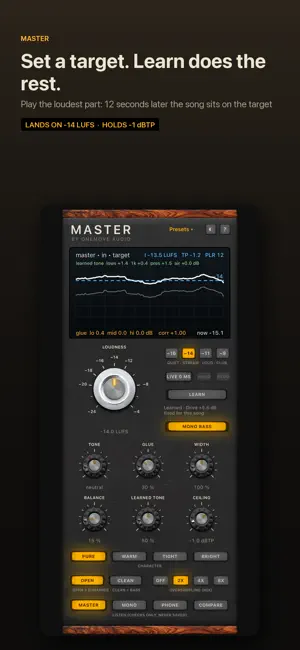


About OneMove Master
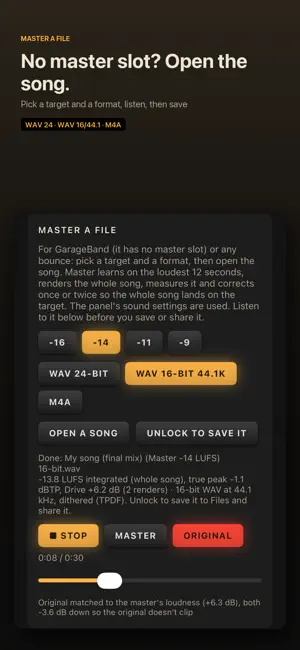
Mastering for iPad and iPhone, as an AUv3 plug-in and in the app. Put Master last on your mix, pick a loudness target, play the loudest part of the song: Master learns it for 12 seconds, sets the gain so the song lands on the target, then holds still. No riding, no guessing. PICK A TARGET −14 LUFS for most streaming services, −16 for quieter platforms and podcasts, −11 louder, −9 for club masters, or anything from −24 to −4. Louder than −14, Master lowers the true-peak ceiling to −2 dBTP by default, following Spotify's guidance, so encodes don't clip. You can still set your own. FOUR CHARACTERS • Pure: clean, EQ only. • Warm: rounder lows, a touch of tube colour. • Tight: a firmer low end, tape colour. • Bright: more presence and air. Each one is level-matched, so switching changes the sound, not just the volume. Learned tone compares your mix with released masters in four regions (lows, 1 kHz, presence, air) and corrects part of the difference. If a region is already well over, the character stops adding to it. A TRUE-PEAK CEILING THAT HOLDS In our tests the output held −1.1 dBTP with the ceiling at −1, on every song, character and setting. Mix mode adds 4 ms of latency, reported to your host. Live mode has zero latency, for playing through Master. HEAR IT HONESTLY Compare plays your unmastered mix at the master's loudness, so you judge the sound and not the level. Mono and Phone let you check one speaker and a phone-sized one. Undo and Redo on the panel. MASTER A FILE No master slot in your app? Open a bounce in the Master app, pick a target and a format (24-bit WAV, 16-bit 44.1 kHz WAV with dither, or M4A). Master learns on the loudest 12 seconds, renders the whole song, measures it and corrects until the whole song lands on the target. Listen to it, switching between the master and the original at the same loudness, before you save it. GENTLE ON PURPOSE Master is a finishing tool, not a repair tool. On our 31 test mixes with deliberate faults (harsh, dull, boomy, thin, boxy, airy, already limited), it never made a fault worse, and it took off part of each. CONTROLS Loudness target, Learn, Character, Learned tone, Tone, Glue (three bands), Width with mono bass, Balance, Ceiling, limiter Open or Clean, oversampling Off to 8x, Live. Every control is a host parameter. A quick guide sits behind the "?" on the panel. FREE TO TRY Every feature works. In a host, Master runs 5 minutes per load, then passes your audio through until you reload it. Bounces pass through unmastered. In the app you can master a file and listen to it. One purchase unlocks everything: no subscription. WORKS WITH AUv3 hosts on iPad and iPhone. The "?" opens the manual and a form for bugs, ideas and questions. PRIVACY Everything runs on your device. No data collected. Measurements: our own, input and output audio only.
What’s new
Version 1.1 · Updated November 25, 2026
Hear your own song live, then save exactly what you heard. - Open a song in the app: it plays through the panel. Loop any part, turn Character, Tone, Glue and the rest while it plays, and switch between the master and the original at the same loudness. - Master file writes exactly the settings you heard. If the whole song still misses your target, only Drive moves, and the app tells you by how much. - Long songs open without filling the memory. - The screen has four views: tap to switch. Loudness (momentary, short-term, integrated, loudness range, true peak, PLR, a 30 s history), Spectrum (before and after, and what Master added or took away), Stereo (vectorscope, width per band, correlation) and Dynamics. Each instance remembers its view. - The loudness meter now reads the standard test tones exactly. - Display settings (the gear): how fast the screen updates, how the spectrum rises and falls, its resolution, the history length, and what every number on the screen means. - Lighter on the battery: the audio uses about half the processing it did. - Fixed: the demo countdown could stop updating after the plug-in window was closed and reopened. When the demo time is used, the panel now says plainly that audio passes through unprocessed until you reload it (5-minute demo per load). - Fixed: on iPadOS 27, Open a song could close the Files window by itself. Your masters are now listed in the app under Saved masters, each with Share (to Files, AirDrop or another app), instead of a folder in Files.
App privacy
The developer, Vadim Medynskii, reported these privacy practices to Apple.
Data Not Collected
The developer does not collect any data from this app.
Alternatives to OneMove Master
Looking for apps like OneMove Master? Here are 6 similar apps on the App Store. The highest rated is L-1 Sound Library (5.0/5), and all 6 are free to download.
-
 L-1 Sound Library
5.0
-
 D-65 Guitar Amp & Effects
5.0
-
 R-4 Multitrack Recorder
5.0
-
 Bamboo Drift
5.0
-
 J-17 Poly Synth
5.0
-
 Hoju-106
| App | Rating | Price | Last updated | Compare |
|---|---|---|---|---|
| OneMove Master | 5.0 / 5 (1 rating) | Free | November 25, 2026 | |
| L-1 Sound Library | 5.0 / 5 (1) | Free | Nov 20, 2026 | Compare |
| D-65 Guitar Amp & Effects | 5.0 / 5 (1) | Free | Nov 20, 2026 | Compare |
| R-4 Multitrack Recorder | 5.0 / 5 (1) | Free | Nov 18, 2026 | Compare |
| Bamboo Drift | 5.0 / 5 (1) | Free | Nov 16, 2026 | Compare |
| J-17 Poly Synth | 5.0 / 5 (1) | Free | Nov 15, 2026 | Compare |
| Hoju-106 | – | Free | Nov 13, 2026 | Compare |
Compare OneMove Master with the top alternatives: ratings, updates, ASO score and keyword gaps →