

Mail: All Your Inboxes
Ian Kolesnik Productivity iPhoneiPadiPod touch
Mail: All Your Inboxes is a free Productivity app for iPhone and iPad by Ian Kolesnik. Requires iOS 17.0. Updated November 23, 2026.
- Price
- Free
- on the App Store
- Size
- 34 MB
- Age 4+
- Updated
- Nov 23
- 2026 · v1.0.2
Screenshots
Save to Pinterest

About Mail: All Your Inboxes
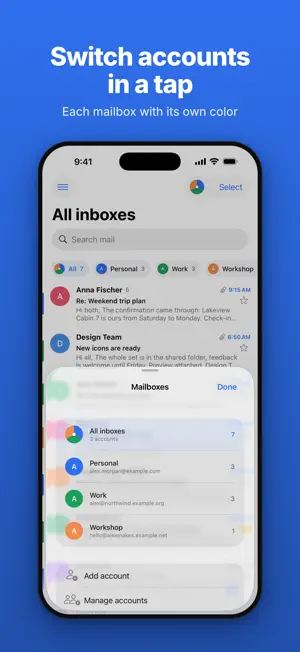
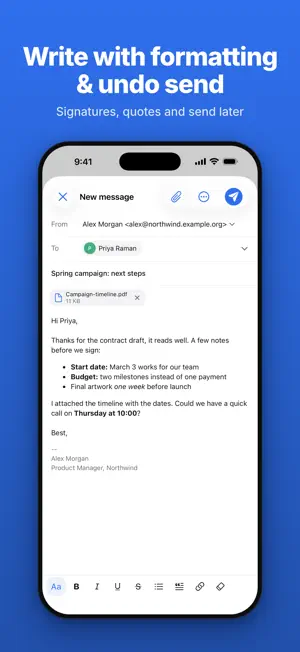
Mail is a clean, fast email app for all your mailboxes. Add Gmail, Yahoo, iCloud, Yandex, Mail.ru, GMX, Zoho, Fastmail or any other IMAP account and keep everything in one place, on iPhone and iPad. ALL YOUR MAILBOXES, ONE TAP APART • A combined inbox for every account, plus all unread and all starred mail • Switch accounts with the chips under the title, a tap on your avatar or the sidebar • Each account has its own color, so you always see where a message came from • Settings for your own domain are found automatically, also on Yandex 360, Google Workspace and other mail hosts • Switching keeps you in the same folder: from Sent to Sent, from Drafts to Drafts EVERYTHING YOU EXPECT FROM EMAIL • Conversations: replies are grouped with the original message • Archive, delete, mark as read, star, move or report spam for one message or many at once; every action can be undone • Sender photos from your contacts and Gravatar, company logos, and your own photo for each account • Folders, labels, archive, spam and trash, with all changes synced to the server • Search on your device and on the server at the same time • Attachments: preview with Quick Look, save to Files or share • Unsubscribe from newsletters in one tap WRITING • Bold, italic, underline, lists, quotes and links • Address suggestions from your contacts and past mail • Signatures and aliases for each account • Undo send and send later • Drafts sync with your mailbox on the server • A reminder when you mention an attachment but forget to add it • Share text, links, photos and files from other apps straight into a new message MADE FOR IPHONE AND IPAD • Home Screen and Lock Screen widgets with your unread count and latest mail • Find messages with Spotlight; the search index stays on your device • Unread count on the app icon • Three-column layout on iPad, with support for multiple windows • Mark as read, archive or delete right from a notification PRIVATE BY DESIGN • No ads, no analytics, no accounts with us • The app connects straight to your mail provider. Your mail never passes through our servers, because we don't have any • Remote images in messages are blocked until you allow them. Company logos next to senders are loaded from the companies' own websites; you can turn this off in Settings • Emails are shown without scripts, and links open in Safari • Passwords are kept in the iOS Keychain MAKE IT YOURS • System, light or dark theme, with an optional pure black background • 10 accent colors • Five text sizes, three list densities and up to three preview lines • Choose what happens after you delete a message • Dark mode for bright emails too • 10 languages: English, Russian, Ukrainian, German, Spanish, French, Italian, Portuguese, Polish and Turkish NEW MAIL • While the app is open, new mail arrives instantly (IMAP IDLE) • In the background, the app checks for mail as often as iOS allows, and notifies you about new messages • Notifications are grouped by account GOOD TO KNOW • Gmail, Yahoo, iCloud and some other providers need an app password; the app shows where to create one • Outlook.com, Hotmail and Live mailboxes are not supported yet: Microsoft no longer accepts passwords from mail apps • Works with standard IMAP and SMTP. Exchange ActiveSync and POP3 are not supported
What’s new
Version 1.0.2 · Updated November 23, 2026
What's new in 1.0.2: • If your server has no Trash or Spam folder and won't let the app create one, the app now asks whether to delete the message for good instead of quietly putting it back. • New Archive, Trash and Spam folders are created where your server keeps its folders. • Easier setup: settings for your own domain are found automatically, iCloud sending works, servers with separate certificates for incoming and outgoing mail are supported, and you can cancel the search at any time. • Signing in again keeps your server settings. • Clearer errors: network problems offer "Tap to try again", and a failed server search says so. • Reply buttons, the compose screen and message headers fit small screens and large text sizes. • Delete messages from the Outbox; clearing storage asks first. • Keyboard shortcuts on iPad. • Outlook.com, Hotmail and Live mailboxes are not supported yet; the app now says so clearly.
App privacy
The developer, Ian Kolesnik, reported these privacy practices to Apple.
Data Not Collected
The developer does not collect any data from this app.
Alternatives to Mail: All Your Inboxes
Looking for apps like Mail: All Your Inboxes? Here are 6 similar apps on the App Store. The highest rated is AI Keyboard : Type AI (4.6/5), and all 6 are free to download.
-
 FuryMail
-
 Italian Translator Offline!
3.7
-
 AppMare: AI App Builder
3.8
-
 AI Keyboard : Type AI
4.6
-
 Mail – Organized Email
3.7
-
 French - English : Translator
4.1
| App | Rating | Price | Last updated | Compare |
|---|---|---|---|---|
| Mail: All Your Inboxes | – | Free | November 23, 2026 | |
| FuryMail | – | Free | Nov 26, 2026 | Compare |
| Italian Translator Offline! | 3.7 / 5 (3) | Free | Jun 15, 2026 | Compare |
| AppMare: AI App Builder | 3.8 / 5 (6) | Free | Nov 23, 2026 | Compare |
| AI Keyboard : Type AI | 4.6 / 5 (204) | Free | Sep 22, 2024 | Compare |
| Mail – Organized Email | 3.7 / 5 (7) | Free | Aug 6, 2024 | Compare |
| French - English : Translator | 4.1 / 5 (38) | Free | Aug 13, 2026 | Compare |