

Pinggo: Who's On My WiFi
TideGlowDecor LLC Utilities iPhoneiPadiPod touch
Pinggo: Who's On My WiFi is a free Utilities app for iPhone and iPad by TideGlowDecor LLC. Requires iOS 17.0. Updated November 23, 2026.
- Price
- Free
- on the App Store
- Size
- 19 MB
- Age 4+
- Updated
- Nov 23
- 2026 · v1.1.0
Screenshots
Save to Pinterest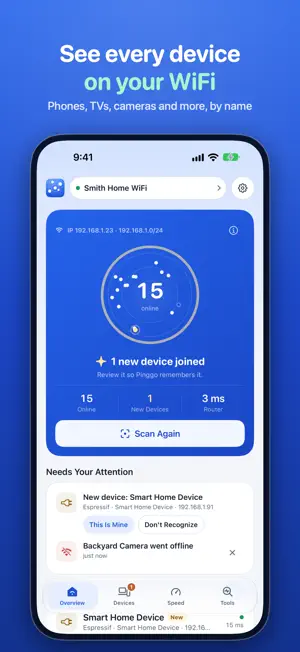


About Pinggo: Who's On My WiFi
Who's on your WiFi right now? Pinggo scans your home network and shows every phone, TV, camera, speaker and printer by name, so you can spot the one you don't recognize. When a device drops off, Pinggo doesn't just say "offline". It checks your WiFi, router, internet and the maker's cloud service step by step, then tells you in plain English what went wrong and what to try. Your scan data stays on your iPhone. No account needed. SEE EVERY DEVICE • Scan your WiFi and see phones, tablets, TVs, cameras, speakers, consoles, printers and smart-home gear • Devices are named from their own name, services and maker, not just an IP address • Keep a separate device list for each WiFi network you use SPOT UNKNOWN DEVICES • Mark the devices that are yours; anything new lands in "Needs Your Attention" • Not sure what a device is? Pinggo watches it while you unplug things and tells you the moment it drops off • Block a stranger: step-by-step instructions for your router brand, from eero and Xfinity to TP-Link Deco • Get a notification when a new device joins or one of yours leaves • See when each device was last online FIX "WHY IS IT OFFLINE?" • Step-by-step diagnosis for any device that stopped responding • Checks the router, internet, DNS and whether the maker's cloud service is reachable for 25 popular brands • A clear cause and the fixes to try, written for people who aren't network experts CHECK YOUR NETWORK • One-tap network check: router, internet and DNS response • Internet speed test with download, upload and ping, plus history and a trend chart • Router security check and a finder for cameras connected to your WiFi • Device security: flags risky open services such as Telnet or exposed admin pages • Pro tools: Ping, Traceroute, DNS lookup and Port scan ALWAYS AT HAND • Home Screen and Lock Screen widgets • Control Center controls and Siri Shortcuts • Live Activity while a speed test runs • Light and dark mode, 14 languages PRIVATE BY DESIGN Your device list, device names and history are stored only on your iPhone. The app goes online only for a speed test (run by Measurement Lab), tools you point at an address outside your home, a maker-cloud reachability check during diagnosis, and a small update check. Pinggo is free thanks to ads from Google AdMob. Ads are personalized only if you allow tracking, and your scan data is never shared. Please only scan networks you own or have permission to test. iOS does not let any app read other devices' MAC addresses, so Pinggo identifies devices by their name, services and maker instead. Questions or ideas? Write to [email protected]. We read every message. Terms of Use: https://www.apple.com/legal/internet-services/itunes/dev/stdeula/ Privacy Policy: https://pinggo-app.pages.dev/privacy
What’s new
Version 1.1.0 · Updated November 23, 2026
• What Is It? Find out which gadget an unknown device is. Pinggo watches it while you unplug things around the house and tells you the moment it drops off. • Block It: step-by-step blocking for your router (eero, Xfinity, Spectrum, Google Nest, AT&T, Verizon, TP-Link Deco and more), with a button that opens your router's app. • Camera Finder recognizes more cloud cameras, including Ring, Lorex and SimpliSafe. • Works on iOS 27. Still no account and no scan limits.
App privacy
The developer, TideGlowDecor LLC, reported these privacy practices to Apple.
Data Used to Track You
The following data may be used to track you across apps and websites owned by other companies:
- Location: Coarse Location
- Identifiers: Device ID
- Usage Data: Product Interaction, Advertising Data
Data Not Linked to You
The following data, which may be collected but is not linked to your identity, may be used for the following purposes:
- Location: Coarse Location
- Identifiers: Device ID
- Usage Data: Product Interaction, Advertising Data
- Diagnostics: Crash Data, Performance Data, Other Diagnostic Data
Used for: Third-Party Advertising, Analytics
Alternatives to Pinggo: Who's On My WiFi
Looking for apps like Pinggo: Who's On My WiFi? Here are 6 similar apps on the App Store. The highest rated is HostLens: WiFi Device Scanner (5.0/5), and all 6 are free to download.
-
 Universal TV Remote - Remoly
-
 Calculator: Cute, Date & Tip
-
 Calculator- scientific
-
 HostLens: WiFi Device Scanner
5.0
-
 Who is connected to My Wifi
4.0
-
 Remote Control for TV ‧
4.9
| App | Rating | Price | Last updated | Compare |
|---|---|---|---|---|
| Pinggo: Who's On My WiFi | – | Free | November 23, 2026 | |
| Universal TV Remote - Remoly | – | Free | Nov 25, 2026 | Compare |
| Calculator: Cute, Date & Tip | – | Free | Nov 3, 2026 | Compare |
| Calculator- scientific | – | Free | Jul 30, 2025 | Compare |
| HostLens: WiFi Device Scanner | 5.0 / 5 (2) | Free | Nov 23, 2026 | Compare |
| Who is connected to My Wifi | 4.0 / 5 (2) | Free | Oct 9, 2026 | Compare |
| Remote Control for TV ‧ | 4.9 / 5 (8) | Free | Jul 4, 2026 | Compare |