

RapidResponse ICS Field Guide
Steven Frischling Productivity iPhoneiPadiPod touchMac
RapidResponse ICS Field Guide is a free Productivity app for iPhone and iPad by Steven Frischling. Requires iOS 15.0. Updated November 23, 2026.
- Price
- Free
- on the App Store
- Size
- 14 MB
- Age 4+
- Updated
- Nov 23
- 2026 · v1.1
Screenshots
Save to Pinterest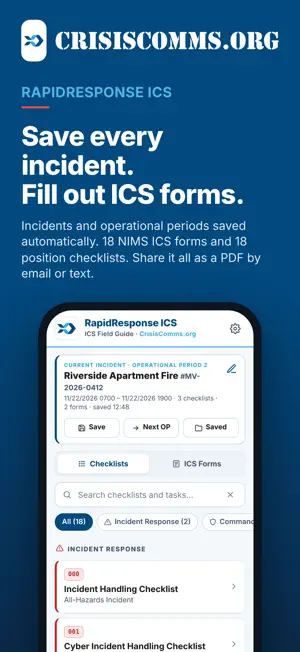


About RapidResponse ICS Field Guide
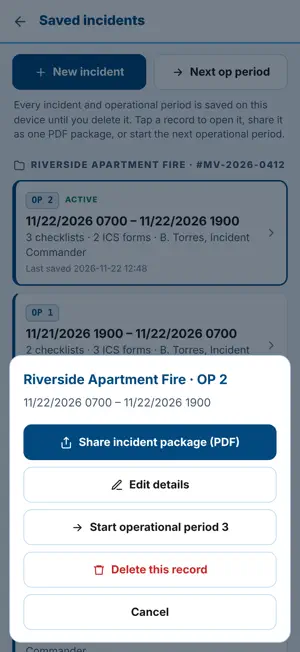
RapidResponse ICS puts the Incident Command System in your pocket: 18 ICS position checklists, 18 fillable NIMS ICS forms, and saved incident records you can share as one PDF. Work the position instead of hunting for the binder. Built by CrisisComms.org for incident commanders, command and general staff, EOC personnel, and anyone assigned an ICS role. SAVE EVERY INCIDENT AND OPERATIONAL PERIOD • Everything you enter is saved automatically to the current incident and operational period. Closing the app never erases your work. • Name the incident, add the incident number, set the operational period dates and times, and record who completed it. • Tap "Next OP" to start the next operational period. The previous one stays on file. • Saved incidents are grouped by incident. Reopen, edit or delete any record. • Share a full incident package as one PDF: a cover sheet, every checklist in progress and every completed ICS form. FILL OUT ICS FORMS ON YOUR PHONE • 18 standard NIMS ICS forms: 201, 202, 203, 204, 205, 205A, 206, 207, 208, 208HM, 209, 211, 213, 213RR, 214, 215, 215A and 221. • Tap any box on the form to type in it, or use the field list. Previous and Next buttons move you from field to field. • Incident name, incident number and operational period dates fill in for you. • Send the completed form as a PDF by email or text, or share a blank form to print. CHECK OFF TASKS RIGHT ON THE FORM Every checklist includes the CrisisComms.org PDF form. Tap any box printed on the form and the task is checked off. Prefer a list? Switch to Checklist view. Both views stay in sync. 18 CHECKLISTS, ORGANIZED THE WAY ICS IS • Incident Response: All-Hazards Incident Handling and Cyber Incident Handling for Executive Leadership • Command Staff: EOC Initial Response Actions, Incident Commander, Safety Officer, Public Information Officer, Liaison Officer • General Staff: Operations, Logistics, Planning, and Finance/Administration Section Chiefs, Operations Branch Director, Division/Group Supervisor • Unit Leaders & Specialists: Documentation, Communications, Staging Area Manager, Medical Unit Leader, Technical Specialists BUILT FOR THE FIELD • Works completely offline. Every checklist and form is stored on your device. • Each check records the time it was made. • Sub-tasks expand and collapse so long checklists stay readable. • Progress bars for every checklist and every section. • Search all 553 checklist tasks and all 18 ICS forms. • Pinch with two fingers to zoom in and move around any form or checklist. On iPad, forms fill the whole screen in landscape. • Light and dark mode. A RECORD YOU CAN HAND OFF • A completed checklist PDF with your check marks, the time of each action, and the incident details printed on the form • Completed ICS forms as PDFs, by email or text • A full incident package PDF for each operational period • A plain-text activity log for your ICS 214 PRIVATE BY DESIGN No account. No sign-in. No ads. No analytics. No tracking. Everything you enter stays on your device unless you choose to share it. ABOUT CRISISCOMMS.ORG CrisisComms.org provides crisis and strategic communications consulting, training, and crisis response. Bringing Order To The Chaos. These checklists and forms are reference aids based on standard ICS guidance. They do not replace your agency's plans, SOPs, training, or the direction of the Incident Commander.
What’s new
Version 1.1 · Updated November 23, 2026
• Saved incidents and operational periods: your work is saved automatically and stays on your device when you close the app. Start a new operational period with one tap, keep past ones on file, and reopen, edit or delete any record. • Share a full incident package as one PDF: cover sheet, checklists and completed ICS forms. • New ICS Forms tab with 18 standard NIMS ICS forms (201, 202, 203, 204, 205, 205A, 206, 207, 208, 208HM, 209, 211, 213, 213RR, 214, 215, 215A and 221). Fill them in on your phone, with incident details filled in for you, and send the completed form as a PDF by email or text. • Pinch to zoom: use two fingers to zoom in, zoom out and move around forms and checklists. On iPad, forms now fill the whole screen in landscape.
App privacy
The developer, Steven Frischling, reported these privacy practices to Apple.
Data Not Collected
The developer does not collect any data from this app.
Alternatives to RapidResponse ICS Field Guide
Looking for apps like RapidResponse ICS Field Guide? Here are 6 similar apps on the App Store. The highest rated is Incident Management Handbook (5.0/5), and all 6 are free to download.
-
 EM Field Companion
-
 CAD Reader - DWG & DXF Viewer
-
 Incident Management Handbook
5.0
-
 CERA
5.0
-
 Futurity Mobile
-
 INVENTORY - Salamander
4.7
| App | Rating | Price | Last updated | Compare |
|---|---|---|---|---|
| RapidResponse ICS Field Guide | – | Free | November 23, 2026 | |
| EM Field Companion | – | Free | Sep 15, 2026 | Compare |
| CAD Reader - DWG & DXF Viewer | – | Free | Nov 21, 2026 | Compare |
| Incident Management Handbook | 5.0 / 5 (3) | Free | Aug 25, 2026 | Compare |
| CERA | 5.0 / 5 (1) | Free | Mar 3, 2026 | Compare |
| Futurity Mobile | – | Free | Apr 13, 2026 | Compare |
| INVENTORY - Salamander | 4.7 / 5 (3) | Free | Mar 12, 2026 | Compare |