

Boyfriend Cam - Framing Coach
KUN YU HAN Photo & Video iPhoneiPadiPod touch
Boyfriend Cam - Framing Coach is a free Photo & Video app for iPhone and iPad by KUN YU HAN. Requires iOS 17.0. Updated November 23, 2026.
- Price
- Free
- on the App Store
- Size
- 9 MB
- Age 4+
- Updated
- Nov 23
- 2026 · v1.3
Screenshots
Save to Pinterest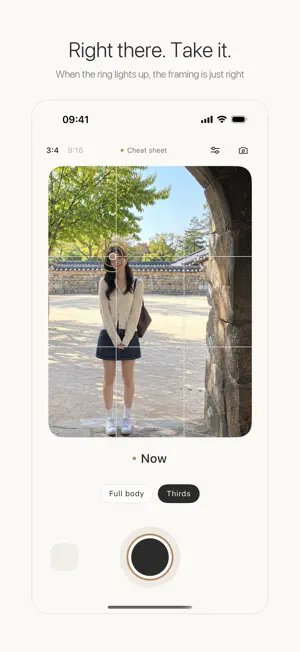


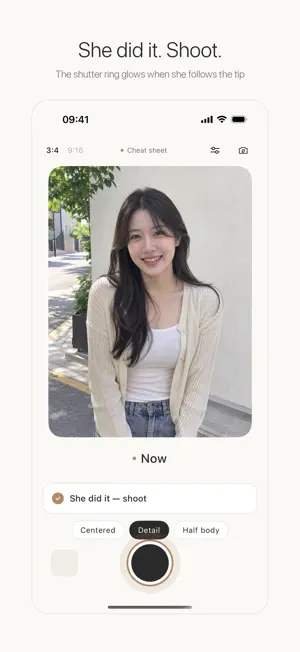
About Boyfriend Cam - Framing Coach
Taking her photo? Know exactly where to move. Boyfriend Cam opens straight to the camera and coaches you like a photographer at your side. A target ring and one short hint appear on screen. Move as it says, and when the dot lands in the ring, you'll see "Now." When to shoot is your call. It never takes the photo for you. ONLY THE COMPOSITIONS THAT FIT In Portrait mode the app knows 23 compositions, from thirds, full body and leading lines to symmetry, reflection and layers. It reads the scene in real time and shows at most 3 that fit the moment. OBJECT AND LANDSCAPE MODES Tap the mode button next to the shutter to switch between Portrait, Object and Landscape. These modes bring 18 guides, including level, horizon, reflection, leading lines, symmetry, frame, overhead cross, table edge, verticals and an angle scale. The app picks one for the scene, or tap your own. When the moment fits, a "Try this" idea suggests one quick move, like switching to 0.5× or clearing the clutter. Plus 12 filters with a strength slider, live as you frame. ONE LINE TELLS YOU HOW TO MOVE "Move left a little." "Lower the camera." "Take a step back." One short hint at a time. The things that ruin a photo come first: hold the phone straight, don't cut at the knees, leave room above her head. BAD LIGHT? IT TELLS YOU FIRST Backlight, half her face in shadow, harsh overhead sun, a face that's too bright, or just too dark: one line tells you where to move instead. When she's backlit, it brightens her face a little. SHOOT IT LIKE THIS She frames the shot she wants, taps to save it and hands you the phone. Line up with the see-through overlay of her frame, and when it matches, that's your moment. DINING MODE When you sit down to eat or have coffee, the tips switch to table shots: use 2× so her face looks slimmer, raise the phone to her eye level, or shoot the table from above. The cheat sheet follows suit. A CHEAT SHEET FOR WHAT TO SAY A line you can say to her as is: small, doable moves in six kinds — eyes, expression, head and face, hands, body, and movement. In selfie mode, the lines are written for you. PEOPLE, PETS AND OBJECTS The subject can be a person, a pet or an object; tap to switch. With pets, it reminds you to get down to their eye level. RECOMPOSE ANY PHOTO, EVEN FROM YOUR LIBRARY Turn a photo you've just taken, or one from your library, into another composition that fits, and save a new copy. Vertical photos: Original, 3:4, 4:5, 1:1 or 9:16. Horizontal photos also get 16:9 and 3:2. It only crops and never edits the picture; the original stays. ALSO - Works with the phone held upright or sideways - Interface in 11 languages, including English - Report a Problem right from Settings - No sign-up or login - For iPhone with iOS 17 or later FREE AND PRO Boyfriend Cam is free to download. The free version lets you take 3 photos a day with every feature included (shots and library photos both count); once they're used up, the shutter locks until midnight. Upgrade to Pro for unlimited photos. Two options: - Pro Lifetime: a one-time purchase that never renews. Family Sharing supported. - Pro Yearly: an auto-renewable subscription, billed once a year. New subscribers can try it free for 7 days, if eligible. Prices are shown in the App Store before you buy. Subscription terms: Payment is charged to your Apple Account when you confirm the purchase. The subscription renews automatically unless auto-renew is turned off at least 24 hours before the end of the current period, and renewal is charged within 24 hours before the period ends. If you don't cancel at least 24 hours before the free trial ends, you will be charged. Any unused portion of a free trial is forfeited when you purchase a subscription. You can manage or cancel your subscription anytime in Settings > [your name] > Subscriptions. Terms of Use (EULA): https://www.apple.com/legal/internet-services/itunes/dev/stdeula/ Privacy Policy: https://sona-orbit.github.io/boyfriend-cam/privacy/
What’s new
Version 1.3 · Updated November 23, 2026
What's new 1.3: - Object and Landscape modes: tap the button next to the shutter to cycle Portrait, Object and Landscape - 18 guides, like level, horizon, reflection, leading lines, overhead cross, table edge and an angle scale, picked for the scene or tapped by you - "Try this" ideas: at the right moment, a quick move such as changing zoom, moving or clearing the clutter - Pick the mode the app opens in from Settings - The composition guide adds pages for the Object and Landscape guides - 12 filters: tap the filter button left of the shutter to see them live, adjust the strength, or change the filter after the shot
App privacy
The developer, KUN YU HAN, reported these privacy practices to Apple.
Data Not Linked to You
The following data, which may be collected but is not linked to your identity, may be used for the following purposes:
- Contact Info: Email Address
- User Content: Customer Support
- Diagnostics: Other Diagnostic Data
Used for: App Functionality
Alternatives to Boyfriend Cam - Framing Coach
Looking for apps like Boyfriend Cam - Framing Coach? Here are 6 similar apps on the App Store.
-
 Stone智拍助手
-
 如画 Lumira
-
 CueCam Framing: Food & Pose
-
 KaiCam: Pose Camera & Remote
-
 Kawi: Pose Camera
-
 LensCue
| App | Rating | Price | Last updated | Compare |
|---|---|---|---|---|
| Boyfriend Cam - Framing Coach | – | Free | November 23, 2026 | |
| Stone智拍助手 | – | Free | May 18, 2026 | Compare |
| 如画 Lumira | – | 0.99 USD | Oct 8, 2026 | Compare |
| CueCam Framing: Food & Pose | – | 1.49 USD | Nov 9, 2026 | Compare |
| KaiCam: Pose Camera & Remote | – | Free | Nov 23, 2026 | Compare |
| Kawi: Pose Camera | – | Free | Nov 12, 2026 | Compare |
| LensCue | – | Free | Nov 12, 2026 | Compare |