

Merge Images: Overlay & Join
Adam Padusinski Photo & Video iPhoneiPadiPod touch
Merge Images: Overlay & Join is a free Photo & Video app for iPhone and iPad by Adam Padusinski. Requires iOS 17.0. Updated November 19, 2026.
- Price
- Free
- on the App Store
- Size
- 3 MB
- Age 4+
- Updated
- Nov 19
- 2026 · v1.1
Screenshots
Save to Pinterest


About Merge Images: Overlay & Join
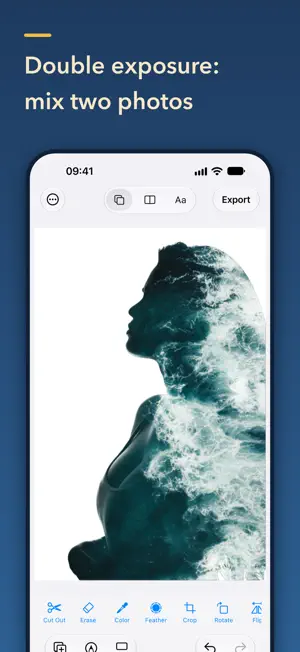
Merge Images puts photos together, right on your iPhone. Three modes cover the usual jobs: OVERLAY — one photo on another • Pick a base photo or start from a blank canvas in any size or color, even transparent. • Add photos on top, then move, resize, turn and flip them with your fingers. • Cut Out finds people, animals and objects in a photo and keeps just them, like lifting a subject in Photos. • Erase and restore by hand, remove a color like a green screen, soften the edges, change opacity or blur. • Crop, turn, mirror or blur the base photo, and remove unwanted things from it with a tap or a brush. • Draw rectangles, ellipses, arrows, lines and freehand strokes, or blur and pixelate a face or a license plate. • The result is saved at the full resolution of the base photo. JOIN — photos side by side • Put photos in a row, a column or a grid collage. • Crop to the smallest, shrink, enlarge or keep the original sizes. • Spacing, rounded corners and any background color. TEXT — captions and memes • Write on the photo or on a colored band above, below or around it. • Twelve fonts, bold and italic, outline, shadow, spacing, rotation and alignment. AND ALSO • Undo and redo for every change. • Continue in another mode: join photos, then caption the result, then place it on another photo. • Open photos straight from Photos or Files with the share sheet. • Add your own watermark to every export. • Save to Photos or share anywhere, as JPEG or PNG with transparency. PRIVATE BY DESIGN Everything runs on your device. There is no account, no ads, no tracking and no network access. The app only adds pictures to your library and never reads it; you choose photos with the system picker.
What’s new
Version 1.1 · Updated November 19, 2026
New in 1.1: • Double exposure: blend one photo into another with Screen, Multiply, Lighten and more, or only inside the people and objects of the base photo. • Background: fill everything around the people and objects of the base photo with white, black or any color. • Filters for photos and the base: Mono, Noir, Sepia, Chrome and more. • Stitch screenshots: scrolled screenshots join into one long image where they overlap. • Cut: take a stretch out of a row or column. • Gradient for a blank canvas: linear or radial, at any angle. • Compare your edits with the original photo. • Fixes and improvements.
App privacy
The developer, Adam Padusinski, reported these privacy practices to Apple.
Data Not Collected
The developer does not collect any data from this app.
Alternatives to Merge Images: Overlay & Join
Looking for apps like Merge Images: Overlay & Join? Here are 6 similar apps on the App Store. The highest rated is AI Photo Editor: Wonder Edit (5.0/5), and all 6 are free to download.
-
 ReadyCam
-
 TemPic: Pose & Overlay Camera
-
 Mepo9: AI Beauty Photo Editor
-
 AI Photo Editor: Wonder Edit
5.0
-
 Montio — AI Video Editor
-
 TwoShot - Dual Camera Record
| App | Rating | Price | Last updated | Compare |
|---|---|---|---|---|
| Merge Images: Overlay & Join | – | Free | November 19, 2026 | |
| ReadyCam | – | Free | Jun 5, 2026 | Compare |
| TemPic: Pose & Overlay Camera | – | Free | Nov 19, 2026 | Compare |
| Mepo9: AI Beauty Photo Editor | – | Free | Nov 11, 2026 | Compare |
| AI Photo Editor: Wonder Edit | 5.0 / 5 (2) | Free | Nov 25, 2026 | Compare |
| Montio — AI Video Editor | – | Free | Oct 10, 2026 | Compare |
| TwoShot - Dual Camera Record | – | Free | Nov 18, 2026 | Compare |