

ScreenNotes: Screenshot OCR
YURI KOTENIATKIN Productivity iPhoneiPadiPod touch
ScreenNotes: Screenshot OCR is a free Productivity app for iPhone and iPad by YURI KOTENIATKIN. Requires iOS 17.0. Updated November 16, 2026.
- Price
- Free
- on the App Store
- Size
- 1 MB
- Age 4+
- Updated
- Nov 16
- 2026 · v1.0
Screenshots
Save to Pinterest
About ScreenNotes: Screenshot OCR
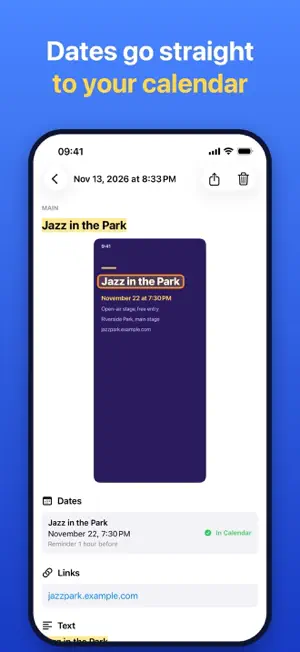
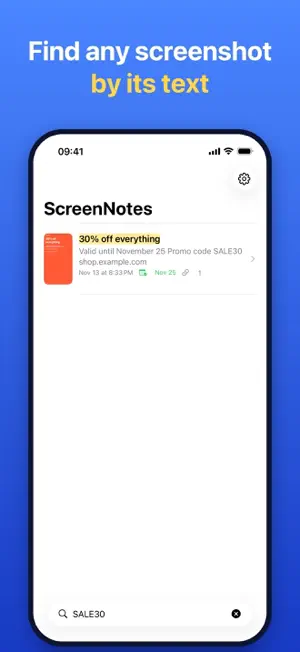
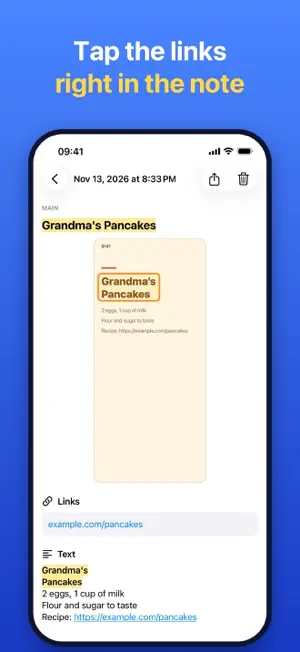
Take a screenshot — ScreenNotes turns it into a searchable note on its own. No buttons, no sharing, no copy-paste. SCREENSHOT → NOTE • Every new screenshot becomes a note automatically: right away while the app is open, and in the background too (iOS decides when to wake the app) • Text is recognized on your iPhone in dozens of languages, even several on one screen • The main text — the headline — is found and highlighted, so notes are easy to tell apart • The status bar (clock, battery) is left out • Optional notification when a note is created in the background DATES → CALENDAR • A future date on a screenshot — a concert, a deadline, a sale, a flight — becomes a calendar event with a reminder • Dates and times in many formats and languages: "Nov 20, 7 pm", "15.11 at 19:30", "du 15 au 17 novembre", "11月15日 19時" • Reminder 1 hour before, or at 9:00 the day before for all-day events • Prefer to decide yourself? Turn auto-adding off and add an event with one tap LINKS AND SEARCH • Links in the text become tappable • Search through the text of all your screenshots • Swipe to delete a note — the screenshot itself stays in Photos PRIVATE BY DESIGN • Recognition runs entirely on the device: no internet, no servers, no account • No ads, no tracking, no data collection • Only new screenshots, taken after you first open the app, are read COMPLETELY FREE Every feature is free — no subscriptions, no ads, nothing locked. If ScreenNotes saves you time, you can leave the developer an optional tip in Settings. It unlocks nothing; it is simply a thank-you.
App privacy
The developer, YURI KOTENIATKIN, reported these privacy practices to Apple.
Data Not Collected
The developer does not collect any data from this app.
Alternatives to ScreenNotes: Screenshot OCR
Looking for apps like ScreenNotes: Screenshot OCR? Here are 6 similar apps on the App Store. The highest rated is Moss: Email & Calendar, No AI (5.0/5), and 5 of the 6 are free to download.
-
 M+Fibra
-
 UgMeet
-
 AI Plagiarism Check PRO
-
 Moss: Email & Calendar, No AI
5.0
-
 Noteriv
-
 Zebra: Markdown Knowledge Base
5.0
| App | Rating | Price | Last updated | Compare |
|---|---|---|---|---|
| ScreenNotes: Screenshot OCR | – | Free | November 16, 2026 | |
| M+Fibra | – | Free | Nov 17, 2026 | Compare |
| UgMeet | – | Free | Nov 24, 2026 | Compare |
| AI Plagiarism Check PRO | – | 1.99 USD | Jul 24, 2026 | Compare |
| Moss: Email & Calendar, No AI | 5.0 / 5 (4) | Free | Nov 9, 2026 | Compare |
| Noteriv | – | Free | Nov 25, 2026 | Compare |
| Zebra: Markdown Knowledge Base | 5.0 / 5 (1) | Free | Nov 20, 2026 | Compare |