

Scrollcue: Teleprompter Video
Jiajie Xu Photo & Video iPhoneiPadiPod touch
Scrollcue: Teleprompter Video is a free Photo & Video app for iPhone and iPad by Jiajie Xu. Requires iOS 17.0. Updated November 29, 2026.
- Price
- Free
- on the App Store
- Size
- 2 MB
- Age 4+
- Updated
- Nov 29
- 2026 · v1.1
Screenshots
Save to Pinterest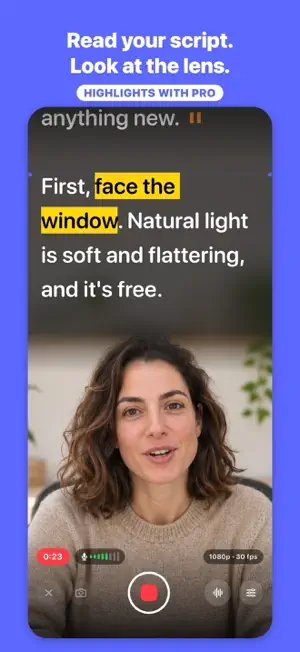


About Scrollcue: Teleprompter Video
Scrollcue puts your script right under the camera, so you can read every word and still look your viewer in the eye. RECORD WITH YOUR SCRIPT ON SCREEN • Your words scroll at the top of the screen, next to the front camera • Front or back camera, saved straight to Photos • iPhone and iPad, portrait and landscape • Plug in a wired, USB-C or Bluetooth microphone and Scrollcue uses it, with a live level meter A PROMPTER THAT KEEPS UP • Set the speed in words per minute and see how long your script will take • Tap to pause, drag to go back, one tap to start over • Countdown before you start • Text size, line spacing, margins, reading line and colors your way • Mirror mode (left-right or upside down) for beam-splitter teleprompter rigs SCROLLCUE PRO • Voice follow: the script scrolls as you speak and stops when you stop. Speech is recognized on your device, never uploaded • Floating prompter: your script stays on top while you use other apps • Unlimited scripts and recordings of any length (free: 3 scripts, 60 seconds) • 4K and 60 fps, grid lines, tap to focus and lock exposure • Bluetooth page-turners and keyboards: play, pause, speed and page • Bold, highlight and [pause] marks Pro is $19.99 a year, with a 7-day free trial for new subscribers, or $39.99 once for life. Prices may vary by country. ALL YOUR SCRIPTS IN ONE PLACE • Type, paste or import .txt, .md, .rtf and .pdf files • Word count and reading time for every script PRIVATE BY DESIGN • No account, no ads, no tracking • Scripts stay on your device The yearly plan renews automatically unless you turn it off at least 24 hours before the end of the period; manage or cancel it in your Apple Account settings. Payment is charged to your Apple Account. Terms of Use: https://www.apple.com/legal/internet-services/itunes/dev/stdeula/ Privacy Policy: https://kerfcalc.vercel.app/scrollcue/privacy.html
What’s new
Version 1.1 · Updated November 29, 2026
Scrollcue Pro is here. • Voice follow: the script scrolls as you speak and waits when you pause. Runs on your device, works offline • Floating prompter: your script stays on top while you use other apps • 4K and 60 fps recording, grid lines, tap to focus • Bluetooth page-turner and keyboard control • Bold, highlight and pause marks in your scripts Free: 3 scripts and 60-second recordings. Everyone who downloaded Scrollcue before 1.1 keeps unlimited scripts and recording length.
App privacy
The developer, Jiajie Xu, reported these privacy practices to Apple.
Data Not Collected
The developer does not collect any data from this app.
Alternatives to Scrollcue: Teleprompter Video
Looking for apps like Scrollcue: Teleprompter Video? Here are 6 similar apps on the App Store. The highest rated is Rolltake Teleprompter & Camera (4.9/5), and all 6 are free to download.
-
 Teleprompter - video
-
 Orate: Video Teleprompter
4.7
-
 Rolltake Teleprompter & Camera
4.9
-
 Teleprompter-Read script
4.6
-
 Teleprompter™
4.5
-
 PromptSmart+
4.5
| App | Rating | Price | Last updated | Compare |
|---|---|---|---|---|
| Scrollcue: Teleprompter Video | – | Free | November 29, 2026 | |
| Teleprompter - video | – | Free | Nov 20, 2026 | Compare |
| Orate: Video Teleprompter | 4.7 / 5 (3) | Free | Nov 20, 2026 | Compare |
| Rolltake Teleprompter & Camera | 4.9 / 5 (128) | Free | Nov 13, 2026 | Compare |
| Teleprompter-Read script | 4.6 / 5 (562) | Free | Jan 6, 2026 | Compare |
| Teleprompter™ | 4.5 / 5 (159) | Free | Aug 5, 2026 | Compare |
| PromptSmart+ | 4.5 / 5 (598) | Free | Nov 25, 2026 | Compare |