

Wakelift: Workout Alarm Clock
Amangeldy Baiserkeev Health & Fitness iPhoneiPadiPod touch
Wakelift: Workout Alarm Clock is a free Health & Fitness app for iPhone and iPad by Amangeldy Baiserkeev. Requires iOS 26.0. Updated November 23, 2026.
- Price
- Free
- on the App Store
- Size
- 59 MB
- Age 4+
- Updated
- Nov 23
- 2026 · v2.0
Screenshots
Save to Pinterest

About Wakelift: Workout Alarm Clock
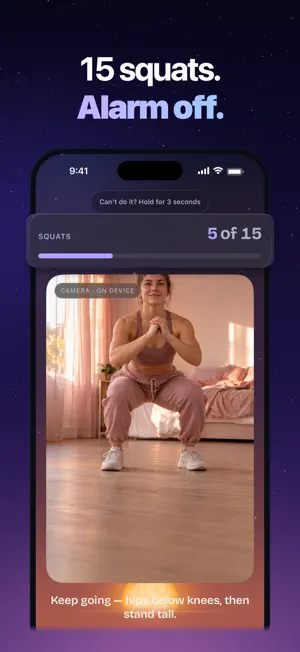
Wakelift is an alarm clock you turn off by getting up. When it rings, you finish a short task: squats or push-ups counted by your camera, a photo of your made bed checked by AI, a few steps, a math problem, or scanning a code you placed in another room. By the time it's quiet, you're already out of bed. Made for iPhone Duo too: unfold it and your alarms and morning summary spread across both halves of the screen. BUILT ON ALARMKIT Wakelift schedules its alarms with Apple's AlarmKit, the same system alarms iOS uses for the Clock app. They show on the Lock Screen and in the Dynamic Island, and the app doesn't have to stay open overnight. During onboarding you can set a test alarm 10 seconds ahead to hear it for yourself. HARD TO SNOOZE THROUGH iOS always shows a Stop button on an alarm. If you tap it without doing the task, Wakelift rings again a minute later, and keeps coming back for several minutes until the task is done. If you really can't do the task, hold the emergency button for 3 seconds and type the code shown on screen. It always works. WAKE-UP MISSIONS - Squats and Push-ups: the front camera counts each rep on your iPhone with Apple's Vision framework. Video is never recorded, stored or sent anywhere. - Steps: walk 10 to 200 steps. - Turn Over: flip your phone face down and back a few times. - Math: solve 1 to 10 problems on a big keypad. - Light Up: point the back camera at a lit room for a few seconds. - Scan Code: scan a barcode or QR code you chose, like your toothpaste in the bathroom. - Shake and Spin: shake the phone or turn around in a full circle. - AI Photo (Pro): photograph your made bed, a mug, the sky or the sink, and AI checks it. Sent only after you agree, not kept. Every mission has a Preview. YOUR MORNING - A good-morning screen with how long the task took and your streak of mornings. - A short morning note written on your device with Apple Intelligence where it's available, or a ready-made line where it isn't. - Optional: today's weather (Apple Weather) and up to three of today's calendar events. - A streak counter on the home screen and a countdown card to your next alarm. SOUNDS AND REMINDERS - Nine built-in alarm sounds from gentle to loud, Shuffle, or your own sound from Files. - Optional bedtime reminder, and a 9 PM reminder when nothing is set for tomorrow. FREE - Unlimited regular alarms without a mission. - One active mission alarm with Math, Squats (up to 15), Steps or Turn Over. - No ads, no account. Alarms sync through iCloud. WAKELIFT PRO - Unlimited mission alarms. - Push-ups, Light Up, Scan Code and AI Photo missions. - Weekly AI coach: a short look at your last seven mornings. - Squats up to 50 reps. - Wake-up check: a few minutes after the task, Wakelift asks if you're still up. No answer within a minute and the alarm rings again with a shorter task. Pro is available as a yearly subscription with a 7-day free trial ($39.99 per year after the trial), a monthly subscription ($6.99 per month), or a one-time lifetime purchase ($79.99). Prices are in US dollars and may differ in other countries. Payment is charged to your Apple Account when you confirm the purchase, or when the free trial ends. Subscriptions renew automatically unless turned off at least 24 hours before the end of the current period. Your account is charged for renewal within 24 hours before the period ends. You can manage or cancel subscriptions in your Apple Account settings after purchase. Any unused part of a free trial is forfeited when you buy a subscription. Physical missions are optional. Do them only if you can do them safely. Wakelift is not medical or fitness advice. Privacy Policy: https://cassianvire.com/wakelift/privacy/ Terms of Use: https://cassianvire.com/wakelift/terms/
What’s new
Version 2.0 · Updated November 23, 2026
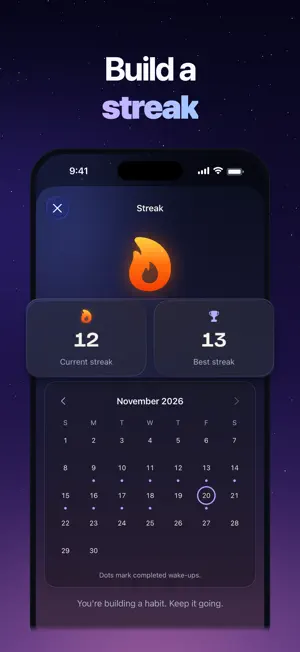
Wakelift 2.0 has a new look. - A night-sky design with glass panels - A live countdown to your next alarm on the main screen - A wake-up streak with a calendar of your mornings - Smoother missions and fixes
App privacy
The developer, Amangeldy Baiserkeev, reported these privacy practices to Apple.
Data Linked to You
The following data, which may be collected and linked to your identity, may be used for the following purposes:
- Purchases: Purchase History
- Identifiers: User ID, Device ID
- Usage Data: Product Interaction, Other Usage Data
- User Content: Photos or Videos
Used for: Analytics, Product Personalization, App Functionality
Data Not Linked to You
The following data, which may be collected but is not linked to your identity, may be used for the following purposes:
- Location: Coarse Location
Used for: App Functionality
Alternatives to Wakelift: Workout Alarm Clock
Looking for apps like Wakelift: Workout Alarm Clock? Here are 6 similar apps on the App Store. The highest rated is Mission Alarm Clock & Wake Up (5.0/5), and all 6 are free to download.
-
 WorkOut Alarm: Wake Up & Move
-
 Floorbell: Push-Up Alarm
-
 Unsnooze – Paid Snooze Alarm
-
 Mission Alarm Clock & Wake Up
5.0
-
 Impact protocol
4.7
-
 здоровьедетей.рус
| App | Rating | Price | Last updated | Compare |
|---|---|---|---|---|
| Wakelift: Workout Alarm Clock | – | Free | November 23, 2026 | |
| WorkOut Alarm: Wake Up & Move | – | Free | Nov 11, 2026 | Compare |
| Floorbell: Push-Up Alarm | – | Free | Nov 16, 2026 | Compare |
| Unsnooze – Paid Snooze Alarm | – | Free | Mar 5, 2026 | Compare |
| Mission Alarm Clock & Wake Up | 5.0 / 5 (7) | Free | May 14, 2026 | Compare |
| Impact protocol | 4.7 / 5 (32) | Free | Apr 20, 2026 | Compare |
| здоровьедетей.рус | – | Free | Nov 1, 2024 | Compare |