

Smart Home: Devices & Scenes
TVGSOFT LIMITED Lifestyle iPhoneiPadiPod touch
Smart Home: Devices & Scenes is a free Lifestyle app for iPhone and iPad by TVGSOFT LIMITED. Requires iOS 16.0. Updated November 17, 2026.
- Price
- Free
- on the App Store
- Size
- 188 MB
- Age 4+
- Updated
- Nov 17
- 2026 · v0.0.1
Screenshots
Save to Pinterest


About Smart Home: Devices & Scenes
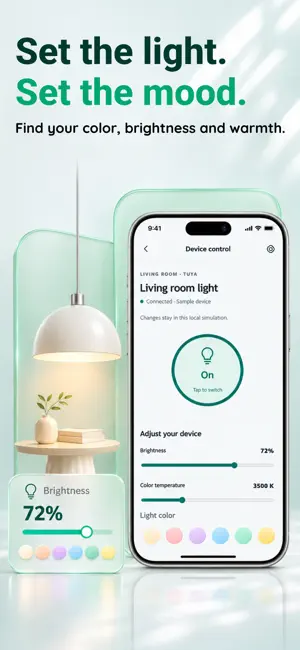
Turn down the lights, run your bedtime scene, and see how much energy a compatible plug uses. Smart Home brings your rooms and connected devices together in one place. Try a simulated demo home before you subscribe. Adding devices requires Smart Home Plus, a Smart Home account, and compatible hardware. CONTROL DEVICES BY ROOM Organize compatible lights, plugs, switches, fans, climate devices, and curtains by room. Keep favorites on the dashboard and adjust settings such as light brightness, color, or temperature when your device supports them. MAKE EVERYDAY ROUTINES EASIER Run a Good Morning or Good Night scene with a tap. Set schedules or countdown timers for supported devices. Create automations that respond to a time or a supported device event. SEE WHERE ENERGY GOES View energy use from compatible devices that report it, compare readings by device or room, and estimate electricity costs using your rate. CHECK DEVICE ACTIVITY Review supported device events and maintenance reminders, and choose which notification categories you want to receive. EXPLORE A DEMO HOME Try sample controls, scenes, and energy screens before connecting your own hardware. ASK YOUR HOME ASSISTANT Chat to check home status, control supported devices, or draft a scene for you to review. The assistant requires an internet connection, and usage limits may apply. Available controls, automations, readings, and notifications vary by model, setup, and connectivity. Some devices require a compatible hub. Energy costs are estimates. Some features require Smart Home Plus, and the free experience may show ads. SUBSCRIPTION & PURCHASE INFORMATION - Unlock premium features with subscription: weekly, monthly and yearly. - Payment will be charged to your iTunes Account at confirmation of purchase. - Subscription automatically renews unless auto-renew is turned off at least 24 hours before the end of the current period. - Account will be charged for renewal within 24 hours prior to the end of the current period. - You can manage or turn off auto-renew in your Apple ID Account Settings any time after purchase. Privacy Policy: https://tvgsoft.com/privacy-policy Terms of Service: https://tvgsoft.com/terms-of-service
App privacy
The developer, TVGSOFT LIMITED, reported these privacy practices to Apple.
Data Used to Track You
The following data may be used to track you across apps and websites owned by other companies:
- Identifiers: Device ID
Data Linked to You
The following data, which may be collected and linked to your identity, may be used for the following purposes:
- Identifiers: Device ID
Used for: Developer’s Advertising or Marketing
Data Not Linked to You
The following data, which may be collected but is not linked to your identity, may be used for the following purposes:
- Usage Data: Product Interaction
- Diagnostics: Crash Data, Performance Data
Used for: App Functionality
Alternatives to Smart Home: Devices & Scenes
Looking for apps like Smart Home: Devices & Scenes? Here are 6 similar apps on the App Store. The highest rated is PSL App by Face PSL (4.8/5), and all 6 are free to download.
-
 MMSCL Mobile
-
 Unisenza Plus
-
 PSL App by Face PSL
4.8
-
 Loud Alarm Clock - iAlarm
4.6
-
 Encounter Jesus
4.4
-
 wrkman
4.2
| App | Rating | Price | Last updated | Compare |
|---|---|---|---|---|
| Smart Home: Devices & Scenes | – | Free | November 17, 2026 | |
| MMSCL Mobile | – | Free | Jun 11, 2026 | Compare |
| Unisenza Plus | – | Free | Nov 27, 2026 | Compare |
| PSL App by Face PSL | 4.8 / 5 (93) | Free | Nov 25, 2026 | Compare |
| Loud Alarm Clock - iAlarm | 4.6 / 5 (222) | Free | Nov 17, 2026 | Compare |
| Encounter Jesus | 4.4 / 5 (14) | Free | Nov 20, 2026 | Compare |
| wrkman | 4.2 / 5 (35) | Free | Oct 6, 2026 | Compare |