

Kitchen Planner 3D: Cabinets
Gableworks Tech Inc. Lifestyle iPhoneiPadiPod touch
Kitchen Planner 3D: Cabinets is a free Lifestyle app for iPhone and iPad by Gableworks Tech Inc. Requires iOS 18.0. Updated November 18, 2026.
- Price
- Free
- on the App Store
- Size
- 8 MB
- Age 4+
- Updated
- Nov 18
- 2026 · v1.1
Screenshots
Save to Pinterest

About Kitchen Planner 3D: Cabinets
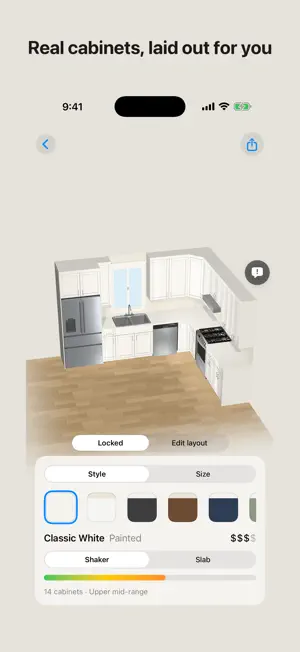
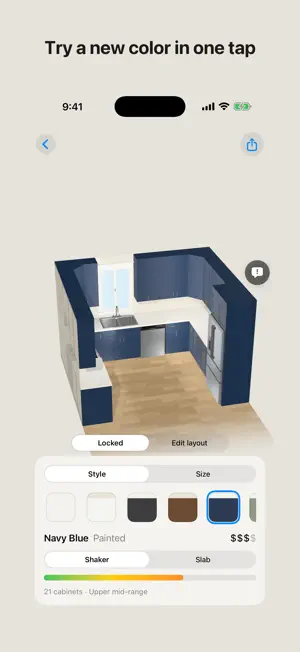
Plan your new kitchen in minutes, right on your phone. Choose the shape of your kitchen, set your wall lengths, and the cabinets lay themselves out for you: base cabinets, uppers, the sink under the window, room for the stove, dishwasher and fridge. Everything is in 3D, so you can walk around it, open the doors and pull out the drawers. MAKE IT YOURS - Drag the sink, stove, fridge, windows and doors along the walls; the cabinets rearrange around them - Tap any cabinet to change its type: drawers, doors, a trash pull-out and more - Put the dishwasher on either side of the sink - Uppers to the ceiling, or the shorter, simpler kind - Try different finishes: Classic White, Navy Blue, Sage Green, Warm Walnut, Natural Oak and more, each with a feel for how the price moves - Shaker or slab doors REAL CABINETS, NOT A PICTURE Every cabinet comes from the library of a working custom cabinet shop, built the way they are really built. What you see is a kitchen that can be made. SCAN YOUR ROOM On an iPhone Pro or iPad Pro, walk around the room and get its floor plan: every wall's length, the ceiling height, doors and windows, shared as a PDF. Turn the scan in 3D to see the whole space. SHARE IT Save a picture of your kitchen and send it to your family, your contractor or your cabinet maker. TELL US WHAT YOU NEED Tap the feedback button on any screen, circle what you mean and write a line. We read every one and reply.
What’s new
Version 1.1 · Updated November 18, 2026
Scan your room: on an iPhone Pro or iPad Pro, tap the ruler button, walk around the room and get its floor plan with every wall's length, the ceiling height, doors and windows. Share it as a PDF, or turn it in 3D.
App privacy
The developer, Gableworks Tech Inc., reported these privacy practices to Apple.
Data Linked to You
The following data, which may be collected and linked to your identity, may be used for the following purposes:
- Contact Info: Email Address, Name
- User Content: Customer Support, Other User Content
- Identifiers: User ID
- Diagnostics: Other Diagnostic Data
Used for: App Functionality
Data Not Linked to You
The following data, which may be collected but is not linked to your identity, may be used for the following purposes:
- Identifiers: Device ID
- Usage Data: Product Interaction
Used for: Analytics
Alternatives to Kitchen Planner 3D: Cabinets
Looking for apps like Kitchen Planner 3D: Cabinets? Here are 6 similar apps on the App Store. The highest rated is Kitchen Planner: 3D Design (5.0/5), and all 6 are free to download.
-
 Kitchen Planner: 3D Design
5.0
-
 Rochen
-
 Stoll 3D Kitchen Designer
-
 Kitchen Design: Home Remodel
3.1
-
 Gemini 3D Kitchen Designer
3.7
-
 Invaders Finder
5.0
| App | Rating | Price | Last updated | Compare |
|---|---|---|---|---|
| Kitchen Planner 3D: Cabinets | – | Free | November 18, 2026 | |
| Kitchen Planner: 3D Design | 5.0 / 5 (1) | Free | Nov 18, 2026 | Compare |
| Rochen | – | Free | Oct 5, 2026 | Compare |
| Stoll 3D Kitchen Designer | – | Free | Oct 24, 2026 | Compare |
| Kitchen Design: Home Remodel | 3.1 / 5 (7) | Free | Jun 6, 2026 | Compare |
| Gemini 3D Kitchen Designer | 3.7 / 5 (6) | Free | Nov 16, 2026 | Compare |
| Invaders Finder | 5.0 / 5 (6) | Free | Nov 22, 2026 | Compare |