

PhotoSweep: Swipe to Delete
MICHAEL ANDREW RUTA Photo & Video iPhoneiPadiPod touch
PhotoSweep: Swipe to Delete is a free Photo & Video app for iPhone and iPad by MICHAEL ANDREW RUTA. Requires iOS 26.0. Updated November 20, 2026.
- Price
- Free
- on the App Store
- Size
- 2 MB
- Age 4+
- Updated
- Nov 20
- 2026 · v1.9.0
Screenshots
Save to Pinterest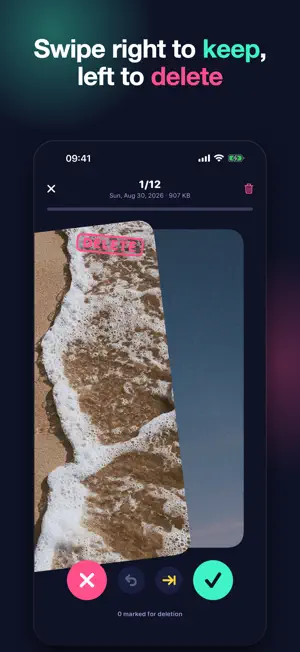


About PhotoSweep: Swipe to Delete
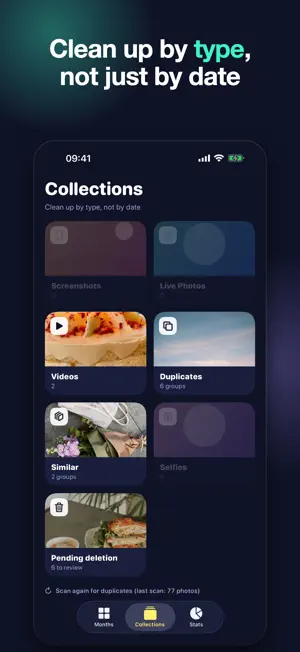
Clean up your camera roll, one swipe at a time. PhotoSweep makes tidying thousands of photos and videos quick, safe and even a bit fun. See one photo at a time: swipe right to keep it, swipe left to delete it. Made a mistake? Undo is always one tap away. SWIPE TO DECIDE - Big, beautiful cards: right to keep, left to delete - Undo any decision instantly - Videos and Live Photos play right on the card - Tap any photo to view it full screen and zoom in - Share a photo or video straight from the swipe screen TIDY MONTH BY MONTH - Work through your library in small, satisfying chunks - Progress rings show how far you've got in every month - "On this day" brings back memories from past years - Random mix gives you a surprise batch when you just want a quick clean COLLECTIONS - Jump straight to Screenshots, Live Photos, Videos and Selfies - Duplicates: identical photos grouped together - Similar: near-identical shots (bursts and retakes) grouped together - Open any group and keep only the best one SAFE BY DESIGN - Nothing is deleted until you review the list and confirm - Tap any photo on the review page to change your mind - Deleted photos go to Recently Deleted, so you have 30 days to get them back - Your progress is saved automatically PRIVATE AND FREE - Everything happens on your iPhone. Your photos are never uploaded - No account, no ads, no tracking - No subscriptions, no in-app purchases. Free, with nothing locked away SEE YOUR PROGRESS - Watch your streak grow and see how much space you've freed up PhotoSweep works with Full Access or Limited Access to your photos. Requires iOS 26 or later. Questions or ideas? Email [email protected].
What’s new
Version 1.9.0 · Updated November 20, 2026
Lots of new things in this update: • Skip button: not sure about a photo? Skip it and come back to it later. • Share now lives in the photo options, and full screen uses iOS's own viewers, so pinch-to-zoom works properly and videos keep playing from where you were. • Filter and sort your Months, Duplicates and Similar lists (hide finished ones, sort by size, number of items or date). • Duplicate and Similar groups have a thumbnail strip so you can see every photo before choosing. • Delete all: mark a whole set for deletion in one tap (you still review before anything is deleted). • New "Pending deletion" collection with everything you've marked. • Stats: a progress bar, a lifetime or since-last-reset view, and a reset option. • Photos stored in iCloud load more smoothly. • New sample photos in the intro, plus lots of polish and fixes.
App privacy
The developer, MICHAEL ANDREW RUTA, reported these privacy practices to Apple.
Data Not Collected
The developer does not collect any data from this app.
Alternatives to PhotoSweep: Swipe to Delete
Looking for apps like PhotoSweep: Swipe to Delete? Here are 6 similar apps on the App Store. The highest rated is Swiped: Photo & Video Cleaner (5.0/5), and all 6 are free to download.
-
 PicLumenAI - Photo Generator
-
 Max Photo Frames
-
 Photogenic
-
 Swiped: Photo & Video Cleaner
5.0
-
 Mirror For Chromecast App
3.9
-
 AudioFix: Video Volume Booster
4.1
| App | Rating | Price | Last updated | Compare |
|---|---|---|---|---|
| PhotoSweep: Swipe to Delete | – | Free | November 20, 2026 | |
| PicLumenAI - Photo Generator | – | Free | Nov 19, 2026 | Compare |
| Max Photo Frames | – | Free | Sep 24, 2026 | Compare |
| Photogenic | – | Free | Feb 3, 2025 | Compare |
| Swiped: Photo & Video Cleaner | 5.0 / 5 (5) | Free | Nov 2, 2026 | Compare |
| Mirror For Chromecast App | 3.9 / 5 (791) | Free | Jul 23, 2026 | Compare |
| AudioFix: Video Volume Booster | 4.1 / 5 (1,653) | Free | Sep 22, 2026 | Compare |