

Orametra: Overtime Tracker
THOMAS NOCK Productivity iPhoneiPadiPod touchApple Watch
Orametra: Overtime Tracker is a free Productivity app for iPhone and iPad by THOMAS NOCK. Requires iOS 16.4. Updated November 26, 2026.
- Price
- Free
- on the App Store
- Size
- 53 MB
- Age 4+
- Updated
- Nov 26
- 2026 · v1.0.3
Screenshots
Save to Pinterest


About Orametra: Overtime Tracker
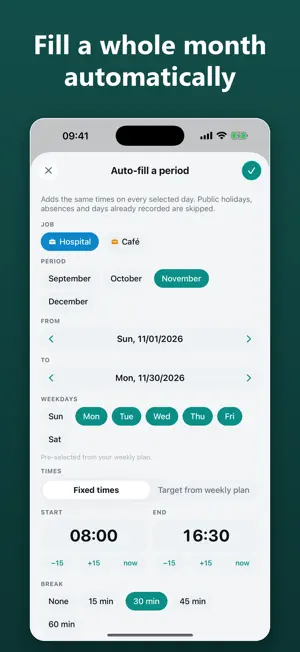
Orametra tracks your working hours and keeps your overtime balance – no account, no subscription. Your data stays on your iPhone. CLOCK IN AND OVERVIEW • Clock in, take a break and clock out with one tap – or add times later • Overtime balance (hours bank): plus and minus every day, with history • Scheduled hours per weekday; changes apply from a chosen date • Night shifts past midnight calculated correctly, including daylight saving time changes • Several jobs or employers, each with its own weekly schedule, hourly wage and hours balance • Mark and count work-from-home days • Statistics by week, month and year WIDGETS, APPLE WATCH, LOCATION • Home Screen widgets in three sizes, plus Lock Screen widgets (Orametra Pro) • Live Activity: your running shift on the Lock Screen (free) • Apple Watch app with complications: clock in, pause and clock out from your wrist • Optional clock in by location: when you arrive at or leave a workplace, Orametra asks you – or clocks you in and out automatically. Off by default; your location stays on your iPhone VACATION, SICK DAYS, HOLIDAYS • Vacation with remaining days, sick days and comp time – also for whole periods • Reduced-hours allowance (hours per year) and your own absence types • Public holidays offline for 246 countries and territories – with states, provinces and cantons (e.g. all US states, Canadian provinces, German states, Swiss cantons) PAY ESTIMATE • Optional hourly wage: estimate of what your overtime is worth • Premiums for night work, Saturdays, Sundays, public holidays and overtime (percent or fixed amount per hour) • Payslip check: compare paid hours with your own records EXPORT AND BACKUP • Timesheet PDF with signature line, checksum and change log • Spreadsheet for Excel (CSV) • Employer export: close the month, PDF with checksum, change log and signature fields, plus a CSV for payroll or Excel • Export your hours to your calendar • CSV import from other apps • Automatic daily backup on your iPhone, plus backup files for iCloud Drive EXTRAS • Reminders to clock in and out • Hints on rest periods and maximum weekly hours for selected countries (indicative only, can be turned off) • 12- or 24-hour clock, number format and currency follow your device • Languages: English, German, Italian, French, Spanish, Dutch, Polish, Portuguese (incl. Brazilian), Japanese, Korean PRICE Orametra is free – no time limit, no subscription. The Live Activity, location clock-in, premiums and earnings, import and CSV/PDF export are free too (PDF with a small “Created with Orametra” note). The free version shows ads: full-screen ads after clocking out, when opening Stats or Calendar and before an export – never when clocking in, never in the first 2 days, at most 3 a day – plus a small banner in Stats and Calendar. Optional: watch a video for 24 hours without ads. Orametra Pro (one-time in-app purchase, no subscription): ad-free, Apple Watch, widgets (Home and Lock Screen), multiple jobs, PDF with signature field and without the note. PRIVACY No account. Your entries (working hours, wage, places) stay on your iPhone unless you create a backup yourself, for example in iCloud Drive. Without a purchase, ads come from Google AdMob; personalised ads only with your consent, which you can change anytime in the app (More → Ad privacy settings). Google never receives your entries. IMPORTANT Orametra is a personal record for your own overview. It does not replace your employer’s official time recording. Hints on rest periods, maximum working time, overtime value and earnings are indicative only and are not legal or payroll advice. The PDF checksum only shows whether the table was changed afterwards.
What’s new
Version 1.0.3 · Updated November 26, 2026
• New: monthly target hours (e.g. 168 h per month) instead of only a weekly schedule • Improvements to ads and stability • Clearer purchase screen: the price loads reliably, the buy button stays at the bottom • New: estimated finish time (“Finish approx.”) in the ring and in the Live Activity on the Lock Screen • Fixed: the absence chart in Stats counted leave days wrongly • Better contrast and larger tap targets • Small fixes and improvements
App privacy
The developer, THOMAS NOCK, reported these privacy practices to Apple.
Data Used to Track You
The following data may be used to track you across apps and websites owned by other companies:
- Identifiers: Device ID
- Usage Data: Advertising Data
Data Not Linked to You
The following data, which may be collected but is not linked to your identity, may be used for the following purposes:
- Location: Coarse Location
- Identifiers: Device ID
- Usage Data: Product Interaction, Advertising Data
- Diagnostics: Crash Data, Performance Data
Used for: Third-Party Advertising, Analytics, App Functionality
Alternatives to Orametra: Overtime Tracker
Looking for apps like Orametra: Overtime Tracker? Here are 6 similar apps on the App Store.
-
 Shift & Pay: Work Hours
-
 Hiyoko Time Card: Pay & Hours
-
 勤怠カレンダー
-
 Monthly Calendar & Agenda
-
 Time Ledger: Time Tracker
-
 Tecsmart - Totem
| App | Rating | Price | Last updated | Compare |
|---|---|---|---|---|
| Orametra: Overtime Tracker | – | Free | November 26, 2026 | |
| Shift & Pay: Work Hours | – | Free | Sep 27, 2026 | Compare |
| Hiyoko Time Card: Pay & Hours | – | Free | Nov 23, 2026 | Compare |
| 勤怠カレンダー | – | Free | Nov 5, 2026 | Compare |
| Monthly Calendar & Agenda | – | Free | Oct 16, 2026 | Compare |
| Time Ledger: Time Tracker | – | Free | Nov 8, 2026 | Compare |
| Tecsmart - Totem | – | Free | Oct 22, 2026 | Compare |