

After Hours: AI DJ
Gabriel Stanek Music iPhoneiPadiPod touch
After Hours: AI DJ is a free Music app for iPhone and iPad by Gabriel Stanek. Rated 5.0/5 from 3 ratings. Requires iOS 15.1. Updated November 18, 2026.
- Rating
- 5.0
- 3 ratings
- Price
- Free
- on the App Store
- Size
- 525 MB
- Age 12+
- Updated
- Nov 18
- 2026 · v1.0.1
Screenshots


About After Hours: AI DJ
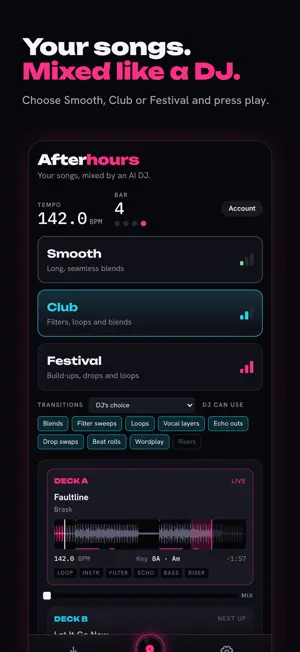
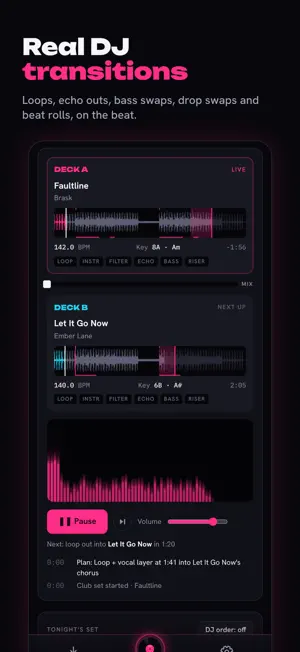
After Hours turns the music on your phone into a DJ set. Add your songs, choose a style and press play. After Hours works out every song's tempo, key, sections and energy, puts them in an order that flows, and mixes each one into the next on the beat, the way a club DJ would. REAL DJ TRANSITIONS • Loops, filter sweeps and EQ blends • Echo outs, bass swaps, drop swaps and beat rolls • Vocal layers that sing one song over the next one's beat • Wordplay: switches songs on a shared lyric THREE STYLES • Smooth: long, seamless blends • Club: filters, loops and quick, tight mixes • Festival: build-ups, drops and big moments SMART ORDER DJ order arranges your set by tempo, key and energy so every mix lands, and changes it up each time so it never feels the same. YOUR LIBRARY, YOUR WAY Add MP3, M4A, WAV, FLAC or OGG files one at a time, or import a whole ZIP of songs at once. Song titles and artists come from your files' tags. PRIVATE BY DESIGN Your music stays on your device. Mixing and stem separation happen on your iPhone, and nothing is uploaded. An account is optional. Note: After Hours mixes music files you have on your device. Songs from streaming services can't be used, because those services don't allow other apps to mix their songs.
What’s new
Version 1.0.1 · Updated November 18, 2026
• New welcome screen: sign up with email, Apple or Google, or skip • Drag songs by the grip to reorder your set • DJ order now arranges your set as soon as you open the app • Importing the same song twice is skipped automatically • Song names are cleaned up ("(Official Audio)", "(Lyrics)" and similar are removed) • A simpler, cleaner set list • Wordplay is only offered where it actually fits • Lock screen shows the song, artist and your place in the set • Faster ordering for big libraries • Rate After Hours from Settings • Small layout fixes
App privacy
The developer, Gabriel Stanek, reported these privacy practices to Apple.
Data Linked to You
The following data, which may be collected and linked to your identity, may be used for the following purposes:
- Contact Info: Email Address
- Identifiers: User ID
- Usage Data: Product Interaction
- Diagnostics: Other Diagnostic Data
Used for: Developer’s Advertising or Marketing, Analytics, App Functionality
Alternatives to After Hours: AI DJ
Looking for apps like After Hours: AI DJ? Here are 6 similar apps on the App Store. The highest rated is Onda by Mola (5.0/5), and all 6 are free to download.
-
 Repeat - My Music Play Count
-
 Starflight DJ: Auto DJ Player
-
 Onda by Mola
5.0
-
 Not That Random
-
 b2b: AI DJ partner & auto mix
-
 Cue the Music Man
5.0
| App | Rating | Price | Last updated | Compare |
|---|---|---|---|---|
| After Hours: AI DJ | 5.0 / 5 (3 ratings) | Free | November 18, 2026 | |
| Repeat - My Music Play Count | – | Free | Nov 10, 2026 | Compare |
| Starflight DJ: Auto DJ Player | – | Free | Nov 15, 2026 | Compare |
| Onda by Mola | 5.0 / 5 (4) | Free | Nov 15, 2026 | Compare |
| Not That Random | – | Free | Mar 5, 2024 | Compare |
| b2b: AI DJ partner & auto mix | – | Free | Nov 16, 2026 | Compare |
| Cue the Music Man | 5.0 / 5 (1) | Free | Oct 10, 2026 | Compare |
Compare After Hours: AI DJ with the top alternatives: ratings, updates, ASO score and keyword gaps →