

Penglide: Notes, PDF, Tutoring
Ismail Ozkan Productivity iPhoneiPadiPod touch
Penglide: Notes, PDF, Tutoring is a free Productivity app for iPhone and iPad by Ismail Ozkan. Requires iOS 15.0. Updated November 19, 2026.
- Price
- Free
- on the App Store
- Size
- 119 MB
- Age 4+
- Updated
- Nov 19
- 2026 · v1.4.0
Screenshots
Save to Pinterest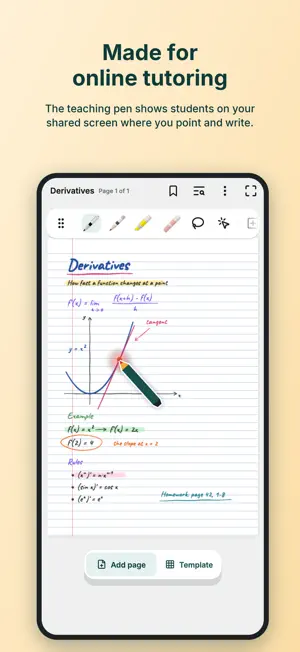


About Penglide: Notes, PDF, Tutoring
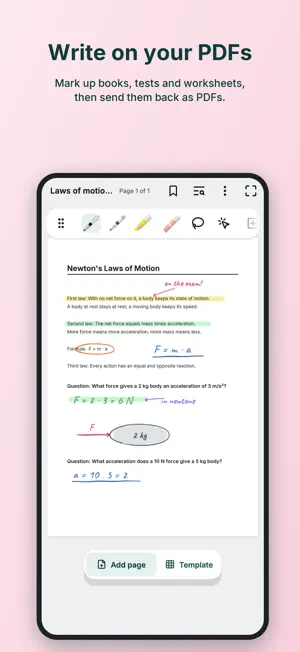
Penglide is a notebook app for handwritten notes, PDF annotation and online tutoring. It was designed with private tutors in mind: prepare your lesson, share your screen and teach with your pen. A PEN POINTER FOR ONLINE TUTORS When you teach over screen sharing, students cannot see your hand or your pen. Penglide's teaching pen (pen pointer) was made for exactly that. • A pen-shaped pointer follows your stylus or finger on the page. Students watching your screen see where you point and where you write. • A soft ring shows under the tip while you write, so attention goes to the right place. • Laser pointer: leaves a short-lived trail where you point and keeps the page clean. You choose how long it stays. • Lesson timer: ready-made lengths or your own. • An infinite canvas, like a whiteboard: teach on endless space. • Study tape: cover an answer, tap to reveal it. HANDWRITTEN NOTES • 17 pens and brushes: ballpoint, fountain pen, pencil, highlighter, calligraphy, watercolour and more. • Eraser, lasso select, move, rotate and resize. • Lined, grid, dotted, music and many other page templates. Save your own, too. • Geometric shapes, layers, text boxes, images and tables. • A digital notebook or an infinite canvas: pick what suits the lesson. PDF ANNOTATOR • Import PDFs and write on books, tests and worksheets. • Expand the margins to make room for your notes. • Export PDFs that keep their text selectable and send them to students. STAY ORGANISED • Coloured folders, tags, favourites and trash. • Search titles, typed text, PDF content and, if you turn it on, your handwriting (read on the device). • Voice notes that play back with your writing. PRIVACY • No account needed, works offline. • No ads, no tracking. • We have no servers and your notes never reach us. • Encrypted notebooks and locked notes. Penglide is designed for tablets and also runs on iPhone. For private tutors, students and anyone who takes handwritten notes: get Penglide and prepare your first lesson.
What’s new
Version 1.4.0 · Updated November 19, 2026
Favourites bar: keep the lasso, shapes, eraser, add page and other tools beside your pens, and drag them into your own order (long press → Rearrange). New notebooks and new pages now start with the template picker. Pick any colour from a spectrum of all colours. Plainer wording for the handwriting search setting.
App privacy
The developer, Ismail Ozkan, reported these privacy practices to Apple.
Data Not Linked to You
The following data, which may be collected but is not linked to your identity, may be used for the following purposes:
- User Content: Other User Content
- Identifiers: Device ID
- Usage Data: Product Interaction
- Diagnostics: Performance Data, Other Diagnostic Data
- Other Data: Other Data Types
Used for: Analytics, App Functionality
Alternatives to Penglide: Notes, PDF, Tutoring
Looking for apps like Penglide: Notes, PDF, Tutoring? Here are 6 similar apps on the App Store. The highest rated is SigmaNote (5.0/5), and all 6 are free to download.
-
 WhiteboardGenie: STEM Notes
-
 Draw – Native Whiteboard
-
 MindVault AI
-
 Constellation: Mind Atlas
-
 Mapable: AI Notes & Journal
-
 SigmaNote
5.0
| App | Rating | Price | Last updated | Compare |
|---|---|---|---|---|
| Penglide: Notes, PDF, Tutoring | – | Free | November 19, 2026 | |
| WhiteboardGenie: STEM Notes | – | Free | Nov 9, 2026 | Compare |
| Draw – Native Whiteboard | – | Free | Nov 11, 2026 | Compare |
| MindVault AI | – | Free | Mar 4, 2026 | Compare |
| Constellation: Mind Atlas | – | Free | Oct 24, 2026 | Compare |
| Mapable: AI Notes & Journal | – | Free | Oct 19, 2026 | Compare |
| SigmaNote | 5.0 / 5 (1) | Free | Jan 8, 2026 | Compare |