

Play That Back
Storytailor Inc. Photo & Video iPhoneiPadiPod touch
Play That Back is a free Photo & Video app for iPhone and iPad by Storytailor Inc. Rated 5.0/5 from 1 ratings. Requires iOS 26.0. Updated November 24, 2026.
- Rating
- 5.0
- 1 ratings
- Price
- Free
- on the App Store
- Size
- 78 MB
- Age 4+
- Updated
- Nov 24
- 2026 · v1.0.3
Screenshots
Save to Pinterest

About Play That Back
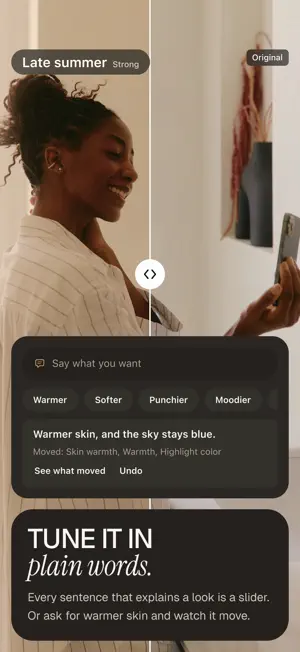
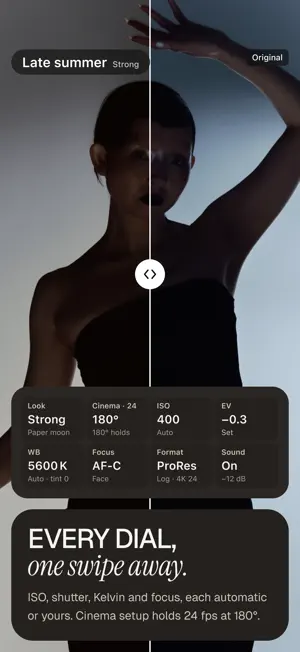
Play That Back is a pro camera built around your look. Choose one, see it live as you shoot, and keep a clean original alongside your graded shot. SEVENTEEN HOUSE LOOKS Original looks, each made for skin and light. Natural, Paper moon, Soft negative and Silver are free; Plus opens thirteen more, from Postcard and Harbor to City neon and Blue hour. Highlights roll off gently, faces stay natural, and every look is tuned for your iPhone's footage, Apple Log included. Tap Make it yours to save a copy you can change. A CAMERA THAT SHOOTS GRADED • ISO, shutter, Kelvin, tint, focus and exposure, each one manual or automatic • Waveform, vectorscope and histogram, plus false color, zebras and focus peaking • HDR, Apple Log and ProRes, where your iPhone records them • Camera Control: change the look and its strength while you shoot • Tap the ratio to choose a saved crop for photos or video. Frame with guides, a grid and a level. • Keep Original is on by default. Save the full-frame original alongside your cropped shot. CINEMA SETUP FOR VIDEO One switch in Video settings sets up the 24 fps look: 24 fps at a 180° shutter (25 fps on 50 Hz power), with an ND meter that tells you how many stops to add. With Plus it also turns off Apple's extra processing where iOS allows and adds bloom and grain as their own effects, never baked into a look. Nothing covers the picture: the shutter reading shows the setup. MAKE ANY LOOK YOURS Learn a look from 6 to 12 photos you've already edited in Photos. It happens on your iPhone or iPad, and nothing is uploaded. Every look is explained in plain sentences, and each sentence is a slider. Or just ask for "warmer skin" and see what moved. With Plus, shape it with curves and color wheels, or start from scratch. Each editing session is saved as a version you can go back to. TEST IT BEFORE YOU SHOOT The test strip runs your look across skin, sky and shadow and marks where it breaks. Plus fixes it in one tap. BRING YOUR OWN LUTS Import any 3D .cube file. Play That Back works out what footage it was made for, Apple Log or normal video, asks only when it isn't sure, and warns you in the camera when a look is on the wrong footage. Looks you make or learn can be shared as .cube for your editor. CHECK BEFORE POSTING, MATCH ON SET Check before posting shows what an app's compression and crop will do to a take before you post it. Free previews one app; Plus checks every app and makes a version that holds up. With Plus, Match on set compares your scene with a reference you love and tells you what to change, in plain words. IPHONE, IPAD AND IPHONE DUO Each one has its own layout. On iPad the picture sits beside the editor. On iPhone Duo, the outer screen shows your look live. Subject assist can guide groups into frame and show a countdown for a hands-free solo photo. ON A MAC Play That Back for Mac is its own app. Connect its library folder in iCloud Drive and the looks you make on your Mac come to your iPhone and iPad. If you own the Mac app, your license email unlocks Plus here. FREE, AND PLUS ONCE Free has the pro camera controls, four house looks, two learned looks, the plain-words editor, the test strip, .cube import, Check for one app, and 24 fps at 180° with the ND meter. Plus is one purchase, not a subscription, and Family Sharing shares it: all seventeen house looks and copies you can change, unlimited learned looks, curves and wheels, one-tap fixes, the full Cinema setup, Natural processing for photos, Match on set, Check on every app, and full Recipes from a video you have.
What’s new
Version 1.0.3 · Updated November 24, 2026
Ten bold new looks in Plus, from Cinema to Neon: color that goes all the way, with skin kept true. Subject assist on iPhone Duo gives groups visible framing cues. For a solo photo, the front screen shows the ready countdown and confirms when the photo is taken. Shots opens directly into your photo or video. Pinch to zoom, or open Details for the graded and original versions, shot information, and sharing. App Settings is available from Camera, Looks, Shots, and References. Onboarding now fits the Duo’s open and closed displays.
App privacy
The developer, Storytailor Inc., reported these privacy practices to Apple.
Data Linked to You
The following data, which may be collected and linked to your identity, may be used for the following purposes:
- Contact Info: Email Address
- Identifiers: Device ID
Used for: App Functionality
Alternatives to Play That Back
Looking for apps like Play That Back? Here are 6 similar apps on the App Store. The highest rated is FilmFridge (5.0/5), and 5 of the 6 are free to download.
-
 FilmFridge
5.0
-
 Remjet – Photo & Video Editor
5.0
-
 LUMENKORN
-
 HyperCam: Lightning Camera
5.0
-
 oblivious — vlog maker
-
 Dual Camera Recorder - DuoRec
| App | Rating | Price | Last updated | Compare |
|---|---|---|---|---|
| Play That Back | 5.0 / 5 (1 rating) | Free | November 24, 2026 | |
| FilmFridge | 5.0 / 5 (3) | 4.99 USD | May 1, 2026 | Compare |
| Remjet – Photo & Video Editor | 5.0 / 5 (1) | Free | Nov 17, 2026 | Compare |
| LUMENKORN | – | Free | Sep 15, 2026 | Compare |
| HyperCam: Lightning Camera | 5.0 / 5 (1) | Free | Nov 17, 2026 | Compare |
| oblivious — vlog maker | – | Free | Nov 10, 2026 | Compare |
| Dual Camera Recorder - DuoRec | – | Free | Sep 18, 2026 | Compare |
Compare Play That Back with the top alternatives: ratings, updates, ASO score and keyword gaps →