

WeldCanvas: Welding Plans
EZ Live productions Productivity iPhoneiPadiPod touch
WeldCanvas: Welding Plans is a free Productivity app for iPhone and iPad by EZ Live productions. Requires iOS 15.0. Updated November 18, 2026.
- Price
- Free
- on the App Store
- Size
- 18 MB
- Age 4+
- Updated
- Nov 18
- 2026 · v1.1
Screenshots
Save to Pinterest

About WeldCanvas: Welding Plans
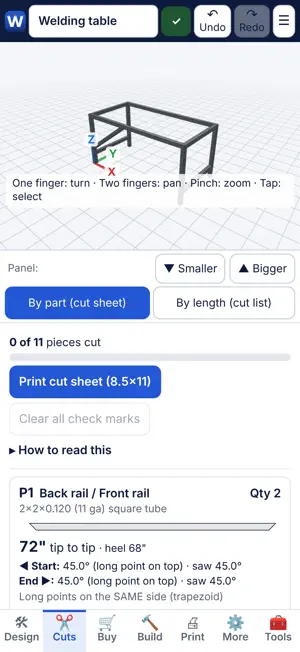
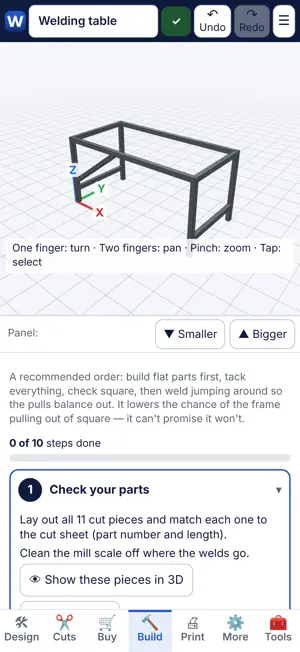
WeldCanvas turns a steel project into a cut list you can take to the saw. Pick one of 195 ready-made plans — welding tables, carts, racks, gates, trailers, sheds, BBQ pits, horse and barn gear — or draw your own from real tube, angle, and flat bar in 3D. Change a size and every connected piece follows. **DESIGN IT** - Draw pieces of real steel: square and rectangular tube, round tube, pipe, angle, channel, and flat bar - Snap ends together, set exact lengths, and mirror, copy, or move pieces - Add sheet and plate tops, shelves, deck boards, and metal roof panels - Undo and redo everything **CUT IT** - A printable cut sheet: every piece drawn to scale with its tip-to-tip length, long point, short point, and the number to set on your saw - A shopping list and a cutting plan that gets every piece from the fewest sticks, with your saw's kerf - Mark pieces off as you cut them **WELD IT** - Build steps in a sensible order: what to tack first, how to check square with the diagonal numbers, and a weld order that keeps it straight - Handy shop tools: wire and rod calculator, unit converter, cost estimate, scrap tracker - "Will it float?" check for the steel boat plans **WORKS WHERE YOU WORK** - Everything works offline in the garage, barn, or field - Free account (optional) keeps your projects in sync across iPhone, iPad, and the website - Share a project you drew with a friend — they tap the file and it opens **PLANS** 32 plans are free. The rest are sold one at a time — no subscription. Bought plans are yours to keep and restore on any device. **IMPORTANT** WeldCanvas is a planning tool, not engineering. Plans are computer-generated models with no guarantees. Check every measurement before you cut, and have a qualified engineer check anything that carries people, animals or loads, is towed, or floats. Terms of Use: https://weldcanvas.com/terms/ Privacy Policy: https://weldcanvas.com/privacy/
What’s new
Version 1.1 · Updated November 18, 2026
• Hundreds more steel sizes: square, rectangular and round tube, pipe, angle, flat bar, solid round and square bar, rebar, channel, I-beam, and C and Z purlins • New size picker: pick Shape, then Size, then Wall • Custom size: type in your own steel size when it's not on the list • New Schematics view: a to-scale drawing of each assembly with every piece labeled, a parts list, and the corner-to-corner check for square. Print it on 8.5×11 • Printouts now show the steel size and the date printed at the top of every page • Long project names no longer run off printed pages • Fixes and improvements
App privacy
The developer, EZ Live productions, reported these privacy practices to Apple.
Data Linked to You
The following data, which may be collected and linked to your identity, may be used for the following purposes:
- Purchases: Purchase History
- Contact Info: Email Address
- User Content: Other User Content
- Identifiers: User ID
Used for: App Functionality
Alternatives to WeldCanvas: Welding Plans
Looking for apps like WeldCanvas: Welding Plans? Here are 6 similar apps on the App Store. The highest rated is Pocket Welder Helper (5.0/5), and 5 of the 6 are free to download.


| App | Rating | Price | Last updated | Compare |
|---|---|---|---|---|
| WeldCanvas: Welding Plans | – | Free | November 18, 2026 | |
| PocketCAD | – | Free | Nov 18, 2026 | Compare |
| TrueDim | – | Free | Nov 24, 2026 | Compare |
| Fabrication Layout | 1.0 / 5 (1) | 7.99 USD | Aug 15, 2026 | Compare |
| eProtokol | – | Free | Nov 23, 2026 | Compare |
| Pocket Welder Helper | 5.0 / 5 (1) | Free | Aug 25, 2026 | Compare |
| Cookie Tally | 3.5 / 5 (20) | Free | Feb 2, 2026 | Compare |