

Iris Pro Camera
Ibrahim Shawkey Photo & Video iPhoneiPadiPod touch
Iris Pro Camera is a free Photo & Video app for iPhone and iPad by Ibrahim Shawkey. Requires iOS 26.0. Updated November 8, 2026.
- Price
- Free
- on the App Store
- Size
- 5 MB
- Age 4+
- Updated
- Nov 8
- 2026 · v1.0.0
Screenshots
Save to Pinterest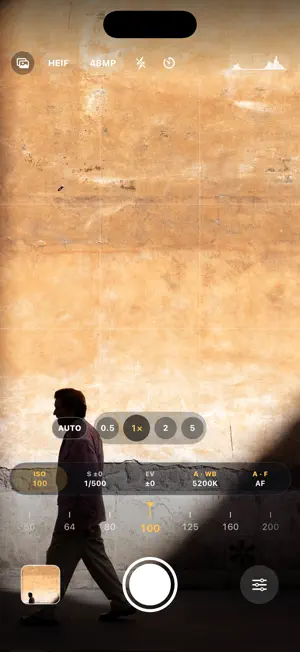


About Iris Pro Camera
Iris is a manual stills camera for iPhone. Take the exposure into your own hands, or let Iris handle it and step in only where you want to. FULL MANUAL CONTROL • ISO, shutter speed, exposure compensation, white balance and focus, each with its own scale. • Slide a control to go manual. Tap AUTO, hold the control, or use Reset to Auto to hand it back. • Shoot HEIF, JPEG, RAW or ProRAW (on iPhones that support it). • AE/AF lock, self-timer, burst, flash and every lens your iPhone has, with pinch or Camera Control zoom. THREE WAYS TO SHOOT • Simple: one exposure bar above the shutter; tap a value and its scale opens. • Dials: ISO and shutter on corner dials, exposure on a ring around the shutter, focus on a ring under the viewfinder. • Meters: scales along the edges of the viewfinder with a live exposure meter. SEE WHAT YOU GET • Focus magnifier at 3×, 5× or 10×, focus peaking and zebras. • Live histogram, grid and level. LONG EXPOSURES • Bulb mode stacks frames while you hold the shutter: add for light, average for smooth water, or light trails. LOOKS AND PRESETS • Color looks with a live preview: vivid, mono, noir, sepia, warm, cool, fade or your own. • Save a whole camera setup as a preset and load it next time the light is the same. Share color looks as files. YOUR GALLERY • Every shot in Iris's gallery and in your Photos library, or the album you pick. • Day sections, quick filters, detailed filters, favorites and multi-select. • Zoom, share, see the photo's settings, save a copy, or delete. QUICK TO OPEN • Open Iris from the Lock Screen or Control Center. PRIVATE BY DESIGN • Your photos stay on your iPhone. They are never uploaded. • No account needed. Sharing usage statistics is your choice, and it's off until you turn it on. • Saving the location into photos is off by default.
App privacy
The developer, Ibrahim Shawkey, reported these privacy practices to Apple.
Data Linked to You
The following data, which may be collected and linked to your identity, may be used for the following purposes:
- Location: Coarse Location
- Identifiers: User ID, Device ID
- Usage Data: Product Interaction
- Diagnostics: Crash Data, Performance Data, Other Diagnostic Data
- Contact Info: Email Address, Name, Phone Number
- User Content: Customer Support
Used for: Analytics, App Functionality
Alternatives to Iris Pro Camera
Looking for apps like Iris Pro Camera? Here are 6 similar apps on the App Store.
-
 Mica: Pure RAW & Film Camera
-
 Exposa: Manual Pro Camera
-
 Ophos: Pro Camera & RAW
-
 DistractCam
-
 Snapper: Interval Camera
-
 Nisky: Night Photo Filters
| App | Rating | Price | Last updated | Compare |
|---|---|---|---|---|
| Iris Pro Camera | – | Free | November 8, 2026 | |
| Mica: Pure RAW & Film Camera | – | Free | Nov 25, 2026 | Compare |
| Exposa: Manual Pro Camera | – | Free | Nov 17, 2026 | Compare |
| Ophos: Pro Camera & RAW | – | Free | Nov 19, 2026 | Compare |
| DistractCam | – | Free | Mar 25, 2026 | Compare |
| Snapper: Interval Camera | – | Free | Sep 22, 2026 | Compare |
| Nisky: Night Photo Filters | – | Free | Oct 1, 2026 | Compare |
Compare Iris Pro Camera with the top alternatives: ratings, updates, ASO score and keyword gaps →