

IM. SCAN: LiDAR 3D Scanner
Manasin Ivan Productivity iPhoneiPadiPod touch
IM. SCAN: LiDAR 3D Scanner is a free Productivity app for iPhone and iPad by Manasin Ivan. Rated 5.0/5 from 1 ratings. Requires iOS 17.0.
- Rating
- 5.0
- 1 ratings
- Price
- Free
- on the App Store
- Size
- 19 MB
- Age 4+
- Updated
- Nov 15
- 2026 · v1.2
Screenshots
Save to Pinterest


About IM. SCAN: LiDAR 3D Scanner
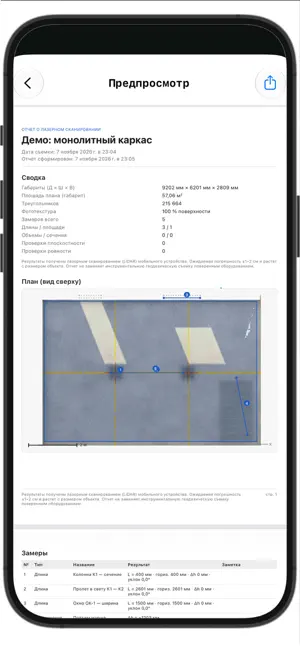
IM. SCAN turns an iPhone or iPad with a LiDAR sensor into a tool for site measurement and as-built surveys. Scan a room, a structure or a site and get a true-scale 3D model with photo textures, measurements, a drawing, a PDF report and files for CAD. Built for contractors, site inspectors, surveyors, designers and anyone who needs accurate dimensions without a tape measure or repeat site visits. • Photo-textured 3D model, levelled to true horizontal using gravity • Live coverage highlighting while scanning: see what is captured and where to point the camera next • Large-area capture and merging of several scans of one site into a single model using targets • Georeferencing to project coordinates • Automatic floor plan: walls, doors, windows, openings, furniture • Chain dimensions, area, perimeter, ceiling height • 3D room model with cut-away walls for an overhead view • Floor plan export to DXF, room model to IFC and STEP • Length, height, height above floor, area • Surface flatness check using the 2-metre straightedge method • Import a design model in IFC, DXF, OBJ, STL or PLY • Align it with the scan and get a colour deviation map, as-built vs design, in millimetres • Results for every element: wall, slab, column REPORTS • PDF report with a photo sheet: you choose the views for the figures • Measurements drawn right on the figures, numbered to match the table • Title page with site, author and company EXPORT • DXF: opens in desktop CAD software • IFC, STEP: for BIM and solid modelling • OBJ and USDZ with photo textures, STL, coloured PLY point cloud • Move projects to another device with AirDrop or the Files app CONVENIENCE • Demo projects: explore the features before your first scan • View and measure finished models on devices without LiDAR • Metric and imperial units, English and Russian interface • Projects are stored on your device • No ads REQUIREMENTS Scanning requires an iPhone Pro or iPad Pro with a LiDAR sensor. Viewing, measuring and exporting finished projects also work on other devices. IMPORTANT Model accuracy depends on scanning conditions: lighting, distance and surface materials. IM. SCAN is not a certified measuring instrument; use calibrated instruments for acceptance inspections. All other names used in the app belong to their respective owners. IM. SCAN is not affiliated with these companies.
What’s new
Version 1.2 · Updated November 15, 2026
- New: scan documents and save them as searchable PDFs; - Fixed issues during scanning; - Fixed issues with generating the room layout.
App privacy
The developer, Manasin Ivan, reported these privacy practices to Apple.
Data Not Collected
The developer does not collect any data from this app.
Alternatives to IM. SCAN: LiDAR 3D Scanner
Looking for apps like IM. SCAN: LiDAR 3D Scanner? Here are 6 similar apps on the App Store. The highest rated is PlaceAnew: Floor Plan Scanner (5.0/5), and all 6 are free to download.
-
 PlaceAnew: Floor Plan Scanner
5.0
-
 Floor Plan: Measure & 3D
-
 Room Planner 3D LiDAR Scanner
5.0
-
 xPlain2Me - draw doodle video
3.0
-
 CN CRM: Jobs, Shifts & Payroll
-
 DraftPlanar: PDF Plan Viewer
| App | Rating | Price | Last updated | Compare |
|---|---|---|---|---|
| IM. SCAN: LiDAR 3D Scanner | 5.0 / 5 (1 rating) | Free | November 15, 2026 | |
| PlaceAnew: Floor Plan Scanner | 5.0 / 5 (2) | Free | Nov 23, 2026 | Compare |
| Floor Plan: Measure & 3D | – | Free | Nov 18, 2026 | Compare |
| Room Planner 3D LiDAR Scanner | 5.0 / 5 (1) | Free | Jul 23, 2026 | Compare |
| xPlain2Me - draw doodle video | 3.0 / 5 (2) | Free | Jul 8, 2025 | Compare |
| CN CRM: Jobs, Shifts & Payroll | – | Free | Nov 25, 2026 | Compare |
| DraftPlanar: PDF Plan Viewer | – | Free | Nov 23, 2026 | Compare |