

VOXA AI: Voice & Reader
Hieu Nguyen Productivity iPhoneiPadiPod touch
VOXA AI: Voice & Reader is a free Productivity app for iPhone and iPad by Hieu Nguyen. Requires iOS 26.0. Updated November 17, 2026.
- Price
- Free
- on the App Store
- Size
- 14 MB
- Age 4+
- Updated
- Nov 17
- 2026 · v3.0
Screenshots


About VOXA AI: Voice & Reader
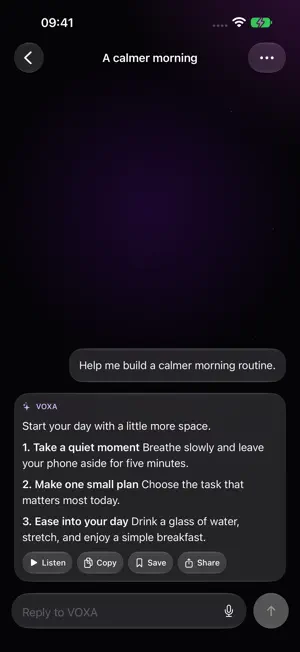
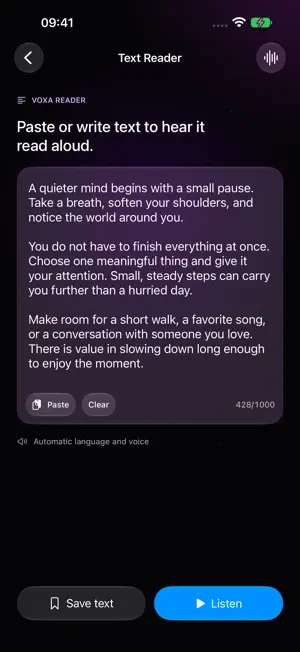
VOXA AI helps you turn spoken requests and written prompts into answers you can read, save, or listen to. Use Text Reader to listen to your own text and export audio for later. ASK, LISTEN, AND SAVE • Ask questions by voice or text • Continue conversations and browse chat history • Listen to answers with highlighted text • Summarize text to find the key points • Choose a system voice and reading language • Save useful results and export audio files FREE AND VOXA PRO Get started with free daily usage limits for conversations, text reading, and summaries. VOXA Pro removes these usage limits. Choose a weekly or yearly auto-renewable subscription; both plans unlock the same Pro features. Prices and any eligible offers are shown in the app before purchase. DEVICE AND AI REQUIREMENTS Requires iOS or iPadOS 26.0 or later. AI conversations and summaries use Apple Foundation Models on device and require a supported Apple Intelligence device, Apple Intelligence enabled, downloaded models, and a supported language and region. Availability is checked in the app. A Pro subscription does not enable AI on an unsupported device. Text Reader uses system voices and can be used independently of AI model availability. Voice input requires microphone permission and supported Apple speech assets; system assets may need to be downloaded. YOUR CONTENT STAYS WITH YOU No VOXA account is required. Chat history, drafts, saved results, and exported audio are stored in the app’s local data. Files are shared only when you choose a sharing destination. SUBSCRIPTIONS Subscriptions renew automatically unless canceled through your Apple account subscription settings. Manage or cancel your plan in Settings > your Apple Account > Subscriptions. Use Restore Purchases in VOXA to restore an existing subscription with the Apple Account used to purchase it. Privacy Policy: https://nguyenheu.github.io/voxaai-legal/privacy-policy.html
What’s new
Version 3.0 · Updated November 17, 2026
• Added a yearly VOXA Pro plan alongside the weekly subscription. • Refined the Pro upgrade experience. • Improved on-device voice performance and stability.
App privacy
The developer, Hieu Nguyen, reported these privacy practices to Apple.
Data Not Collected
The developer does not collect any data from this app.
Alternatives to VOXA AI: Voice & Reader
Looking for apps like VOXA AI: Voice & Reader? Here are 6 similar apps on the App Store. The highest rated is Genesis: ChatNow (5.0/5), and all 6 are free to download.
-
 Easy Voice AI Assistant
1.0
-
 Genesis: ChatNow
5.0
-
 Voxa AI: Smart Voice Companion
-
 Screen Mirroring - Cast to TVs
1.0
-
 Live Voice Translator
1.0
-
 ZIP Extractor - UnZIP, UnRar
4.6
| App | Rating | Price | Last updated | Compare |
|---|---|---|---|---|
| VOXA AI: Voice & Reader | – | Free | November 17, 2026 | |
| Easy Voice AI Assistant | 1.0 / 5 (1) | Free | Nov 12, 2026 | Compare |
| Genesis: ChatNow | 5.0 / 5 (1) | Free | Oct 7, 2026 | Compare |
| Voxa AI: Smart Voice Companion | – | Free | Mar 9, 2026 | Compare |
| Screen Mirroring - Cast to TVs | 1.0 / 5 (2) | Free | Mar 21, 2024 | Compare |
| Live Voice Translator | 1.0 / 5 (1) | Free | Jun 4, 2025 | Compare |
| ZIP Extractor - UnZIP, UnRar | 4.6 / 5 (24) | Free | Jan 20, 2026 | Compare |