

Health Access MCP
Prinz Tech Consulting Health & Fitness iPhoneiPadiPod touch
Health Access MCP is a free Health & Fitness app for iPhone and iPad by Prinz Tech Consulting. Rated 5.0/5 from 1 ratings. Requires iOS 17.0.
- Rating
- 5.0
- 1 ratings
- Price
- Free
- on the App Store
- Size
- 6 MB
- Age 4+
- Updated
- Nov 28
- 2026 · v1.1.0
Screenshots
Save to Pinterest

About Health Access MCP
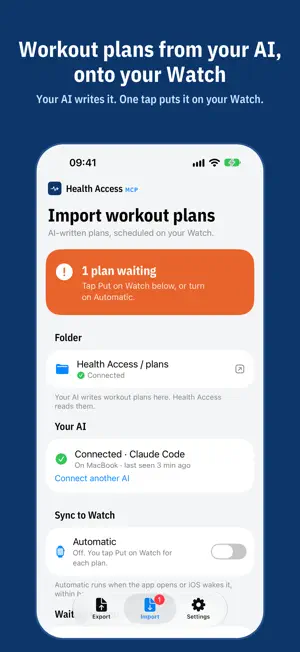
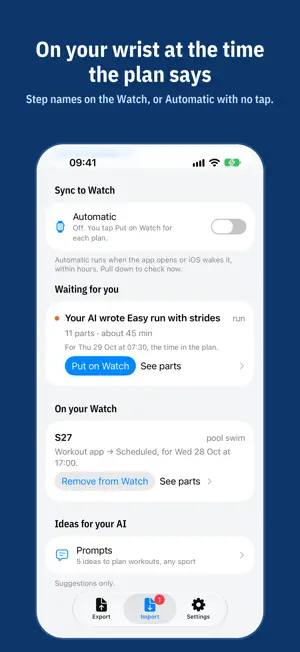
Apple won't let your AI read your Watch. This does. Health Access is middleware. It does the one thing Apple requires a phone app for, writing your workouts and daily health data as JSON into a folder you pick, and then it gets out of the way. Your AI reads that folder, through the MCP or just as files. If it writes you a workout plan, one tap puts it on your Watch, or none with Automatic on. WHAT GOES INTO THE FOLDER - Every workout from Apple Health: laps, splits, heart rate, stroke and SWOLF for swims, the effort rating your Watch asks for. - One file per day: sleep, resting heart rate, HRV, VO2 max, weight, steps and everything else you allow. - A short briefing your AI can read first, and a catalog of what was exported. WHO IT IS FOR - You have an Apple Watch and an AI coach (Claude, ChatGPT, Cursor, a local model) and want it to see your actual sessions instead of what you remember to type. - You coach yourself in the pool, on the rower or on the road, and want a coach that has read every session, not the last screenshot. - You will not put your health data on someone else's server. The folder is yours, on storage you already have: iCloud Drive, a network drive, or just On My iPhone. Google Drive can't be picked as a folder on iPhone, so the app uploads to it itself if you switch on Cloud upload. A WebDAV server (Nextcloud, a NAS) or S3 storage works the same way. - You have a human coach. Share the same folder and they get the real splits. PLANS BACK TO THE WATCH Your AI writes the session as a small file. The Import tab turns it into a custom workout with the step names on your wrist, at the day and time the plan says. Run, walk, hike, cycle, swim, row, HIIT and more. HOW TO CONNECT YOUR AI On your computer, one command: npx -y healthaccess-mcp. It finds the folder on its own. The app copies a setup message you can paste into your AI, and it shows when your AI is connected. Eleven suggested prompts are in the app, from a weekly check-in to planning your week. PRIVACY No account, no server of ours. Your health data goes only into the folder you choose and, if you switch on Cloud upload, from your iPhone straight to the drive you connected. Usage statistics are off by default; if you turn them on, they are event names and counts, never a health value, file name or folder path. "What left this phone" in Settings lists every request the app made. What you share with an AI, and what it tells you, is between you and that AI. HONEST LIMITS Health data can only be read while the phone is unlocked, so a workout finished with the phone in the bag exports the next time the phone is unlocked, not before. And the Watch keeps its own pool length setting, the plan can't set it. There are no charts in the app. The AI is the user of this data, so the effort goes into the files, the MCP and the docs. Free. An optional in-app purchase removes the support card, or buys the dev a coffee. Docs and setup: healthaccessmcp.com
What’s new
Version 1.1.0 · Updated November 28, 2026
Cloud upload. Health Access can now upload your files to Google Drive, a WebDAV server (Nextcloud, a NAS) or S3 storage, straight from your iPhone. Google Drive can't be picked as a folder on iPhone, so the app does the upload itself. It makes a new folder, Health Access, at the top level of your Drive. An AI that reads the drive can send workout plans back. "Pick folder" now asks where your files go: a folder, or a cloud drive. No synced folder? Choose "A cloud drive". OneDrive and Box are planned. Tap one in Settings > Cloud upload to tell us you want it.
App privacy
The developer, Prinz Tech Consulting, reported these privacy practices to Apple.
Data Not Linked to You
The following data, which may be collected but is not linked to your identity, may be used for the following purposes:
- Usage Data: Product Interaction
- Diagnostics: Other Diagnostic Data
Used for: Analytics, App Functionality
Alternatives to Health Access MCP
Looking for apps like Health Access MCP? Here are 6 similar apps on the App Store. The highest rated is HIGHPROTEIN.IO (5.0/5), and all 6 are free to download.
-
 HIGHPROTEIN.IO
5.0
-
 HabitHero – Habit Tracker
-
 SyncFit - Health Sync & Export
2.0
-
 Memory.fit: AI Fitness Hub
-
 ShockRef
5.0
-
 Peti element studio
| App | Rating | Price | Last updated | Compare |
|---|---|---|---|---|
| Health Access MCP | 5.0 / 5 (1 rating) | Free | November 28, 2026 | |
| HIGHPROTEIN.IO | 5.0 / 5 (2) | Free | Nov 2, 2026 | Compare |
| HabitHero – Habit Tracker | – | Free | Nov 27, 2026 | Compare |
| SyncFit - Health Sync & Export | 2.0 / 5 (1) | Free | Oct 21, 2026 | Compare |
| Memory.fit: AI Fitness Hub | – | Free | Nov 28, 2026 | Compare |
| ShockRef | 5.0 / 5 (10) | Free | Jul 27, 2026 | Compare |
| Peti element studio | – | Free | Sep 24, 2026 | Compare |
Compare Health Access MCP with the top alternatives: ratings, updates, ASO score and keyword gaps →