

Fit Timer: Interval
Jinnosuke Murayama Health & Fitness iPhoneiPadiPod touchApple Watch
Fit Timer: Interval is a free Health & Fitness app for iPhone and iPad by Jinnosuke Murayama. Requires iOS 16.0. Updated November 24, 2026.
- Price
- Free
- on the App Store
- Size
- 7 MB
- Age 4+
- Updated
- Nov 24
- 2026 · v1.0.6
Screenshots
Save to Pinterest

About Fit Timer: Interval
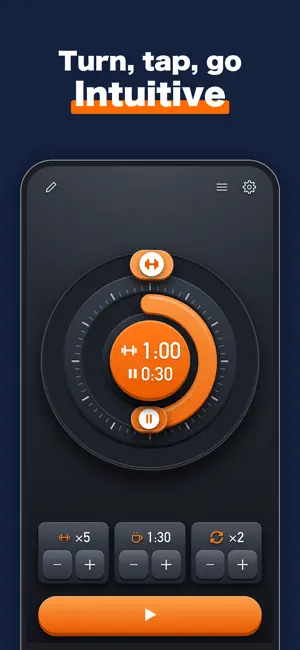
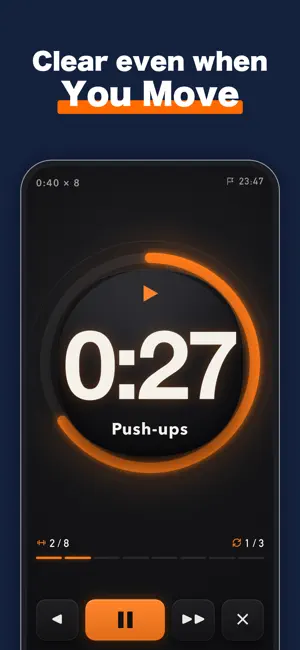
Turn the dial and tap. An interval timer that gets your workout going in seconds. Turn the dial to set your work and rest time, then tap start. During your workout, big full-screen numbers plus voice and sound cues tell you what's next. PERFECT IF YOU WANT TO - Keep your rest between sets honest - Start HIIT or Tabata without a long setup - Read the time from across the room - Stay focused without looking at your phone FEATURES - Set work and rest with a dial - Sets and rest between sets - Big full-screen numbers - Color-coded work and rest - 3-2-1 voice countdown - Halfway and one-minute voice cues - Start and finish sounds - Cues keep playing with the screen locked - Pause, back and skip - Two-tap stop to avoid mistakes - Dark and light modes - 7 ready-made workouts including Tabata, HIIT and boxing - Save and edit your timers - Exercise names - Apple Watch and widget - Workout history HOW TO USE 1. Turn the dial to set work and rest 2. Choose your sets 3. Tap start At the gym or at home, start today's first set. FREE - Set work and rest with the dial - Sets and rest between sets - Big full-screen numbers with color coding - 3-2-1 voice countdown (male and female voice) - Halfway and one-minute voice cues - 3 cue sounds - Cues keep playing with the screen locked - Pause, back and skip - Dark and light modes PRO - No ads - Ready-made workouts and saved timers - Exercise names - All sounds, voices and theme colors - Apple Watch, widget and workout history Pro is an auto-renewable yearly or monthly subscription. New subscribers get a 3-day free trial. Your subscription renews automatically at the price of the plan you chose unless you cancel at least 24 hours before the end of the period. Cancel anytime in your Apple Account settings. Terms of Use: https://jinappslab-apps-pages.pages.dev/apps/interval-timer/terms.html Privacy Policy: https://jinappslab-apps-pages.pages.dev/apps/interval-timer/privacy.html
What’s new
Version 1.0.6 · Updated November 24, 2026
Small improvements and fixes.
App privacy
The developer, Jinnosuke Murayama, reported these privacy practices to Apple.
Data Not Linked to You
The following data, which may be collected but is not linked to your identity, may be used for the following purposes:
- Location: Coarse Location
- Identifiers: Device ID
- Usage Data: Product Interaction, Advertising Data
- Diagnostics: Crash Data, Performance Data, Other Diagnostic Data
Used for: Third-Party Advertising, Analytics
Alternatives to Fit Timer: Interval
Looking for apps like Fit Timer: Interval? Here are 6 similar apps on the App Store. The highest rated is TMR Interval Timer & Stopwatch (3.0/5), and all 6 are free to download.
-
 Ropewise: Jump Rope Counter
-
 Roll Timer — BJJ & Rounds
-
 Strength in Motion
-
 RoundTick: HIIT & Tabata Timer
-
 TMR Interval Timer & Stopwatch
3.0
-
 Arenal Centro Médico
| App | Rating | Price | Last updated | Compare |
|---|---|---|---|---|
| Fit Timer: Interval | – | Free | November 24, 2026 | |
| Ropewise: Jump Rope Counter | – | Free | Nov 6, 2026 | Compare |
| Roll Timer — BJJ & Rounds | – | Free | Nov 10, 2026 | Compare |
| Strength in Motion | – | Free | Sep 28, 2026 | Compare |
| RoundTick: HIIT & Tabata Timer | – | Free | Nov 8, 2026 | Compare |
| TMR Interval Timer & Stopwatch | 3.0 / 5 (1) | Free | Jul 1, 2026 | Compare |
| Arenal Centro Médico | – | Free | Aug 22, 2026 | Compare |