

YankyBot
Techlexity development L.L.C Productivity iPhoneiPadiPod touch
YankyBot is a free Productivity app for iPhone and iPad by Techlexity development L.L.C. Requires iOS 16.4. Updated November 14, 2026.
- Price
- Free
- on the App Store
- Size
- 46 MB
- Age 17+
- Updated
- Nov 14
- 2026 · v0.1.1
Screenshots
Save to Pinterest


About YankyBot
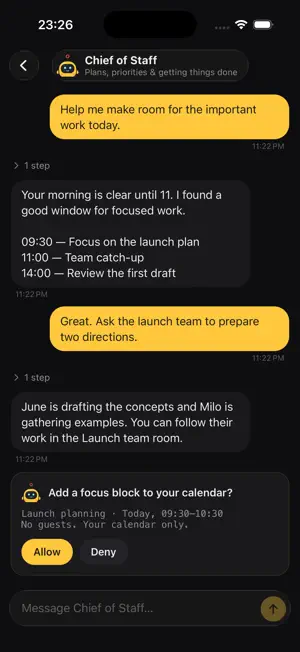
Your AI team, in your pocket. YankyBot for iPhone is the companion to YankyBot on your Mac. Stay in touch with your agents, follow their work and make decisions wherever you are. CHAT WITH YOUR AGENTS Open an agent conversation, send a task and follow replies as they arrive. Tool activity stays readable, with detailed steps folded away. Keep typing above the keyboard, dictate an editable draft on supported devices and languages, or attach photos and files. KEEP YOUR TEAM TOGETHER Browse your agent teams and join the same shared conversations you use on your Mac. REVIEW WHAT NEEDS YOU Find pending permission requests and questions in one place. Allow or deny an action, or choose an answer, directly from your phone. PAIR IN SECONDS Open Settings → Phone in YankyBot on your Mac, then scan the pairing code or enter it on your iPhone. Your device session is stored in the iOS Keychain. YOUR MAC DOES THE WORK The iPhone app connects to your Mac through the YankyBot relay. Your Mac must be online with YankyBot running. Your agents use the AI providers and accounts configured on your Mac; the iPhone app does not include a separate AI model subscription. TRY IT FIRST Explore a sample workspace without an account or a Mac. Demo replies and actions are clearly labeled examples. For real use: a Mac running YankyBot, an active YankyBot account and an internet connection. The Mac service offers a 30-day no-card trial, then a paid subscription; your AI provider subscriptions are separate.
What’s new
Version 0.1.1 · Updated November 14, 2026
A better mobile chat: the composer stays above the keyboard, on-device dictation helps you write, and you can attach photos or files. Failed sends keep your draft, and retries avoid duplicate messages.
App privacy
The developer, Techlexity development L.L.C, reported these privacy practices to Apple.
Data Linked to You
The following data, which may be collected and linked to your identity, may be used for the following purposes:
- Purchases: Purchase History
- Contact Info: Email Address, Name
- User Content: Emails or Text Messages, Photos or Videos, Audio Data, Customer Support, Other User Content
- Identifiers: User ID, Device ID
- Diagnostics: Other Diagnostic Data
Used for: App Functionality