

NashClient
Eklips Digital Estonia OU Utilities iPhoneiPadiPod touch
NashClient is a free Utilities app for iPhone and iPad by Eklips Digital Estonia OU. Requires iOS 17.0. Updated November 17, 2026.
- Price
- Free
- on the App Store
- Size
- 60 MB
- Age 4+
- Updated
- Nov 17
- 2026 · v1.3
Screenshots
Save to Pinterest
About NashClient
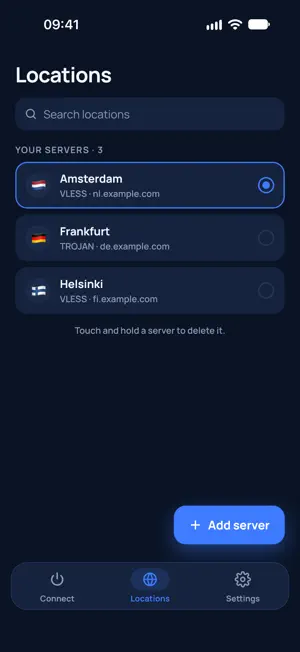
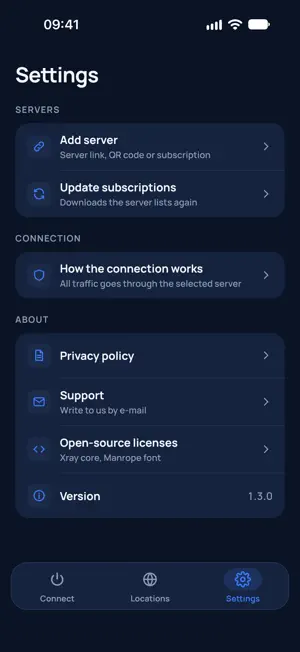
NashClient connects your iPhone or iPad through a proxy server you add yourself. Adding servers Paste or scan a server link (VLESS, VMess, Trojan or Shadowsocks), or add an https subscription address from your provider; its servers appear in the list. Choose a server and tap Connect. How it connects While connected, all internet traffic of the device goes through the server you selected, using the VPN configuration iOS asks you to allow. Before the first connection NashClient explains this on its own screen. Tap Disconnect to stop, or turn the VPN off in Settings. What NashClient leaves out NashClient sells no proxy service and runs no servers; it works only with servers you configure. There is no account to create, no analytics and no ads. Server links stay on this device. The only network traffic is the connection you start, to the server you chose, and the download of a subscription you add, from its address. iPhone and iPad The same app runs on both. On iPad the server list sits in a centred column, in portrait and landscape.
What’s new
Version 1.3 · Updated November 17, 2026
Bugfix and redesign
App privacy
The developer, Eklips Digital Estonia OU, reported these privacy practices to Apple.
Data Not Collected
The developer does not collect any data from this app.
Alternatives to NashClient
Looking for apps like NashClient? Here are 6 similar apps on the App Store. The highest rated is V2Run Client (5.0/5), and all 6 are free to download.
-
 RouteBox
-
 RabbitGo - Proxy Utility
3.0
-
 BessyConnect: VPN & Watch
-
 ValeFly
3.0
-
 V2Run Client
5.0
-
 LAMPA VPN
5.0
| App | Rating | Price | Last updated | Compare |
|---|---|---|---|---|
| NashClient | – | Free | November 17, 2026 | |
| RouteBox | – | Free | Oct 6, 2026 | Compare |
| RabbitGo - Proxy Utility | 3.0 / 5 (2) | Free | Nov 23, 2026 | Compare |
| BessyConnect: VPN & Watch | – | Free | Oct 26, 2026 | Compare |
| ValeFly | 3.0 / 5 (1) | Free | Sep 26, 2026 | Compare |
| V2Run Client | 5.0 / 5 (1) | Free | Nov 24, 2026 | Compare |
| LAMPA VPN | 5.0 / 5 (4) | Free | Nov 26, 2026 | Compare |
Compare NashClient with the top alternatives: ratings, updates, ASO score and keyword gaps →