

TV Home Pro
Owen McLoughlin Entertainment iPhoneiPadiPod touch
TV Home Pro is a free Entertainment app for iPhone and iPad by Owen McLoughlin. Requires iOS 27.0. Updated November 11, 2026.
- Price
- Free
- on the App Store
- Size
- 36 MB
- Age 4+
- Updated
- Nov 11
- 2026 · v1.4
Screenshots
Save to Pinterest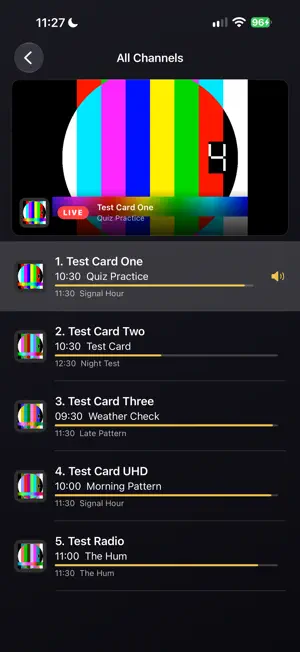


About TV Home Pro
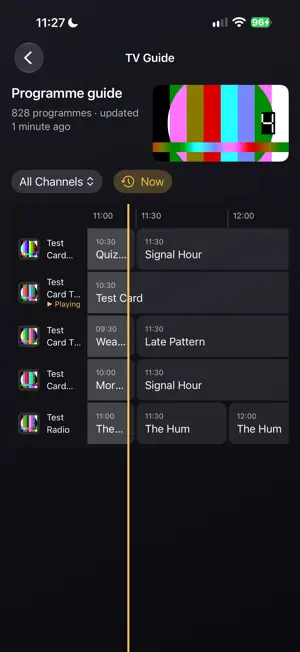
TV Home Pro is a player for Apple TV and iPhone. It plays the IPTV account you already have: an Xtream Codes login, a Stalker portal that works by MAC address, or an M3U playlist. TV Home Pro has no channels, films or series of its own, and doesn't sell or suggest any. LIVE TV • Channels show what's on, with its progress and the minutes left, and keep up with the clock. • Pick a channel to preview it, and again for full screen. On Apple TV, Live TV is one screen: the categories beside the channels, with the preview and what's next. • On Apple TV, Up and Down change channel, Left goes back to the last one, and Right shows recent ones. On iPhone, the player's arrows change channel. • On Apple TV, browse a strip of channels along the bottom without leaving what's playing. • Pause a channel and carry on from there, go back up to 30 minutes, or jump back to live. THE GUIDE • A full guide from your account or playlist, from 12 hours back to a week ahead. • It opens on now. The remote's Guide button opens it; Page Up and Down move a screen at a time. • Remind Me on a programme to come: your iPhone, or the Apple TV while TV Home Pro is open, tells you when it starts. • Catch-up, where your account or playlist keeps an archive: a programme that's over plays from its start. On Xtream Codes, Start Over plays the one on now from its beginning. FILMS AND SERIES • Your account's films and series by category, with posters, details, seasons and episodes. Sort them by recently added, newest, top rated or A to Z. • Follow a series, and its new episodes appear on your source's home. • Continue Watching picks up where you stopped, and the next episode is offered when one ends. • Play films and episodes from 0.5× to 2×, and set a sleep timer, even for the end of the programme. SEARCH • One search across live TV, what's on now, the guide's programmes, films and series, with a count for each. On a Stalker portal it searches live TV. MAKE IT YOURS • On Apple TV, a source's sections sit in a bar across the top: Home, Live TV, TV Guide, Favourites, Movies, Series, Search. • Favourites, and recent channels on the home screen. • Hide, rename and reorder channels and categories, film and series ones too, or sort categories A to Z. • TV Home Pro reopens where you left off, on the channel you watched last. • Add a source on your iPhone and send it to your Apple TV instead of typing with the remote. ON IPHONE • Picture in Picture, sound that plays on in the background, AirPlay, and controls on the Lock Screen. PICTURE AND SOUND • Plays the streams IPTV accounts actually send: MPEG-TS and HLS; interlaced SD and HD; MPEG-2, H.264 and HEVC video; MP2, AAC, AC-3 and E-AC-3 sound. • 4K and HDR10. On Apple TV, full screen switches your TV to the stream's frame rate and dynamic range, with Match Content on. • Choose your audio and subtitle languages once. Subtitles only ever come on in a language you chose, in your Accessibility caption style. • Reconnects by itself when a stream drops, and keeps to your account's connection limit. PRIVATE BY DESIGN • No account with us, no ads, no tracking, no analytics. • Your logins stay in the Keychain of the device they're on, never synced. They go only to their own server, or, when you send a source, straight from your iPhone to your Apple TV, encrypted, after you compare a code. • With Sync with iCloud on, your favourites, what you've watched and where you stopped follow you through your own iCloud. Never a login. • TV Home Pro talks only to the servers you add, the addresses they give for artwork, and your iCloud. BEFORE YOU START • You need an IPTV account: a server address with a username and password, a portal address with the MAC address and device details from the box or player you already use, or a playlist address. • What you can watch, and whether there's a guide or catch-up, depends on your account. • Only add accounts you have the right to use. TV Home Pro doesn't host, store or link to any content.
What’s new
Version 1.4 · Updated November 11, 2026
This update brings the live channels up to the minute and puts your film and series categories in order. • Every channel row shows how many minutes are left of what's on, and the rows keep up with the clock while the list is open. • Channel numbers sit in a column of their own, so names have more room. • Recent Channels show what's on, with its progress and the minutes left. • Hide, rename or reorder film and series categories, or sort them A to Z: touch and hold one. Settings › Hidden shows hidden ones again. • Movies and Series show how many categories they have. • Settings › Accounts shows each source's subscription, the streams it allows or has in use, and any message from your provider. • Subtitles only ever come on in a language you chose, never because a file marks another as its default. • Fixes: a source's menu no longer moves as the source connects, so a tap lands where you aimed. Wording such as "1 channels" is gone.
App privacy
The developer, Owen McLoughlin, reported these privacy practices to Apple.
Data Not Collected
The developer does not collect any data from this app.