

SteerWave: PC Steering Wheel
哲庆 史 Utilities iPhoneiPadiPod touch
SteerWave: PC Steering Wheel is a free Utilities app for iPhone and iPad by 哲庆 史. Requires iOS 17.0. Updated November 25, 2026.
- Price
- Free
- on the App Store
- Size
- 40 MB
- Age 17+
- Updated
- Nov 25
- 2026 · v1.1.0
Screenshots
Save to Pinterest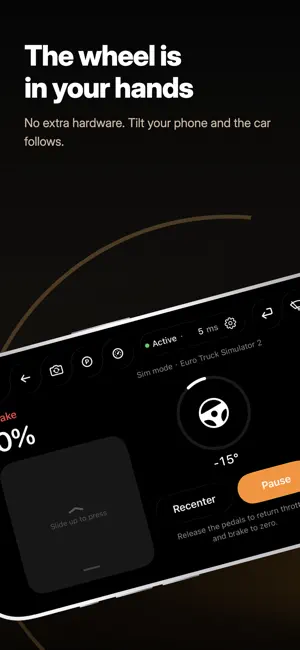

About SteerWave: PC Steering Wheel
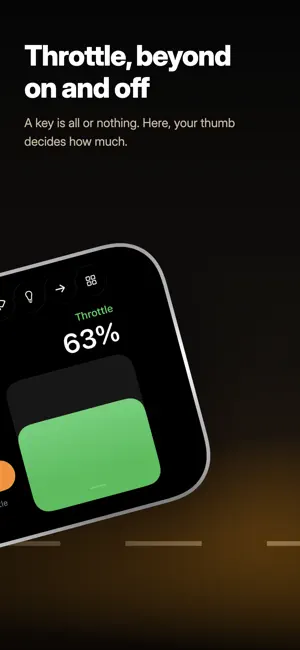
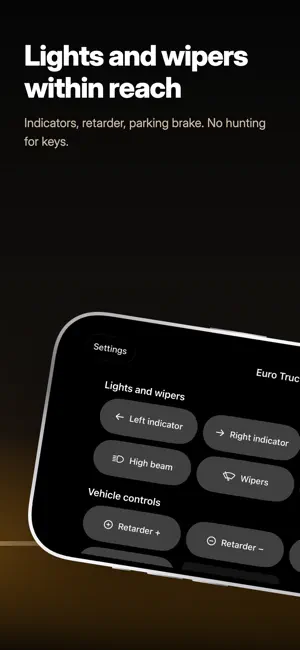
SteerWave turns your phone into a steering wheel for PC games: racing, rally, off-road and truck simulators. A key is either pressed or not. Your phone knows how far you turn and how deep you press, and so does the game. No racing wheel to buy, no desk to clear. HOW YOU DRIVE • Tilt your phone to steer. A small tilt is a small correction; a big one takes the corner. • Throttle and brake sit on either side of the screen. The farther your thumb slides, the deeper you press. Hold a steady 20% to creep through a depot, or ease onto the brake before a bend. • In truck sims, indicators, wipers, lights, retarder, parking brake and camera are on your phone. No hunting for keys. • In other games, your phone is a full Xbox-style gamepad. FEEL Four presets, Truck, Rally, Track and Casual, switch with the game you're playing. Change the steering range, response curves and pedal depth, and feel every change as you press. GAMES Tested in Euro Truck Simulator 2 (ETS2), American Truck Simulator (ATS), SnowRunner, the WRC series and Need for Speed. Forza Horizon, F1, Assetto Corsa, BeamNG.drive and more are supported too. ETS2 and ATS are set up in one click, with no rebinding. Most other PC games that support an Xbox controller work as well; setup varies by game. GET STARTED 1. On your PC, open steerwave.top and install the Windows app. 2. Scan its QR code with your phone. 3. Start your game and drive. Your phone and PC talk over your own Wi-Fi. No cable, no account. PRICE Try it free for 30 minutes of driving. Connecting and settings don't use up the trial. If you like it, unlock it with a one-time purchase. No subscription, no ads. REQUIREMENTS A 64-bit Windows 10 or 11 PC on the same local network as your phone. SteerWave is not affiliated with or endorsed by the developers or publishers of the games named here. All trademarks belong to their respective owners.
What’s new
Version 1.1.0 · Updated November 25, 2026
Added offline voice control in English and Chinese for in-game actions. Improved performance for smoother steering and more responsive controls.
App privacy
The developer, 哲庆 史, reported these privacy practices to Apple.
Data Not Linked to You
The following data, which may be collected but is not linked to your identity, may be used for the following purposes:
- Usage Data: Product Interaction, Other Usage Data
- Body: Hands
Used for: Analytics, App Functionality
Alternatives to SteerWave: PC Steering Wheel
Looking for apps like SteerWave: PC Steering Wheel? Here are 6 similar apps on the App Store. The highest rated is PhonePad - Game Controller (5.0/5), and 5 of the 6 are free to download.
-
 PhonePad - Game Controller
5.0
-
 Weight Scanner: Photo Scale
-
 GyroBridge
-
 BlueLocation
1.0
-
 Anti Theft Alarm: Motion Guard
-
 Symbol Atlas
5.0
| App | Rating | Price | Last updated | Compare |
|---|---|---|---|---|
| SteerWave: PC Steering Wheel | – | Free | November 25, 2026 | |
| PhonePad - Game Controller | 5.0 / 5 (1) | Free | Nov 20, 2026 | Compare |
| Weight Scanner: Photo Scale | – | Free | Nov 14, 2026 | Compare |
| GyroBridge | – | Free | Jan 23, 2026 | Compare |
| BlueLocation | 1.0 / 5 (1) | 1.99 USD | Oct 10, 2025 | Compare |
| Anti Theft Alarm: Motion Guard | – | Free | Sep 15, 2026 | Compare |
| Symbol Atlas | 5.0 / 5 (1) | Free | Apr 27, 2026 | Compare |