

Little fast
soonyong Jeong Utilities iPhoneiPadiPod touchApple Watch
Little fast is a free Utilities app for iPhone and iPad by soonyong Jeong. Requires iOS 17.0. Updated November 7, 2026.
- Price
- Free
- on the App Store
- Size
- 2 MB
- Age 4+
- Updated
- Nov 7
- 2026 · v1.0
Screenshots
Save to Pinterest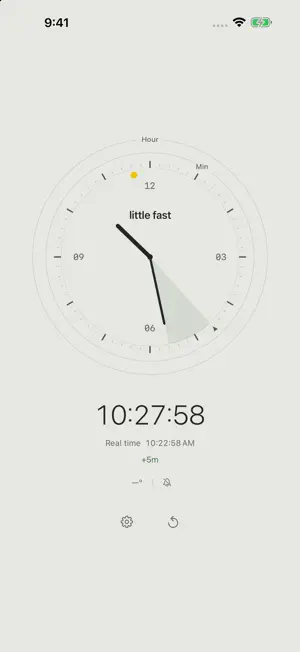


About Little fast
A little ahead. Still your time. Little fast is a minimal clock for keeping your displayed time a little ahead of the real world. Set a few extra minutes before your next start, then keep your clock in view on your desk, Home Screen or wrist. MAKE TIME YOUR OWN Turn the Hour and Min bezels to move forward in clear, discrete steps, with haptic feedback on supported iPhones. Turn back to reduce the lead, or tap reset to return to real time. Your display can be ahead of real time, never behind it. This changes the time shown in Little fast, not your iPhone’s system clock or the speed at which time passes. SEE THE DIFFERENCE A small green marker follows the real minute hand. A shaded sector shows only the extra minutes; whole-hour adjustments leave the sector unchanged. A quiet analog face, compact digital readout and warm neutral palette keep the screen simple. Portrait and landscape layouts make room for the clock. KEEP YOUR CLOCK CLOSE Add Home Screen or Lock Screen widgets for a quick glance. Use the Apple Watch companion to view your clock and adjust the lead with the Digital Crown. ALARMS WITH A PERSONAL TITLE Create daily alarms with your own titles. Alarms follow real time, not your adjusted display time. On iOS 26 and later, system alarms can sound when the app is closed or the screen is locked, after you grant alarm permission. Earlier iOS versions use notifications and depend on Silent Mode, Focus and notification settings. WEATHER, WHEN YOU WANT IT Optionally show local temperature and weather using approximate location after permission. Weather is provided by Open-Meteo. WIDGET DETAILS Analog widget faces and weather refresh on the iOS widget schedule rather than continuously. Live digital seconds require iOS 18 or later and may be limited by Always-On display or power-saving states. Free. No account. No ads. Available in English and Korean.
App privacy
The developer, soonyong Jeong, reported these privacy practices to Apple.
Data Not Linked to You
The following data, which may be collected but is not linked to your identity, may be used for the following purposes:
- Location: Coarse Location
- Other Data: Other Data Types
Used for: App Functionality
Alternatives to Little fast
Looking for apps like Little fast? Here are 6 similar apps on the App Store. The highest rated is Silent Flash Timer - No Sound (4.5/5), and all 6 are free to download.
-
 JustClock: Desk & Bedside
-
 Digital Clock - Advance Time
4.2
-
 아이오트 i-oteu
-
 Silent Flash Timer - No Sound
4.5
-
 Catch All Lite
-
 oa-world
1.5
| App | Rating | Price | Last updated | Compare |
|---|---|---|---|---|
| Little fast | – | Free | November 7, 2026 | |
| JustClock: Desk & Bedside | – | Free | Oct 27, 2026 | Compare |
| Digital Clock - Advance Time | 4.2 / 5 (6) | Free | Apr 8, 2025 | Compare |
| 아이오트 i-oteu | – | Free | Oct 30, 2026 | Compare |
| Silent Flash Timer - No Sound | 4.5 / 5 (20) | Free | Nov 23, 2025 | Compare |
| Catch All Lite | – | Free | Aug 25, 2026 | Compare |
| oa-world | 1.5 / 5 (2) | Free | Jan 13, 2026 | Compare |
Compare Little fast with the top alternatives: ratings, updates, ASO score and keyword gaps →