

Room Planner 3D
WEBDIA INC. Lifestyle iPhoneiPadiPod touch
Room Planner 3D is a free Lifestyle app for iPhone and iPad by WEBDIA INC. Requires iOS 17.0. Updated November 15, 2026.
- Price
- Free
- on the App Store
- Size
- 10 MB
- Age 4+
- Updated
- Nov 15
- 2026 · v1.0.2
Screenshots
Save to Pinterest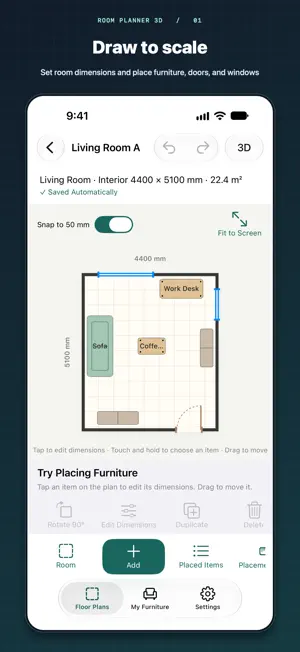


About Room Planner 3D
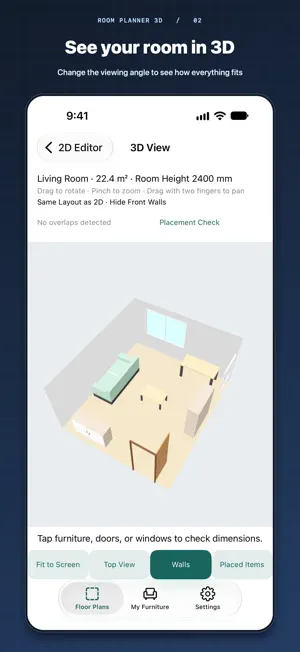
Plan your room before you buy or move furniture. Create a floor plan from the measurements you enter, arrange furniture in 2D, and explore the same layout in 3D. Room Planner 3D helps you compare furniture arrangements, check gaps, and consider door swing space before making changes at home. Use it to plan a move, furnish a studio apartment, or rearrange a bedroom or living room. Each plan contains one room, so you can save separate plans for different rooms and layout ideas. • Create a measured floor plan Enter room width, depth, and height. Create a rectangular room or draw an outline, including an L-shaped room. Add doors and windows with custom dimensions and positions. • Add furniture at the size you need Choose beds, sofas, desks, storage, appliances, and more. Set each item's name, width, depth, and height. Specify its height above the floor to plan wall-mounted storage as well as floor-standing furniture. • Move, rotate, and refine Drag furniture into place, adjust dimensions and rotation, duplicate items, or lock them in position. Use grid snapping, zoom, pan, and undo and redo to refine your layout. • Check gaps and door swing space View distances between furniture and walls or between furniture items. Check passage width at a selected position and height, and see highlighted furniture overlaps and door swing conflicts. • Explore the same layout in 3D Switch from your 2D plan to a matching 3D view. Rotate the view and zoom in to check furniture heights and get a feel for the space. • Reuse your own furniture Save frequently used furniture with custom dimensions and add it to other plans. Try different arrangements using the same items. • Compare layout ideas Duplicate a plan to explore another arrangement while keeping the original. Compare plans side by side at the same scale to review furniture placement and open space. • Save and share Changes are saved automatically on your device. Export dimensioned PNG images and PDFs to share your plans. Export and import backup files to keep editable copies of your work. Designed for iPhone and iPad. No account is required. Basic editing and saving work offline. The app includes ads, and ad delivery and related services use an internet connection. The app interface is currently available in Japanese. Dimensions are entered in millimeters (mm). Dimension, overlap, and passage checks are planning aids based on the values you enter. They do not guarantee safety or that furniture can be delivered through your building. Confirm actual measurements and delivery routes before purchasing.
What’s new
Version 1.0.2 · Updated November 15, 2026
Added chairs, dining tables, TV stands, refrigerators, washing machines, and TVs. Choose white, black, gray, beige, or a wood tone for your furniture. Your chosen colors appear in both 2D and 3D and can be saved in My Furniture.
App privacy
The developer, WEBDIA INC., reported these privacy practices to Apple.
Data Used to Track You
The following data may be used to track you across apps and websites owned by other companies:
- Identifiers: Device ID
Data Linked to You
The following data, which may be collected and linked to your identity, may be used for the following purposes:
- Location: Coarse Location
- Identifiers: Device ID
- Usage Data: Product Interaction, Advertising Data
- Diagnostics: Performance Data
- Purchases: Purchase History
Used for: Third-Party Advertising, Analytics, App Functionality
Data Not Linked to You
The following data, which may be collected but is not linked to your identity, may be used for the following purposes:
- Diagnostics: Other Diagnostic Data, Crash Data
Used for: Third-Party Advertising, Analytics, App Functionality
Alternatives to Room Planner 3D
Looking for apps like Room Planner 3D? Here are 6 similar apps on the App Store.
-
 住宅プランナー:間取り図と家づくり
-
 EmoRecord
-
 Room Layout: Furniture Plan
-
 Madori Fit: Room Planner
-
 Roomlines: Floor Planner
-
 大進自動車 大里店・千秋橋店 公式アプリ
| App | Rating | Price | Last updated | Compare |
|---|---|---|---|---|
| Room Planner 3D | – | Free | November 15, 2026 | |
| 住宅プランナー:間取り図と家づくり | – | Free | Nov 24, 2026 | Compare |
| EmoRecord | – | Free | Aug 25, 2026 | Compare |
| Room Layout: Furniture Plan | – | Free | Nov 6, 2026 | Compare |
| Madori Fit: Room Planner | – | Free | Nov 12, 2026 | Compare |
| Roomlines: Floor Planner | – | Free | Nov 13, 2026 | Compare |
| 大進自動車 大里店・千秋橋店 公式アプリ | – | Free | Oct 6, 2025 | Compare |
Compare Room Planner 3D with the top alternatives: ratings, updates, ASO score and keyword gaps →