

CamTwo – Front & Back Camera
钰博 师 Photo & Video iPhoneiPadiPod touch
CamTwo – Front & Back Camera is a free Photo & Video app for iPhone and iPad by 钰博 师. Rated 5.0/5 from 1 ratings. Requires iOS 17.0.
- Rating
- 5.0
- 1 ratings
- Price
- Free
- on the App Store
- Size
- 25 MB
- Age 4+
- Updated
- Nov 24
- 2026 · v1.0.1
Screenshots
Save to Pinterest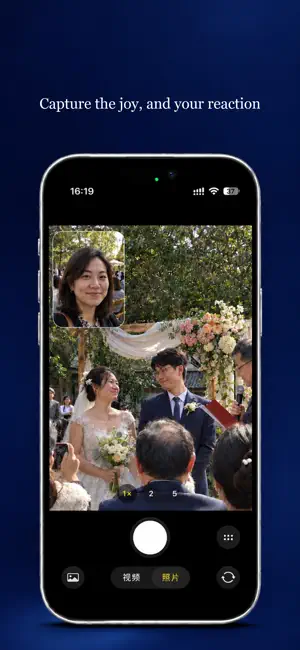


About CamTwo – Front & Back Camera
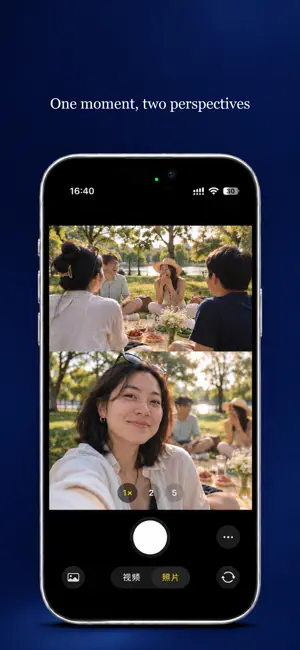
There’s a story in front of the camera—and one behind it, too. CamTwo captures photos and videos with your front and rear cameras at the same time. Record the view on your travels and your reaction to it. Capture a friend’s laughter and your response. One shot brings two perspectives into the same memory. BE PART OF THE STORY Some moments are about more than what’s in front of you. Your reaction belongs in the picture, too. Capture the scenery and how it makes you feel. Record a friend’s smile alongside your own. Or make a vlog that shows both you and the experience you’re sharing. TWO CAMERAS FOR PHOTOS AND VIDEO Use the front and rear cameras together for photos and video. See the combined view as you frame your shot, then save the finished photo or video to your photo library. CHOOSE YOUR COMPOSITION • Picture-in-picture: bring both views together and drag the inset into position • Swap views: switch which camera appears in the main view and the inset • Output aspect ratio: choose a frame that suits what you’re capturing • Inset aspect ratio: choose a different shape for the picture-in-picture view • Split screen: Pro users can choose a stacked or side-by-side layout • Inset size: Pro users can resize the picture-in-picture view ADJUST YOUR CAPTURE SETTINGS Choose a video resolution and frame rate supported by your device, adjust rear-camera zoom while shooting, and set front-camera mirroring to suit your shot. Pro users can also access advanced video settings, including 4K, 30/60 fps, and stabilization. ONE FINISHED SHOT, MORE CREATIVE OPTIONS Save your combined photo or video to your photo library. Pro users can also save the front and rear camera originals separately, giving them more options for editing, reframing, and sharing later. COMPATIBILITY Requires iOS 17 or later and an iPhone that supports simultaneous front and rear camera capture, including most iPhone 11 and later models. Compatibility and available video settings, including resolution and frame rate, vary by device. Terms of Use (EULA): https://www.apple.com/legal/internet-services/itunes/dev/stdeula/
What’s new
Version 1.0.1 · Updated November 24, 2026
• Move the picture-in-picture window while recording. Its movement and motion blur are saved in the final video. Tap the window to swap front and rear views. • Smoother transitions when starting and stopping video recording, with fewer black flashes. • Improved front-camera landscape display on iPhone 17 models and iPhone Air. • Customize your default camera settings and reset them with one tap. • Added options to check for updates, view release notes, and more. • Now available in 12 languages, including English, Chinese, Japanese, and Korean.
App privacy
The developer, 钰博 师, reported these privacy practices to Apple.
Data Not Linked to You
The following data, which may be collected but is not linked to your identity, may be used for the following purposes:
- Purchases: Purchase History
Used for: Analytics, App Functionality
Alternatives to CamTwo – Front & Back Camera
Looking for apps like CamTwo – Front & Back Camera? Here are 6 similar apps on the App Store. The highest rated is VinciPhoto: Photo Cleaner (5.0/5), and all 6 are free to download.
-
 Reknew Album
-
 闪拍Vlog
-
 GIFBloom: GIF Maker
1.0
-
 LightTide: Golden Hour Map
-
 VinciPhoto: Photo Cleaner
5.0
-
 PickerRoy: Video Frame Picker
| App | Rating | Price | Last updated | Compare |
|---|---|---|---|---|
| CamTwo – Front & Back Camera | 5.0 / 5 (1 rating) | Free | November 24, 2026 | |
| Reknew Album | – | Free | Nov 17, 2026 | Compare |
| 闪拍Vlog | – | Free | Oct 19, 2026 | Compare |
| GIFBloom: GIF Maker | 1.0 / 5 (1) | Free | Nov 19, 2026 | Compare |
| LightTide: Golden Hour Map | – | Free | Aug 31, 2026 | Compare |
| VinciPhoto: Photo Cleaner | 5.0 / 5 (3) | Free | Nov 12, 2026 | Compare |
| PickerRoy: Video Frame Picker | – | Free | Oct 26, 2026 | Compare |