

Ice Age Trail Passport
Schiller Technologies Health & Fitness iPhoneiPadiPod touch
Ice Age Trail Passport is a free Health & Fitness app for iPhone and iPad by Schiller Technologies. Requires iOS 16.4. Updated November 25, 2026.
- Price
- Free
- on the App Store
- Size
- 102 MB
- Age 4+
- Updated
- Nov 25
- 2026 · v2.0.0
Screenshots
Save to Pinterest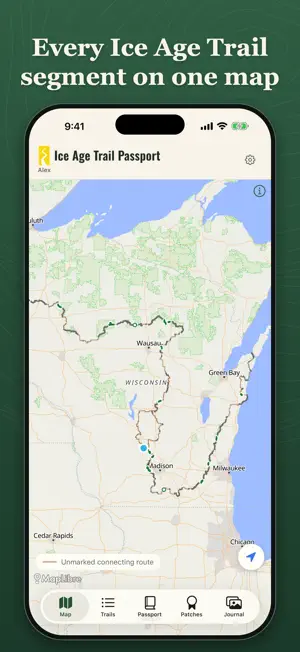


About Ice Age Trail Passport
Ice Age Trail Passport is a hiking log for Wisconsin's Ice Age Trail. Log each segment you hike, collect a passport stamp for it, and watch the trail fill in on the map. The Ice Age Trail is about 1,200 miles of footpath and connecting roads across Wisconsin, following the edge of the last glacier from St. Croix Falls to Sturgeon Bay. The app tracks all 130 segments and the connecting routes that join them. The whole trail on one map Every segment and connecting route is on the map, and each one changes color as you finish it. A blue dot shows where you are. Log a hike in seconds Pick the segment, then add the date, the miles, who hiked, a note and photos. A hike you log without a signal syncs when you're back online. Your passport Every finished segment gets a stamp with the date you hiked it. Milestones mark your first segment, 100 miles and halfway. Your journal Every hike in one place, newest first, with its miles, notes and photos. Tap a segment to see it on the map. Trailhead reminders When you arrive at the start or end of a segment or connecting route, the app asks if you're hiking it. Tap Yes and the hike is ready to log. Your location stays on your phone, and you can turn the reminders off in the app's Settings. Hike together Add the people you hike with and choose who is already selected on a new hike. A couple can share one account on two phones and see the same hikes and photos. Getting started Answer a few questions about how much of the trail you've hiked, who you hike with and what you're aiming for. You can skip any of them. Then start your free trial and create your account with your email address. Your hikes and photos are saved to your account, so they're safe if you change phones. The app is a log and a map for reference. It shows the trail and where you are, but it doesn't give directions, so keep using a trail guide for navigation. Subscription Ice Age Trail Passport is free to download. New subscribers get a 7-day free trial of the Annual Pass. After the trial, the Annual Pass is $7.99 a year in the U.S., and the App Store shows the price in your currency. Apple charges your Apple Account when the trial ends and again each year. The subscription renews automatically unless you cancel at least 24 hours before the trial or the current year ends. To cancel, open Settings on your iPhone, tap your name, tap Subscriptions, choose Ice Age Trail Passport, then tap Cancel. With Family Sharing, the members of your Apple family can use one subscription. Privacy policy: https://iceagetrailpassport.app/privacy Terms of use: https://iceagetrailpassport.app/terms This app isn't affiliated with or endorsed by the Ice Age Trail Alliance or the National Park Service. The trail lines come from data published by the Ice Age Trail Alliance and the National Park Service. Check current trail conditions and closures before you hike.
What’s new
Version 2.0.0 · Updated November 25, 2026
Ice Age Trail Passport has a new look. A new look - A yellow trail blaze on green is the new app icon. On iOS 18 and later it also has a dark and a tinted version. - The launch screen shows the blaze on green, and the header of every tab shows the new logo. - The sign-in, setup and free trial screens show the new Ice Age Trail Passport logo. - Each finished segment's stamp on the Passport tab is now the trail seal, with the segment's name around the top and the day you finished it along the bottom. The stamps sit two across. - The picture you share of your progress now carries the trail seal in its corner and the new logo at the bottom. - The year video now ends on the new logo beside the trail seal. - The emails for signing up, resetting a password and changing your email now carry the new logo. The trail - The trail's miles now follow the 2026 Ice Age Trail atlas, and the map draws the new Blue Hills, Indian Lake and West Bend routes. Your passport - The All view on the Passport tab now shows all 130 segment stamps and all 98 connecting routes below your progress. Patches - Patches has its own tab, with a drawn badge for each of the 23 patches. A patch you have finished moves to the top, under Ready to apply, in color. - Export my hikes moved from Passport to the Patches tab. - A patch's page now opens with its badge, then what it asks, your progress and what to submit. It then shows an Apply now button, or Buy the patch for the Karner Blue patch, with a line under it that says where it goes. Most pages also have Export log. - Under Export log, a line says what the chapter does with the log. - The log you export for a patch now follows that chapter's own sheet, row for row, with what you have finished filled in. Each exported PDF opens with the new logo. - Where a chapter publishes a program brochure, the patch page has a Program brochure button that opens it. - Once you have sent a patch in, tap I’ve applied at the bottom of its page. It moves out of Ready to apply onto its shelf and its line reads Applied. Tap Undo to move it back. It stays marked on your other phones too. - When you finish the whole trail, a full screen congratulates you and lists the four Thousand-Miler steps: apply, write your essay, send your itinerary and make the class cutoff. Open it again from the line under the Passport ring. Your year video - Add photos opens a full-screen grid of every photo from the year, newest hike first. Tap a photo to put it in the video or take it out. A small photo says "May look soft" and can still be added. Larger text - At the largest text sizes, headings, patch names and trail names keep whole words, or break between syllables with a hyphen.
App privacy
The developer, Schiller Technologies, reported these privacy practices to Apple.
Data Linked to You
The following data, which may be collected and linked to your identity, may be used for the following purposes:
- Health & Fitness: Fitness
- Purchases: Purchase History
- Contact Info: Email Address, Name
- User Content: Photos or Videos, Customer Support, Other User Content
- Identifiers: User ID
Used for: App Functionality
Alternatives to Ice Age Trail Passport
Looking for apps like Ice Age Trail Passport? Here are 6 similar apps on the App Store. The highest rated is Empower Martial Arts (4.8/5), and all 6 are free to download.
-
 Family Acupuncture & Wellness
1.0
-
 Empower Martial Arts
4.8
-
 Somryst
3.2
-
 Prairie States Enterprises
1.2
-
 Brain-Body Therapy: Reset
4.1
-
 Mantra Health
4.6
| App | Rating | Price | Last updated | Compare |
|---|---|---|---|---|
| Ice Age Trail Passport | – | Free | November 25, 2026 | |
| Family Acupuncture & Wellness | 1.0 / 5 (1) | Free | Jun 25, 2025 | Compare |
| Empower Martial Arts | 4.8 / 5 (6) | Free | Mar 25, 2026 | Compare |
| Somryst | 3.2 / 5 (5) | Free | May 29, 2026 | Compare |
| Prairie States Enterprises | 1.3 / 5 (4) | Free | Nov 15, 2026 | Compare |
| Brain-Body Therapy: Reset | 4.1 / 5 (27) | Free | Nov 24, 2026 | Compare |
| Mantra Health | 4.6 / 5 (18) | Free | Nov 25, 2026 | Compare |