

Hboard: Clipboard Keyboard
BYFLARE TECHNOLOGIES (OPC) PRIVATE LIMITED Utilities iPhoneiPadiPod touchMac
Hboard: Clipboard Keyboard is a free Utilities app for iPhone and iPad by BYFLARE TECHNOLOGIES (OPC) PRIVATE LIMITED. Requires iOS 17.0.
- Price
- Free
- on the App Store
- Size
- 26 MB
- Age 4+
- Updated
- Nov 12
- 2026 · v1.0.1
Screenshots
Save to Pinterest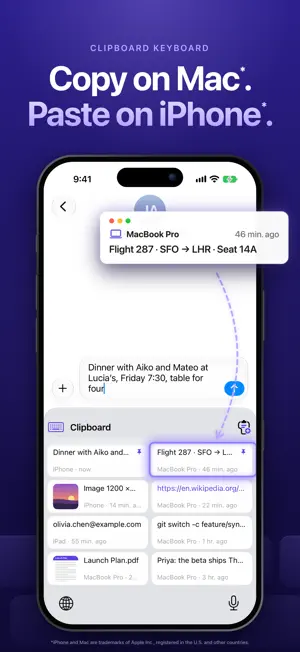


About Hboard: Clipboard Keyboard
Hboard is a keyboard with a clipboard. Save what you copy, and the keyboard shows it in any app: tap a clip to paste it. On iPhone, iPad and Mac, synced through your own iCloud. PASTE FROM YOUR HISTORY • Your clipboard history right in the keyboard, in every app • Recent clips in the suggestion bar, just above the keys • Pin the clips you paste most: addresses, links, replies • Search your whole history in the app • Optionally, the keyboard saves what you copy each time it opens SAVE IN ONE TAP • Tap Paste in the app • Or use the Home Screen widget, Control Center, the Lock Screen, a Live Activity or Siri ("Save clipboard to Hboard") • Add files from the Files app (Pro) • On the Mac, everything you copy is saved as you go; press ⇧⌘V, pick a clip and press Return A KEYBOARD THAT TYPES WELL • Slide to Type with over 100,000 words, tuned to be fast and accurate • Learns the words you use and the names in your contacts • Adaptive Typing learns where you touch each key • Emoji, with search • Auto-correction, auto-capitalization and the "." shortcut • Select text to make it Capitalized, lowercase or UPPERCASE • Slide on the space bar to move the cursor, with a light tap at each letter and word • Key Flicks on iPad: pull down on a key for its number or symbol TYPING INSIGHTS See your words, speed and rhythm in the app and in a widget. Hboard counts how you type, never what. ON ALL YOUR DEVICES • Syncs through your private iCloud: no account, no sign-up • One purchase covers iPhone, iPad and Mac PRIVATE BY DESIGN • No accounts, ads or tracking • Your clips stay on your devices and in your private iCloud database • What you type never leaves your device • Passwords and copies from password managers are never saved HBOARD PRO Hboard is free to use with your latest 25 clips in view, text and links, and 3 pins. Older clips stay saved and come back with Pro. Hboard Pro is a single purchase, not a subscription. It shows your whole history and adds: • Images and files • Unlimited pins • Clip Finds: the links, addresses, codes and plans inside your clips • A weekly summary, on devices with Apple Intelligence The keyboard needs Allow Full Access to show your history and save clips. Without it, it still types. Terms of Use: https://www.apple.com/legal/internet-services/itunes/dev/stdeula/ Privacy Policy: https://byflaretech.com/hboard/privacy/
What’s new
Version 1.0.1 · Updated November 12, 2026
Bug fixes.
App privacy
The developer, BYFLARE TECHNOLOGIES (OPC) PRIVATE LIMITED, reported these privacy practices to Apple.
Data Not Linked to You
The following data, which may be collected but is not linked to your identity, may be used for the following purposes:
- Purchases: Purchase History
Used for: Analytics, App Functionality
Alternatives to Hboard: Clipboard Keyboard
Looking for apps like Hboard: Clipboard Keyboard? Here are 6 similar apps on the App Store. The highest rated is Photo Video Compressor KB (5.0/5), and all 6 are free to download.
-
 Migrante Ec
-
 Pastenel - Clipboard History
-
 Photo Video Compressor KB
5.0
-
 Clipboard: Copy Paste Widget
-
 Magyar Billentyűzet
-
 Auto Paste - Keyboard Shortcut
1.0
| App | Rating | Price | Last updated | Compare |
|---|---|---|---|---|
| Hboard: Clipboard Keyboard | – | Free | November 12, 2026 | |
| Migrante Ec | – | Free | Jun 7, 2024 | Compare |
| Pastenel - Clipboard History | – | Free | Nov 19, 2026 | Compare |
| Photo Video Compressor KB | 5.0 / 5 (1) | Free | Aug 11, 2026 | Compare |
| Clipboard: Copy Paste Widget | – | Free | Oct 16, 2026 | Compare |
| Magyar Billentyűzet | – | Free | Nov 14, 2026 | Compare |
| Auto Paste - Keyboard Shortcut | 1.0 / 5 (1) | Free | Sep 1, 2024 | Compare |