

ShiftRely: Shift Planner
Oliver Anders Productivity iPhoneiPadiPod touch
ShiftRely: Shift Planner is a free Productivity app for iPhone and iPad by Oliver Anders. Requires iOS 16.4. Updated November 26, 2026.
- Price
- Free
- on the App Store
- Size
- 55 MB
- Age 4+
- Updated
- Nov 26
- 2026 · v1.4.1
Screenshots
Save to Pinterest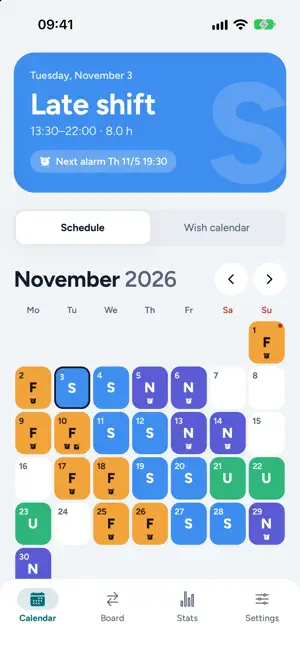


About ShiftRely: Shift Planner
ShiftRely is the shift planner for people who work in shifts, made for nursing and care. YOUR SHIFTS • Calendar with your shifts, vacation and notes • Create your own shift types (early, late, night, on call, whatever you need) or pick templates • Setup at first start in a few steps • Insert shift models (early/late/night, 2-2-3, 4 on 4 off, DuPont) with one tap • Light or dark of your choice, color themes with Pro • Feature search in Settings jumps straight to the feature you look for • Import your schedule from a photo or from a PDF, Excel or CSV file: the app reads your row, you check every day • Import from a calendar or an ICS file, for example when switching from another shift app • Wish calendar for requested days off and preferred shifts, including several shifts per day to choose from • Export as PDF or image, sync with the iPhone calendar A REAL ALARM • For each shift type you set alarm time, sound and snooze, accurate to the minute • The alarm also rings when your iPhone is on silent and in Focus (iOS 26 or later) HOURS, PREMIUMS, PAY • Hours per month against your target, time account with a running balance, cap and payout • Year overview: night, Saturday, Sunday and public holiday shifts, free weekends • Pay preview from your payslip (gross, net, premiums itemized), an estimate without guarantee • Vacation account with carry-over • Warning when the rest period is too short (a hint only) TEAM: FIND COVER AND SWAP • Board: when a shift is uncovered, your team sees it right away and responds • Swaps: offer a shift, receive counter-offers, and your ward lead approves (or turn approval off) • The app shows who has the shift you want and is free on your day • Who works with me? Optionally show your shifts to your team (per team) and see who has the same shift today. Vacation and notes are never shared • After approval the schedules swap automatically • Leads see which swaps they still need to enter into the hospital's scheduling system • Leads: import the schedule for the team and send it to members, who adopt it with one tap • Leads: see the team's wishes live in one table, set a deadline per month, export as PDF or Excel file • Connect wards to find cover across wards • Who can step in? Ask colleagues who are off that day directly • Anonymous staffing: see per day how many colleagues work early, late, night and standby, without names and only from three contributors • Vacation plan for the whole year: everyone enters their vacation, the sum of position percentages counts per day, the lead approves with one tap and approved vacation appears in your calendar automatically • Leads: "Check staffing" shows days below the minimum staffing PARTNER • Show your schedule to someone you know and see days off together for the next 45 days, also with several partners WIDGETS • Next shift, week and month on the Home and Lock Screen, also extra large • "Today in the team": who works with you today BACKUP • Saved automatically to iCloud Drive or as a file, and restored on a new iPhone PRIVACY • Your schedule stays on your device (shifts and wishes only if you share them with your team) • Sign in with Apple or as a guest • No ads, no tracking, anonymous error reports only if you allow them • Delete your account in the app at any time The basics are free. ShiftRely Pro (subscription, monthly or yearly) unlocks pay preview, alarms, import, export and team. For iPhone, iPad and iPhone Duo. Terms of Use (EULA): https://www.apple.com/legal/internet-services/itunes/dev/stdeula/ Privacy Policy: https://lazyawly.github.io/shiftrely-site/datenschutz.html
What’s new
Version 1.4.1 · Updated November 26, 2026
• Request cover: the window shows all fields again on small and split screens (for example Surface Duo) and scrolls completely. • Cover and external care: vacation, special leave, sick leave and similar absences are no longer suggested as a shift type. • Revised: Settings and the Team tab are tidier, with grouped lists, smaller headings and less text. You pick the team from a menu, open requests are collapsed and the weekly plan is a slim row. • Notifications: the kinds are grouped, and new help requests and replies can be turned off individually. • Request cover: you pick the days in a month calendar, and the window header stays in place while scrolling. • New: Request cover. If a station is short-staffed, it urgently asks for help under “Cover” in the exchange, for example 2× late and 1× early. All members of connected stations see the request and agree, and the lead can also send someone. • New: External care. If a patient is moved to another hospital for a limited time, the station reports the period, hospital, station, room and the need per shift type (without on-call duty). Agreeing is per day and shift type. The patient is entered only with title and initial, and only the requesting station and those who agreed see room and initial. • Stepping in: “Who can step in?” marks colleagues whose rest period would be short and does not preselect them. • Swap: the card shows when the swap was posted. • Widget: in the month widget, use the arrows to page through the months without opening the app. Tapping the month name jumps back to today. • Schedule: a new “Today” button jumps back to the current month. • Notice when the plan changes: if a team plan changed your shift for tomorrow, the app reminds you at 6 pm the evening before (can be turned off in Settings). • Calendar import (ICS): events with a time zone are converted correctly, lowercase no longer matters. • Setup: without Pro the team-code step is skipped. “Apply shift pattern” jumps straight to the section. • Vacation: approved vacation is no longer entered again after a restore. Swaps: sick leave and vacation with the same times are no longer mixed up, and codes with special characters (“F+”) no longer match others. • Text: more translations added.
App privacy
The developer, Oliver Anders, reported these privacy practices to Apple.
Data Linked to You
The following data, which may be collected and linked to your identity, may be used for the following purposes:
- Purchases: Purchase History
- Contact Info: Email Address, Name
- User Content: Other User Content
- Identifiers: User ID, Device ID
- Usage Data: Other Usage Data
Used for: App Functionality
Alternatives to ShiftRely: Shift Planner
Looking for apps like ShiftRely: Shift Planner? Here are 6 similar apps on the App Store.
-
 Stundenlotse – Zeiterfassung
-
 Mein Dienstplan – Schichtplan
-
 ShiftMate: Shift Work Calendar
-
 Screen-Off: Reduce Screen Time
-
 Heroshift
-
 My Shift Work Calendar Planner
| App | Rating | Price | Last updated | Compare |
|---|---|---|---|---|
| ShiftRely: Shift Planner | – | Free | November 26, 2026 | |
| Stundenlotse – Zeiterfassung | – | Free | Nov 27, 2026 | Compare |
| Mein Dienstplan – Schichtplan | – | Free | Oct 6, 2026 | Compare |
| ShiftMate: Shift Work Calendar | – | Free | Nov 23, 2026 | Compare |
| Screen-Off: Reduce Screen Time | – | Free | Oct 7, 2026 | Compare |
| Heroshift | – | Free | Oct 12, 2026 | Compare |
| My Shift Work Calendar Planner | – | Free | Nov 24, 2026 | Compare |