

Photo Converter Size Limits
Changsha Xiangling Technology Co., Ltd Utilities iPhoneiPadiPod touch
Photo Converter Size Limits is a free Utilities app for iPhone and iPad by Changsha Xiangling Technology Co., Ltd. Requires iOS 17.6.
- Price
- Free
- on the App Store
- Size
- 5 MB
- Age 4+
- Updated
- Nov 9
- 2026 · v1.2.0
Screenshots


About Photo Converter Size Limits
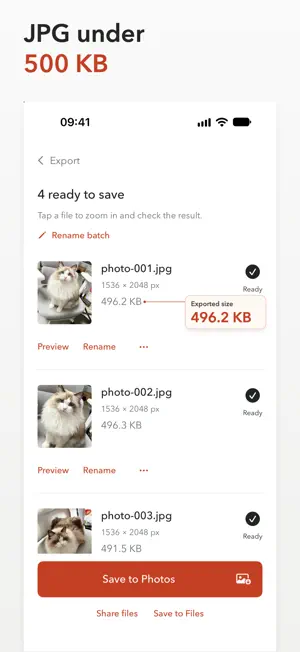
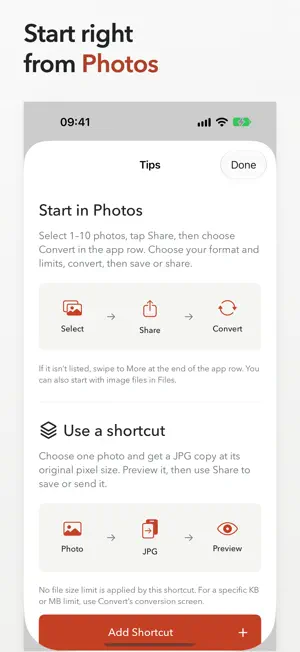
A photo is ready to send, but the website wants JPG, a smaller file, or one PDF. Convert prepares your images on your device and lets you check the actual results before saving or sharing. CONVERT PHOTO FORMATS Choose HEIC, JPG or PNG images from Photos or Files. Export genuine JPG or PNG files, or combine your pictures into a PDF with one image per page. Reorder the images to set the PDF page order. SET PIXEL DIMENSIONS AND FILE SIZE LIMITS Keep the original pixel dimensions or choose a maximum long edge. For JPG and PDF exports, set an optional file size cap in KB or MB. For a combined PDF, the cap applies to the whole PDF. PNG exports preserve transparency and do not use a file size cap. Pixel dimensions and file size are different requirements. If both cannot be met, Convert clearly marks the result for adjustment. Choose to keep the dimensions and relax the size cap, or explicitly allow smaller dimensions. Your selected dimensions are never silently reduced. CHECK THE REAL FILES Preview exported images and PDFs, zoom in on details, and see the actual format, dimensions and file size. Rename your exports before saving. PNG files may be larger than the original, so check the result that fits your task. SAVE AND SHARE Save JPG and PNG copies to Photos or Files. Save PDFs to Files, or send the exported files through the system share sheet. Your originals stay unchanged. START WHERE YOUR PHOTOS ARE Select up to 10 images in Photos and choose Convert from the share sheet's app row. Or add the included shortcut: select one image, convert it to JPG at its original pixel dimensions, and preview the copy. The shortcut does not apply a file size cap or save automatically. LOCAL PROCESSING Image conversion runs on your device. Convert has no user accounts, advertising or third-party analytics SDKs, and does not upload your photos to a developer server. iCloud originals may need to download first. Save copies you want to keep; working files are temporary. All features in version 1.0 are free, with no subscriptions or in-app purchases. The batch limit is 10 images. Supported output formats are JPG, PNG and PDF. Check your recipient's requirements: matching your chosen settings does not guarantee that every website will accept the file. Support: https://dayrune.com/legal/filesubmit/en/support/ Privacy Policy: https://dayrune.com/legal/filesubmit/en/privacy/ Terms of Use: https://dayrune.com/legal/filesubmit/en/terms/
What’s new
Version 1.2.0 · Updated November 9, 2026
• Convert larger batches, adjust photos individually, rename files in bulk, and export them as a ZIP. • Set exact dimensions, preview crops, and import or export still WebP images. • Save named presets, revisit recent exports, and set file size limits for JPG, WebP, and PDF.
App privacy
The developer, Changsha Xiangling Technology Co., Ltd, reported these privacy practices to Apple.
Data Not Collected
The developer does not collect any data from this app.
Alternatives to Photo Converter Size Limits
Looking for apps like Photo Converter Size Limits? Here are 6 similar apps on the App Store. The highest rated is Cleaner Kiki: Storage Cleanup (5.0/5), and all 6 are free to download.
-
 Cleaner Kiki: Storage Cleanup
5.0
-
 SKSSF SAHACHARI
-
 Unit Currency Converter
3.7
-
 Croma Sync
-
 JPG Converter. Compress Photos
4.0
-
 SuvisheshaPetty - Bible verses
3.7
| App | Rating | Price | Last updated | Compare |
|---|---|---|---|---|
| Photo Converter Size Limits | – | Free | November 9, 2026 | |
| Cleaner Kiki: Storage Cleanup | 5.0 / 5 (1) | Free | Feb 11, 2026 | Compare |
| SKSSF SAHACHARI | – | Free | Mar 9, 2026 | Compare |
| Unit Currency Converter | 3.7 / 5 (3) | Free | Oct 5, 2026 | Compare |
| Croma Sync | – | Free | Oct 22, 2026 | Compare |
| JPG Converter. Compress Photos | 4.0 / 5 (36) | Free | Apr 7, 2026 | Compare |
| SuvisheshaPetty - Bible verses | 3.7 / 5 (3) | Free | Nov 9, 2026 | Compare |